
Passive Buzzer
🎮 The Voice of the Robot
Module Goal: give your robot a voice. You will discover that sound is just vibration speed and that a number can sing.
Goal:
make your robot speak its very first sound.
Concepts:
Sound Output · Frequency · Timed Tone
TONE_NOTES=[NOTE_C3→131, NOTE_D3→147, NOTE_E3→165, NOTE_F3→175, NOTE_G3→196, NOTE_A3→220, NOTE_B3→247, NOTE_C4→262, NOTE_D4→294, NOTE_E4→330, NOTE_F4→349, NOTE_G4→392, NOTE_A4→440, NOTE_B4→494, NOTE_C5→523, NOTE_D5→587, NOTE_E5→659, NOTE_F5→698, NOTE_G5→784, NOTE_A5→880, NOTE_B5→988]
PLAYLIST=[DADADADUM, ENTERTAINER, PRELUDE, ODE, NYAN, RINGTONE, FUNK, BLUES, BIRTHDAY, WEDDING, FUNERAL, PUNCHLINE, PYTHON, BADDY, CHASE, BA_DING, WAWAWAWAA, JUMP_UP, JUMP_DOWN→POWER_UP, POWER_DOWN]
📦 CONCEPT BOX What is a SOUND?
Everything you hear is your eardrum being pushed and pulled very fast. How fast? That is the frequency, measured in Hz (pushes per second):
- 131 Hz (NOTE_C4) → slow vibration → low, deep tone (like a big drum)
- 440 Hz (NOTE_A4) → medium vibration → the musical note A
- 988 Hz (NOTE_B5) → fast vibration → high, sharp tone (like a mosquito)
The buzzer is a tiny plate that vibrates electrically. You tell it ONE number the frequency and it vibrates exactly that fast. Sound, for a programmer, is just a number.
import machine  # Library that controls the board's pins
import music  # Library that produces sounds
import time  # Library for pauses

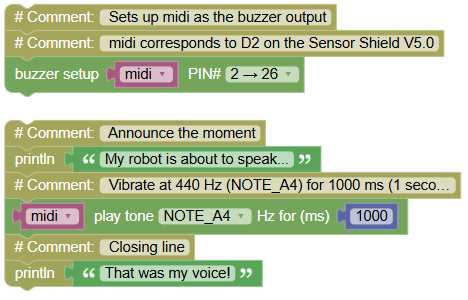
# Sets up midi as the buzzer output
# midi corresponds to D2 on the Sensor Shield V5.0
midi = music.MIDI(26)

print("My robot is about to speak...")  # Announce the moment
midi.pitch_time(440, 1000)  # Vibrate at 440 Hz (NOTE_A4) for 1000 ms (1 second)
print("That was my voice!")  # Closing line
Serial Monitor:
My robot is about to speak...
(one second of tone)
That was my voice!
💡 Note: pitch_time carries TWO numbers inside: 440 (how fast it vibrates = which note) and 1000 (how long = rhythm). Every sound you will ever program is just those two decisions: which pitch and how long. Two numbers = infinite songs.
🎮 The Five-Note Ladder
Goal:
play five different tones and see each frequency on the PC as it sounds.
Concepts:
Frequency Control · Sequences · Serial Reporting
TONE_NOTES=[NOTE_C3→131, NOTE_D3→147, NOTE_E3→165, NOTE_F3→175, NOTE_G3→196, NOTE_A3→220, NOTE_B3→247, NOTE_C4→262, NOTE_D4→294, NOTE_E4→330, NOTE_F4→349, NOTE_G4→392, NOTE_A4→440, NOTE_B4→494, NOTE_C5→523, NOTE_D5→587, NOTE_E5→659, NOTE_F5→698, NOTE_G5→784, NOTE_A5→880, NOTE_B5→988]
PLAYLIST=[DADADADUM, ENTERTAINER, PRELUDE, ODE, NYAN, RINGTONE, FUNK, BLUES, BIRTHDAY, WEDDING, FUNERAL, PUNCHLINE, PYTHON, BADDY, CHASE, BA_DING, WAWAWAWAA, JUMP_UP, JUMP_DOWN→POWER_UP, POWER_DOWN]
import machine  # Pin control library
import music  # Sound library
import time  # Pause library

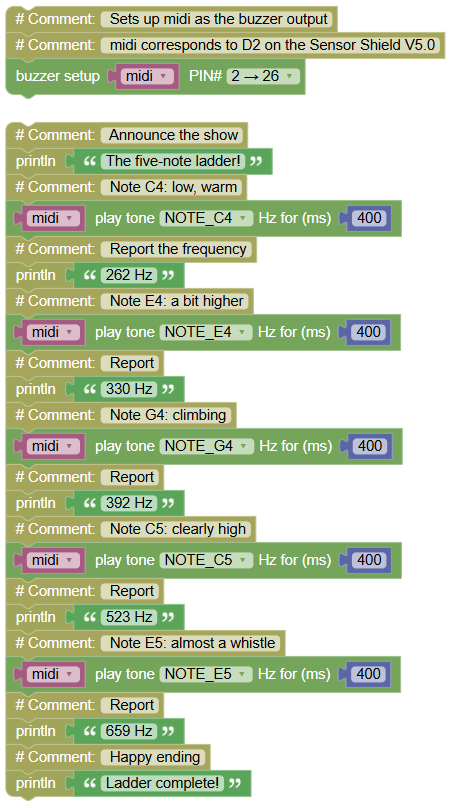
# Sets up midi as the buzzer output
# midi corresponds to D2 on the Sensor Shield V5.0
midi = music.MIDI(26)

print("The five-note ladder!")  # Announce the show
midi.pitch_time(262, 400)  # Note C4: low, warm
print("262 Hz")  # Report the frequency
midi.pitch_time(330, 400)  # Note E4: a bit higher
print("330 Hz")  # Report
midi.pitch_time(392, 400)  # Note G4: climbing
print("392 Hz")  # Report
midi.pitch_time(523, 400)  # Note C5: clearly high
print("523 Hz")  # Report
midi.pitch_time(659, 400)  # Note E5: almost a whistle
print("659 Hz")  # Report
print("Ladder complete!")  # Happy ending
Serial Monitor (each number appears exactly when its tone sounds):
The five-note ladder!
262 Hz
330 Hz
392 Hz
523 Hz
659 Hz
Ladder complete!
💡 Note: match your ears to the screen: as each number prints, the pitch jumps higher. Bigger number = faster vibration = higher sound. You now know how any keyboard or ringtone works: a list of frequencies played in order.
🎮 The Siren
Goal
Create an increasing tone scale and then play the same tones in decreasing order.
Concepts
Sound Output · Frequency · Musical Scale · Sequence · Serial Output
TONE_NOTES=[NOTE_C3→131, NOTE_D3→147, NOTE_E3→165, NOTE_F3→175, NOTE_G3→196, NOTE_A3→220, NOTE_B3→247, NOTE_C4→262, NOTE_D4→294, NOTE_E4→330, NOTE_F4→349, NOTE_G4→392, NOTE_A4→440, NOTE_B4→494, NOTE_C5→523, NOTE_D5→587, NOTE_E5→659, NOTE_F5→698, NOTE_G5→784, NOTE_A5→880, NOTE_B5→988]
PLAYLIST=[DADADADUM, ENTERTAINER, PRELUDE, ODE, NYAN, RINGTONE, FUNK, BLUES, BIRTHDAY, WEDDING, FUNERAL, PUNCHLINE, PYTHON, BADDY, CHASE, BA_DING, WAWAWAWAA, JUMP_UP, JUMP_DOWN→POWER_UP, POWER_DOWN]
import music  # Controls the buzzer sounds
import time   # Controls pauses and timing

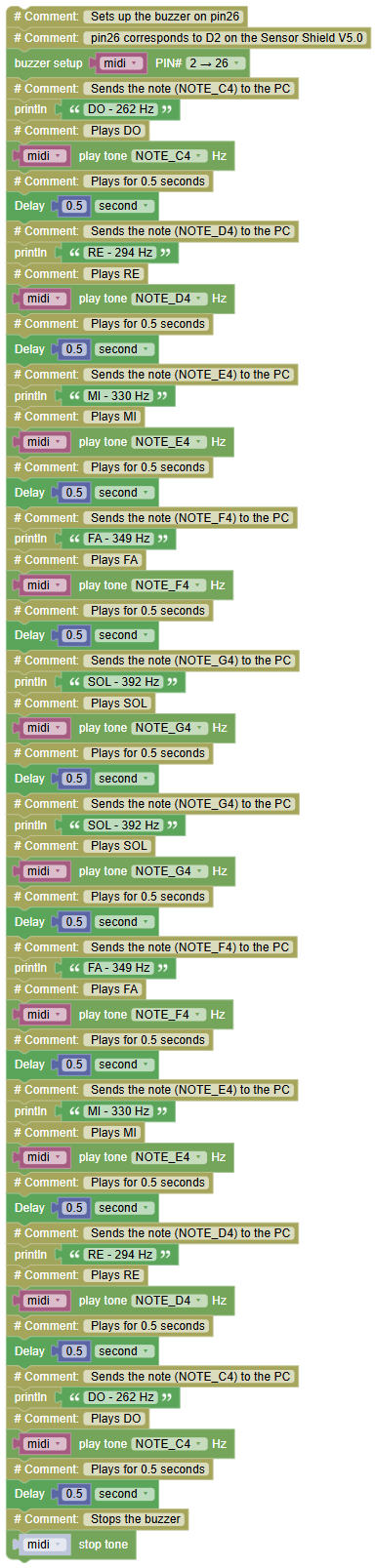
# Sets up the buzzer on pin26
# pin26 corresponds to D2 on the Sensor Shield V5.0
midi = music.MIDI(26)

print('DO - 262 Hz')  # Sends the note (NOTE_C4) to the PC
midi.pitch(262)       # Plays DO
time.sleep(0.5)       # Plays for 0.5 seconds

print('RE - 294 Hz')  # Sends the note (NOTE_D4) to the PC
midi.pitch(294)       # Plays RE
time.sleep(0.5)       # Plays for 0.5 seconds

print('MI - 330 Hz')  # Sends the note (NOTE_E4) to the PC
midi.pitch(330)       # Plays MI
time.sleep(0.5)       # Plays for 0.5 seconds

print('FA - 349 Hz')  # Sends the note (NOTE_F4) to the PC
midi.pitch(349)       # Plays FA
time.sleep(0.5)       # Plays for 0.5 seconds

print('SOL - 392 Hz') # Sends the note (NOTE_G4) to the PC
midi.pitch(392)       # Plays SOL
time.sleep(0.5)       # Plays for 0.5 seconds

print('SOL - 392 Hz') # Sends the note (NOTE_G4) to the PC
midi.pitch(392)       # Plays SOL
time.sleep(0.5)       # Plays for 0.5 seconds

print('FA - 349 Hz')  # Sends the note (NOTE_F4) to the PC
midi.pitch(349)       # Plays FA
time.sleep(0.5)       # Plays for 0.5 seconds

print('MI - 330 Hz')  # Sends the note (NOTE_E4) to the PC
midi.pitch(330)       # Plays MI
time.sleep(0.5)       # Plays for 0.5 seconds

print('RE - 294 Hz')  # Sends the note (NOTE_D4) to the PC
midi.pitch(294)       # Plays RE
time.sleep(0.5)       # Plays for 0.5 seconds

print('DO - 262 Hz')  # Sends the note (NOTE_C4) to the PC
midi.pitch(262)       # Plays DO
time.sleep(0.5)       # Plays for 0.5 seconds

midi.stop()           # Stops the buzzer
🎮 Your First Melody
Goal:
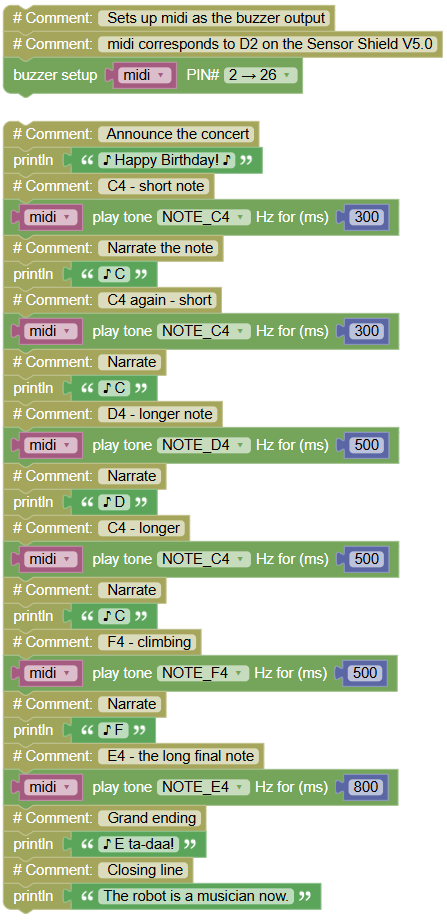
play a real melody the opening of "Happy Birthday" choosing a different duration for each note.
Concepts:
Melody Composition · Note Durations · Rhythm Design
TONE_NOTES=[NOTE_C3→131, NOTE_D3→147, NOTE_E3→165, NOTE_F3→175, NOTE_G3→196, NOTE_A3→220, NOTE_B3→247, NOTE_C4→262, NOTE_D4→294, NOTE_E4→330, NOTE_F4→349, NOTE_G4→392, NOTE_A4→440, NOTE_B4→494, NOTE_C5→523, NOTE_D5→587, NOTE_E5→659, NOTE_F5→698, NOTE_G5→784, NOTE_A5→880, NOTE_B5→988]
PLAYLIST=[DADADADUM, ENTERTAINER, PRELUDE, ODE, NYAN, RINGTONE, FUNK, BLUES, BIRTHDAY, WEDDING, FUNERAL, PUNCHLINE, PYTHON, BADDY, CHASE, BA_DING, WAWAWAWAA, JUMP_UP, JUMP_DOWN→POWER_UP, POWER_DOWN]
import machine  # Pin control library
import music  # Sound library
import time  # Pause library

# Sets up midi as the buzzer output
# midi corresponds to D2 on the Sensor Shield V5.0
midi = music.MIDI(26)

print("♪ Happy Birthday! ♪")  # Announce the concert
midi.pitch_time(262, 300)  # C4 - short note
print("♪ C")  # Narrate the note
midi.pitch_time(262, 300)  # C4 again - short
print("♪ C")  # Narrate
midi.pitch_time(294, 500)  # D4 - longer note
print("♪ D")  # Narrate
midi.pitch_time(262, 500)  # C4 - longer
print("♪ C")  # Narrate
midi.pitch_time(349, 500)  # F4 - climbing
print("♪ F")  # Narrate
midi.pitch_time(330, 800)  # E4 - the long final note
print("♪ E ta-daa!")  # Grand ending
print("The robot is a musician now.")  # Closing line
Serial Monitor:
♪ Happy Birthday! ♪
♪ C
♪ C
♪ D
♪ C
♪ F
♪ E ta-daa!
The robot is a musician now.
💡 Note: look closely the melody is just six lines, each with a frequency and a duration. Change any number and you change the song: make all durations the same and it sounds robotic; stretch the last one and it sounds like a real performance. Melody = a list of (frequency, duration) pairs. Try swapping 262 for 294 in the first note and hear what breaks that is composing.
🎮 Create Your Own Sound Sequence
Goal:
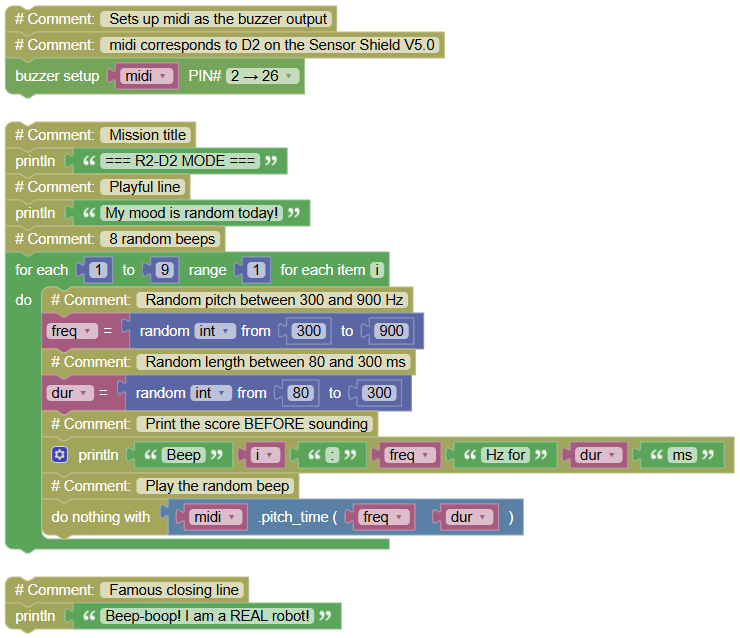
make your robot babble like the famous movie droid random beeps that nobody (not even you) can predict, while the PC prints the "score" of the performance.
Concepts:
Random Numbers · Generative Sound · Mission Program
TONE_NOTES=[NOTE_C3→131, NOTE_D3→147, NOTE_E3→165, NOTE_F3→175, NOTE_G3→196, NOTE_A3→220, NOTE_B3→247, NOTE_C4→262, NOTE_D4→294, NOTE_E4→330, NOTE_F4→349, NOTE_G4→392, NOTE_A4→440, NOTE_B4→494, NOTE_C5→523, NOTE_D5→587, NOTE_E5→659, NOTE_F5→698, NOTE_G5→784, NOTE_A5→880, NOTE_B5→988]
PLAYLIST=[DADADADUM, ENTERTAINER, PRELUDE, ODE, NYAN, RINGTONE, FUNK, BLUES, BIRTHDAY, WEDDING, FUNERAL, PUNCHLINE, PYTHON, BADDY, CHASE, BA_DING, WAWAWAWAA, JUMP_UP, JUMP_DOWN→POWER_UP, POWER_DOWN]
import machine  # Pin control library
import music  # Sound library
import time  # Pause library
import random  # Library for random numbers

# Sets up midi as the buzzer output
# midi corresponds to D2 on the Sensor Shield V5.0
midi = music.MIDI(26)

print("=== R2-D2 MODE ===")  # Mission title
print("My mood is random today!")  # Playful line
for i in range(1, 9, 1):  # 8 random beeps
    freq = random.randint(300, 900)  # Random pitch between 300 and 900 Hz
    dur = random.randint(80, 300)  # Random length between 80 and 300 ms
    print("Beep", i, ":", freq, "Hz for", dur, "ms")  # Print the score BEFORE sounding
    midi.pitch_time(freq, dur)  # Play the random beep
print("Beep-boop! I am a REAL robot!")  # Famous closing line
Serial Monitor (your numbers will be different that's the point!):
=== R2-D2 MODE ===
My mood is random today!
Beep 1 : 745 Hz for 210 ms
Beep 2 : 312 Hz for 95 ms
Beep 3 : 688 Hz for 287 ms
...
Beep-boop! I am a REAL robot!
💡 Note: compare your screen with your classmate's the scores are different every time. random.randint(a, b) picks a secret number between a and b, and it never repeats its plan. This is your first program whose result you cannot fully predict: that is what "generative" means. Video game sound effects use exactly this trick nobody writes 1000 laser sounds by hand; they write ONE random rule.