
LCD 1602 with Adapter IIC/I2C
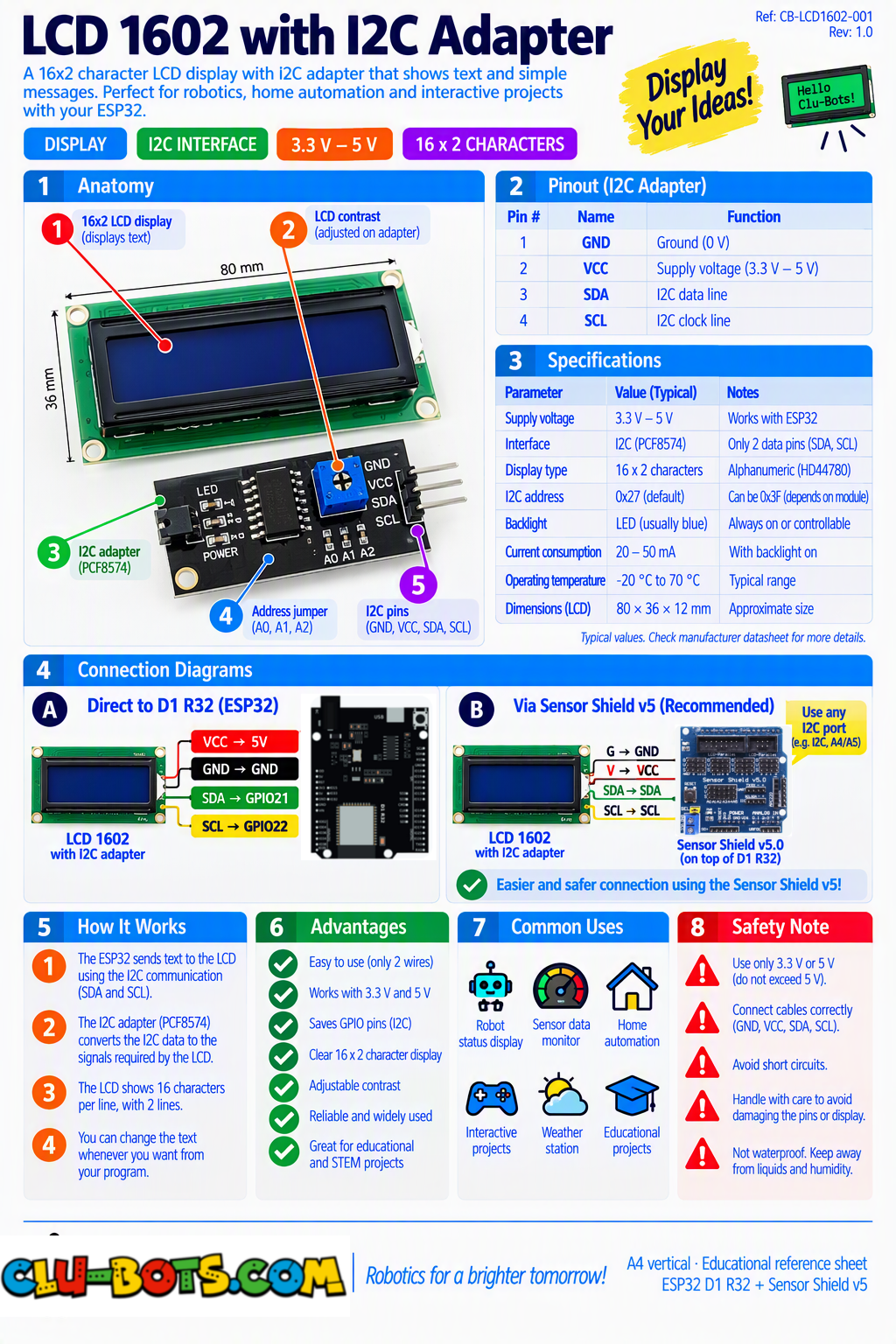
🎮 DISPLAY
Module Goal: give your data a permanent home. The Serial Monitor scrolls away and disappears the LCD stays. Two lines, sixteen characters each: your robot's personal billboard.
🔍 Detective note: if the screen lights up but shows nothing, most backpacks use address 0x27 a few use 0x3F. Change the address in the setup block and retry. Also: the dedicated SDA/SCL pins stay free even when other modules crowd the board remember this for the final project.
📦 CONCEPT BOX A screen of 32 windows
Imagine a wall of 32 little windows: 16 across, 2 rows down. Each window shows exactly one character a letter, a digit, a space. That is the entire universe of the LCD 1602.
The screen rides on the I2C bus you met with the accelerometer (Module 21): two shared wires, and this screen's "house number" is 0x27. Same road, new resident.
Two ways to write on it:
- shows places text at a column and line, instantly.
- print writes text that scrolls across, at a delay speed you choose. Your marquee.
Goal:
the classic first words two lines, centered.
Concepts:
I2C Screen Setup · Line and Column · Centered Text
import machine	# Controls the board's pins
import i2clcd	# Controls the LCD screen
import time	# Controls pauses and timing

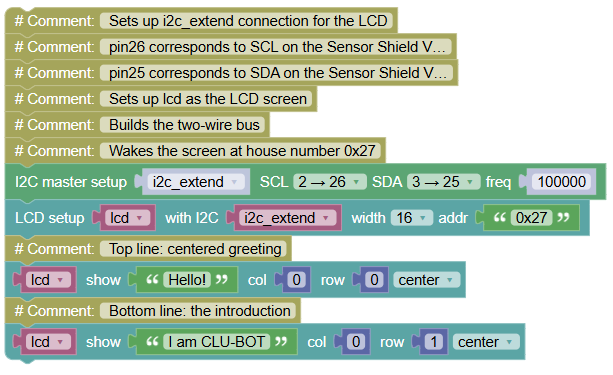
# Sets up i2c_extend connection for the LCD
# pin26 corresponds to SCL on the Sensor Shield V5.0
# pin25 corresponds to SDA on the Sensor Shield V5.0
# Sets up lcd as the LCD screen
i2c_extend = machine.SoftI2C(scl = machine.Pin(26), sda = machine.Pin(25), freq = 100000)	# Builds the two-wire bus
lcd = i2clcd.LCD(i2c_extend,lcd_width=16,i2c_addr='0x27')	# Wakes the screen at house number 0x27

lcd.shows("Hello!",column = 0,line = 0,center = True)	# Top line: centered greeting
lcd.shows("I am CLU-BOT",column = 0,line = 1,center = True)	# Bottom line: the introduction
What you see (on the screen itself and this module, the screen IS the show):
Hello!
I am CLU-BOT
💡 Note: line = 0 is the top row, line = 1 the bottom computers count from zero, always. center = True measures your text and splits the empty space evenly. Without it, text hugs the left wall. Compare: the Serial Monitor flowed past; this screen holds the message as long as power flows. Different jobs, different tools.
🎮 The Flip Board
Goal:
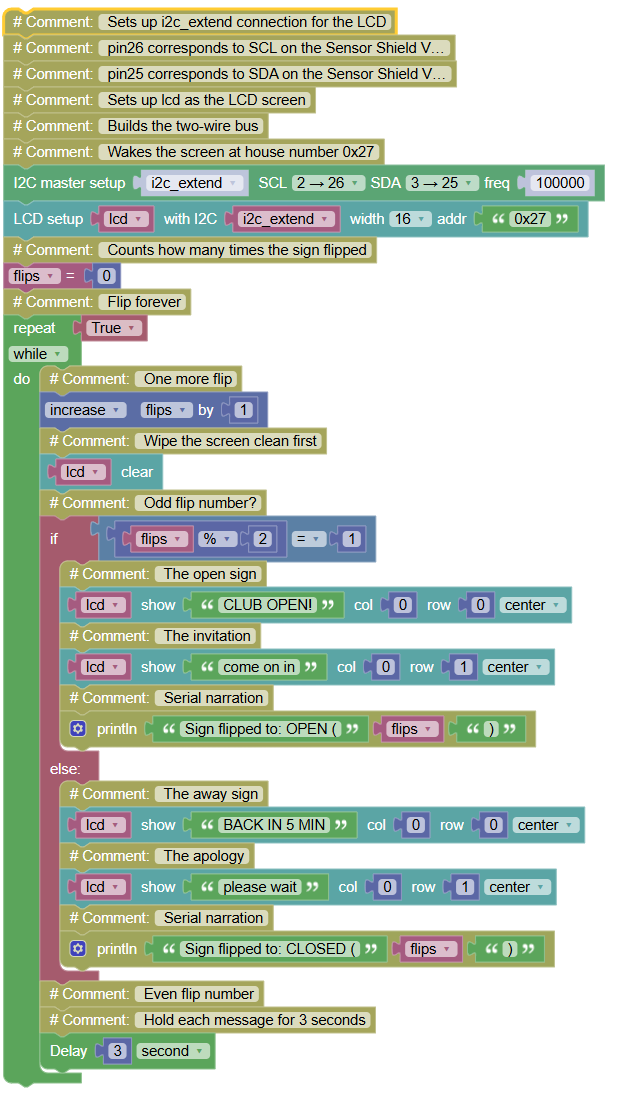
alternate two messages every 3 seconds like a shop's OPEN/CLOSED sign and narrate each flip on the Serial.
Concepts:
State Alternation · Timed Updates · Screen + Serial Teamwork
import machine	# Controls the board's pins
import i2clcd	# Controls the LCD screen
import time	# Controls pauses and timing
# Sets up i2c_extend connection for the LCD
# pin26 corresponds to SCL on the Sensor Shield V5.0
# pin25 corresponds to SDA on the Sensor Shield V5.0
# Sets up lcd as the LCD screen
i2c_extend = machine.SoftI2C(scl = machine.Pin(26), sda = machine.Pin(25), freq = 100000)	# Builds the two-wire bus
lcd = i2clcd.LCD(i2c_extend,lcd_width=16,i2c_addr='0x27')	# Wakes the screen at house number 0x27
flips = 0	# Counts how many times the sign flipped
while True:	# Flip forever
    flips += 1	# One more flip
    lcd.clear()	# Wipe the screen clean first
    if flips % 2 == 1:	# Odd flip number?
        lcd.shows("CLUB OPEN!",column = 0,line = 0,center = True)	# The open sign
        lcd.shows("come on in",column = 0,line = 1,center = True)	# The invitation
        print("Sign flipped to: OPEN (", flips, ")")	# Serial narration
    else:	# Even flip number
        lcd.shows("BACK IN 5 MIN",column = 0,line = 0,center = True)	# The away sign
        lcd.shows("please wait",column = 0,line = 1,center = True)	# The apology
        print("Sign flipped to: CLOSED (", flips, ")")	# Serial narration
    time.sleep(3)	# Hold each message for 3 seconds
Serial Monitor:
Sign flipped to: OPEN ( 1 )
Sign flipped to: CLOSED ( 2 )
Sign flipped to: OPEN ( 3 )
💡 Note: two new tricks. ① lcd.clear() before each write without it, "BACK IN 5 MIN" would leave ghost letters under "CLUB OPEN!" (try removing it and watch the mess a real bug, met on purpose). ② flips % 2 == 1 the % symbol gives the remainder of a division: odd flips leave remainder 1, even flips leave 0. One line, perfect alternation. This odd/even trick drives every blinking thing in the world of code.
🎮 The Living Stopwatch
Goal:
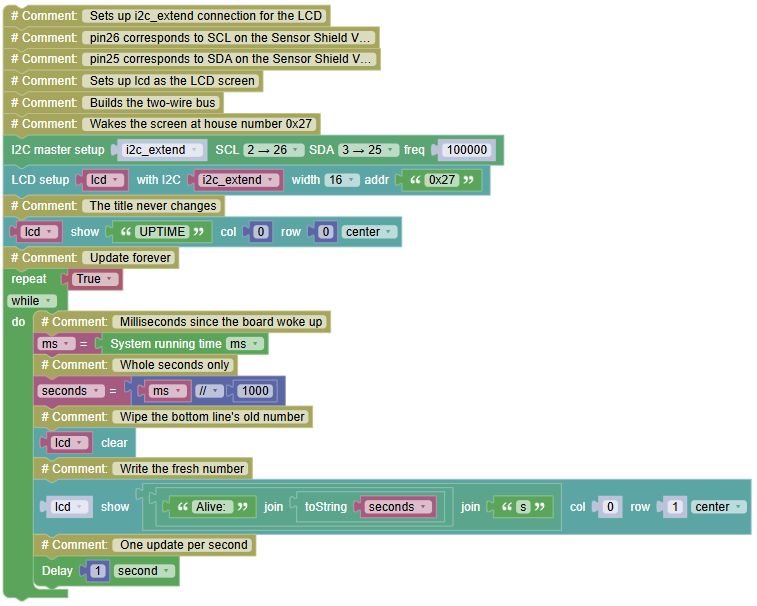
put your board's uptime ON the screen, updating every second the LCD becomes a live instrument.
Concepts:
Internal Clock · Clear-then-Write · Dynamic Values
import machine	# Controls the board's pins
import i2clcd	# Controls the LCD screen
import time	# Controls pauses and timing
# Sets up i2c_extend connection for the LCD
# pin26 corresponds to SCL on the Sensor Shield V5.0
# pin25 corresponds to SDA on the Sensor Shield V5.0
# Sets up lcd as the LCD screen
i2c_extend = machine.SoftI2C(scl = machine.Pin(26), sda = machine.Pin(25), freq = 100000)	# Builds the two-wire bus
lcd = i2clcd.LCD(i2c_extend,lcd_width=16,i2c_addr='0x27')	# Wakes the screen at house number 0x27

lcd.shows("UPTIME",column = 0,line = 0,center = True)	# The title never changes
while True:	# Update forever
    ms = time.ticks_ms()	# Milliseconds since the board woke up
    seconds = ms // 1000	# Whole seconds only
    lcd.clear()	# Wipe the bottom line's old number
    lcd.shows((('Alive: ' + str(seconds)) + 's'),column = 0,line = 1,center = True)	# Write the fresh number
    time.sleep(1)	# One update per second
What you see (bottom line counting up):
UPTIME
Alive: 47s
💡 Note: str(seconds) is the bridge between worlds the clock gives a number, the screen eats text, and str() converts one into the other (your toString block from the Text category). Watch the count pass 9 → 10: without clear(), a leftover "9" would linger. Clear-then-write is now officially a habit.
🎮 The Silent Alarm
Goal:
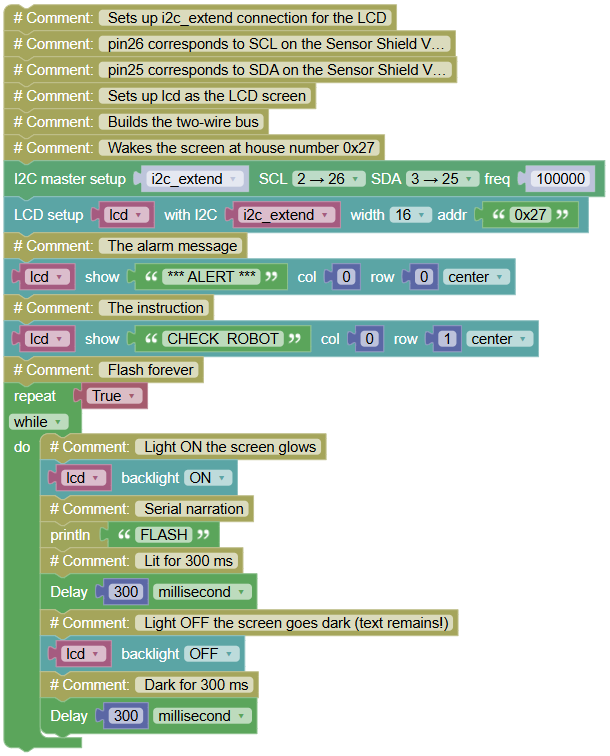
discover the screen's hidden output channel the backlight and build an alarm that flashes like a lighthouse, no sound required.
Concepts:
Backlight Control · Alert Design · The Unexpected Output
import machine	# Controls the board's pins
import i2clcd	# Controls the LCD screen
import time	# Controls pauses and timing
# Sets up i2c_extend connection for the LCD
# pin26 corresponds to SCL on the Sensor Shield V5.0
# pin25 corresponds to SDA on the Sensor Shield V5.0
# Sets up lcd as the LCD screen
i2c_extend = machine.SoftI2C(scl = machine.Pin(26), sda = machine.Pin(25), freq = 100000)	# Builds the two-wire bus
lcd = i2clcd.LCD(i2c_extend,lcd_width=16,i2c_addr='0x27')	# Wakes the screen at house number 0x27

lcd.shows("*** ALERT ***",column = 0,line = 0,center = True)	# The alarm message
lcd.shows("CHECK  ROBOT",column = 0,line = 1,center = True)	# The instruction
while True:	# Flash forever
    lcd.backlight(1)	# Light ON the screen glows
    print("FLASH")	# Serial narration
    time.sleep_ms(300)	# Lit for 300 ms
    lcd.backlight(0)	# Light OFF the screen goes dark (text remains!)
    time.sleep_ms(300)	# Dark for 300 ms
💡 Note: the surprise turning the backlight OFF does not erase the text! The characters stay printed on the glass; only the lamp behind them sleeps. When the light returns, the message is still there. This gives you a second output channel on the same screen: text for information, light for urgency. A washing machine mid-cycle and a router in trouble communicate exactly like this message steady, lamp screaming.
🎮 The Store Sign
Goal:
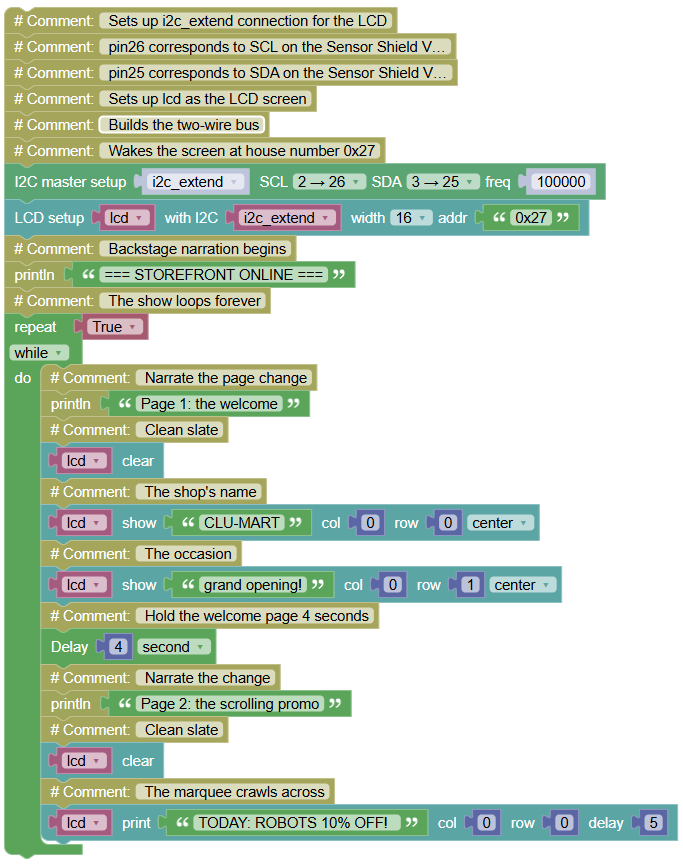
the complete storefront a welcome page, then an endless scrolling marquee, cycling forever, with the Serial narrating the show from backstage.
Concepts:
Marquee Scrolling · Page Cycling · Show Production
import machine	# Controls the board's pins
import i2clcd	# Controls the LCD screen
import time	# Controls pauses and timing
# Sets up i2c_extend connection for the LCD
# pin26 corresponds to SCL on the Sensor Shield V5.0
# pin25 corresponds to SDA on the Sensor Shield V5.0
# Sets up lcd as the LCD screen
i2c_extend = machine.SoftI2C(scl = machine.Pin(26), sda = machine.Pin(25), freq = 100000)	# Builds the two-wire bus
lcd = i2clcd.LCD(i2c_extend,lcd_width=16,i2c_addr='0x27')	# Wakes the screen at house number 0x27

print("=== STOREFRONT ONLINE ===")	# Backstage narration begins
while True:	# The show loops forever
    print("Page 1: the welcome")	# Narrate the page change
    lcd.clear()	# Clean slate
    lcd.shows("CLU-MART",column = 0,line = 0,center = True)	# The shop's name
    lcd.shows("grand opening!",column = 0,line = 1,center = True)	# The occasion
    time.sleep(4)	# Hold the welcome page 4 seconds
    print("Page 2: the scrolling promo")	# Narrate the change
    lcd.clear()	# Clean slate
    lcd.print("TODAY: ROBOTS 10% OFF!  ",column = 0,line = 0,delay=5)	# The marquee crawls across
What you see: the welcome page holds 4 seconds... then the promo crawls right-to-left across the top line, letter by letter, until it finishes... then the whole show repeats.
💡 Note: lcd.print with delay=5 is a self-running animation: one block, and the screen performs the whole scroll while your program waits politely at that line. Slower delay = dignified crawl; faster = urgent ticker. Real store signs, airport departure boards and stadium displays are this exact architecture: pages of static info alternating with crawlers of moving info. You just programmed retail.