
L298N Motor Driver
🎮 A Car Is Born
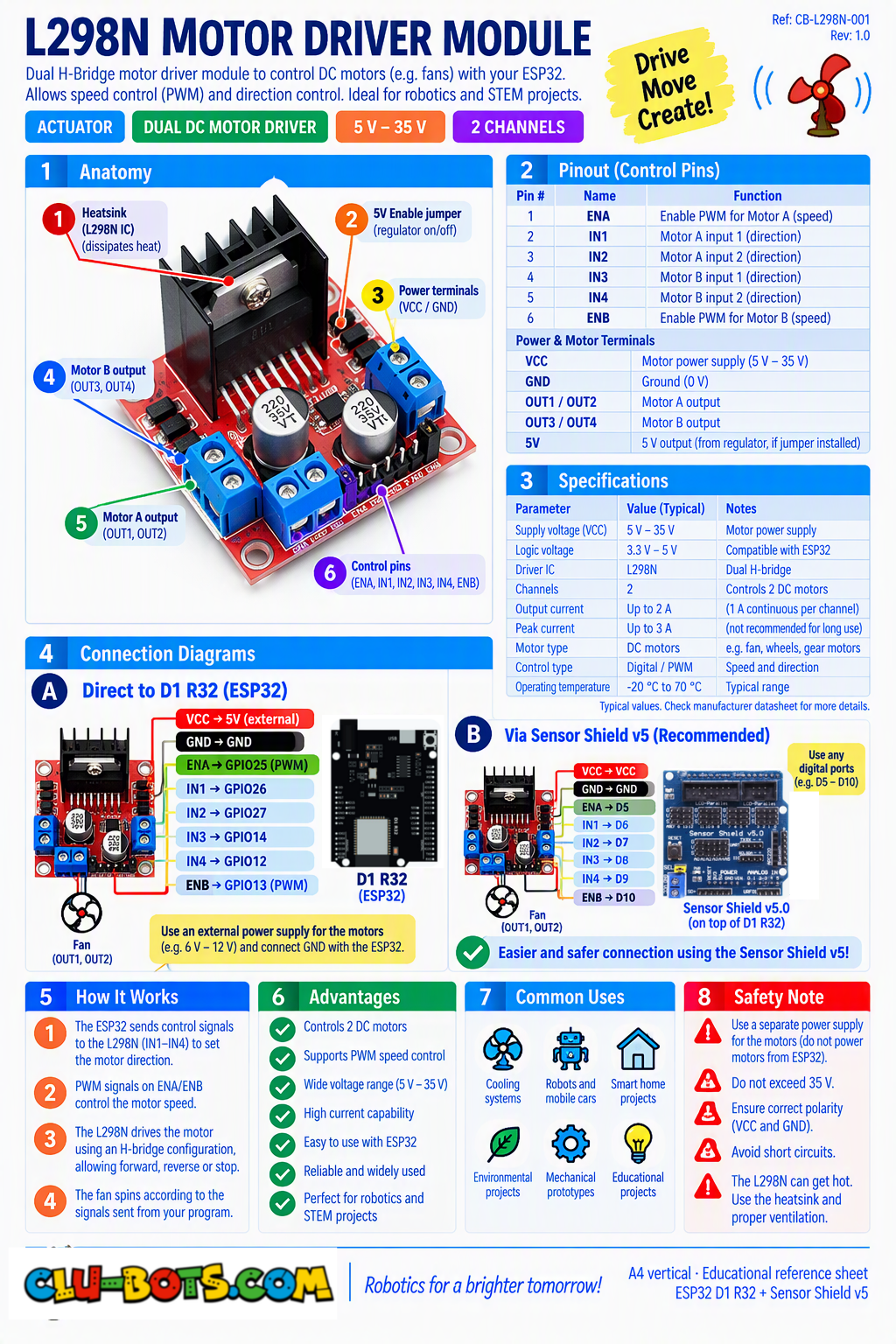
Module Goal: two motors, one big driver, and a chassis the moment your code moves a vehicle. Direction = choice of door; speed = PWM on the same doors, pure software: the ENA/ENB jumpers stay installed, zero extra wires. This is the flagship milestone: PC → ESP32 → motion.
| L298N | Shield label | Code name |
|---|---|---|
| IN1 (left, door 1) | D2 | pin26 / pwm26 |
| IN2 (left, door 2) | D3 | pin25 / pwm25 |
| IN3 (right, door 1) | D6 | pin27 |
| IN4 (right, door 2) | D7 | pin14 |
| ENA / ENB | jumpers stay installed no wires | — |
| Motor power | battery pack on the L298N NEVER the USB | — |
⚠️ Two safety rules before starting: ① the motors eat far more current than USB can give power them from the battery pack through the L298N, and disconnect USB while the wheels spin hard. ② For the first tests, put the car on a stand (wheels in the air) so it can't escape the desk.
📦 CONCEPT BOX The big H-bridge
The L298N is the L9110's big brother: two H-bridges in one box, one per motor, each with two doors:
| door 1 | door 2 | the motor does |
|---|---|---|
| open | closed | spin FORWARD |
| closed | open | spin BACKWARD |
| closed | closed | coast stop |
The same two-door table you learned with the fan the exact same physics, scaled up. And the speed trick is the same too: open a door with PWM. Since the ENA/ENB jumpers stay installed, the bridge is always enabled, and the flicker on the door pins alone decides the power. No hardware knobs, no extra wires speed lives entirely in your code, on the same 0–65535 scale you already own.
The golden rule of this module: the Serial will show the commanded power never a measured speed. The TT motor has no sensor inside; nobody (not even the car) knows its true RPM. Command ≠ measurement, and honest engineers keep the two apart from day one.
Goal:
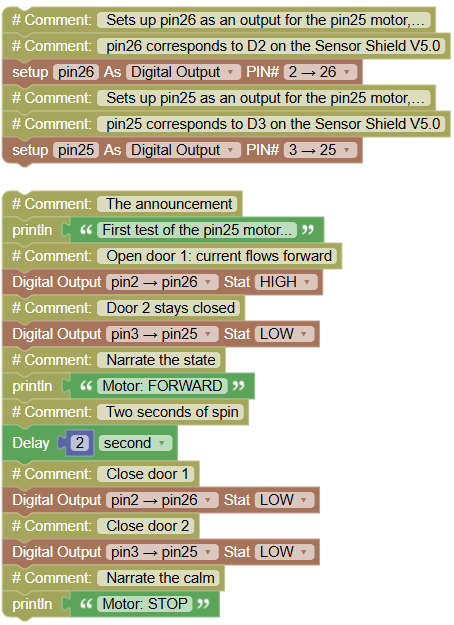
the left motor's first spin forward for two seconds, then stop.
Concepts:
H-Bridge Recap · Two Doors per Motor · Motor Safety
import machine	# Controls the board's pins
import time	# Controls pauses and timing

# Sets up pin26 as an output for the pin25 motor, door 1 (L298N IN1)
# pin26 corresponds to D2 on the Sensor Shield V5.0
pin26 = machine.Pin(26, machine.Pin.OUT)
# Sets up pin25 as an output for the pin25 motor, door 2 (L298N IN2)
# pin25 corresponds to D3 on the Sensor Shield V5.0
pin25 = machine.Pin(25, machine.Pin.OUT)

print("First test of the pin25 motor...")	# The announcement
pin26.value(1)	# Open door 1: current flows forward
pin25.value(0)	# Door 2 stays closed
print("Motor: FORWARD")	# Narrate the state
time.sleep(2)	# Two seconds of spin
pin26.value(0)	# Close door 1
pin25.value(0)	# Close door 2
print("Motor: STOP")	# Narrate the calm
💡 Note: one motor, two doors, one decision you already know this machine from the fan. The only new idea is scale: this driver commands a motor strong enough to push a chassis, so the wiring discipline matters (battery for motors, wheels off the table for now). Whisper in, thunder out.
🎮 The Car's Vocabulary

Goal:
both motors together FORWARD, STOP, BACKWARD. The three words every vehicle speaks.
Concepts:
Synchronized Motors · State Sequence · Direction = Door Choice
import machine	# Controls the board's pins
import time	# Controls pauses and timing

# Sets up pin26 as an output for the left motor, door 1 (L298N IN1)
# pin26 corresponds to D2 on the Sensor Shield V5.0
pin26 = machine.Pin(26, machine.Pin.OUT)
# Sets up pin25 as an output for the left motor, door 2 (L298N IN2)
# pin25 corresponds to D3 on the Sensor Shield V5.0
pin25 = machine.Pin(25, machine.Pin.OUT)
# Sets up pin27 as an output for the right motor, door 1 (L298N IN3)
# pin27 corresponds to D6 on the Sensor Shield V5.0
pin27 = machine.Pin(27, machine.Pin.OUT)
# Sets up pin14 as an output for the right motor, door 2 (L298N IN4)
# pin14 corresponds to D7 on the Sensor Shield V5.0
pin14 = machine.Pin(14, machine.Pin.OUT)

print("FORWARD")	# State 1
pin26.value(1)	# Left: door 1 open
pin25.value(0)	# Left: door 2 closed
pin27.value(1)	# Right: door 1 open
pin14.value(0)	# Right: door 2 closed
time.sleep(2)	# Roll ahead 2 seconds
print("STOP")	# State 2
pin26.value(0)	# Left: everything closed
pin25.value(0)
pin27.value(0)	# Right: everything closed
pin14.value(0)
time.sleep(1)	# One second of stillness
print("BACKWARD")	# State 3
pin26.value(0)	# Left: door 1 closed...
pin25.value(1)	# ...door 2 open = reversed!
pin27.value(0)	# Right: door 1 closed
pin14.value(1)	# ...door 2 open = reversed!
time.sleep(2)	# Roll back 2 seconds
print("STOP")	# Final state
pin26.value(0)	# All doors closed
pin25.value(0)
pin27.value(0)
pin14.value(0)
Serial Monitor:
FORWARD
STOP
BACKWARD
STOP
💡 Note: watch the wheels while each word prints direction is data, and the data is just a door table. The backward trick deserves attention: nobody "told the motor to reverse"; the code simply opened the other door, routing the current the opposite way. Four doors total now drive a vehicle. Only four.
🎮 Software Speed and the Curve Secret
Goal:
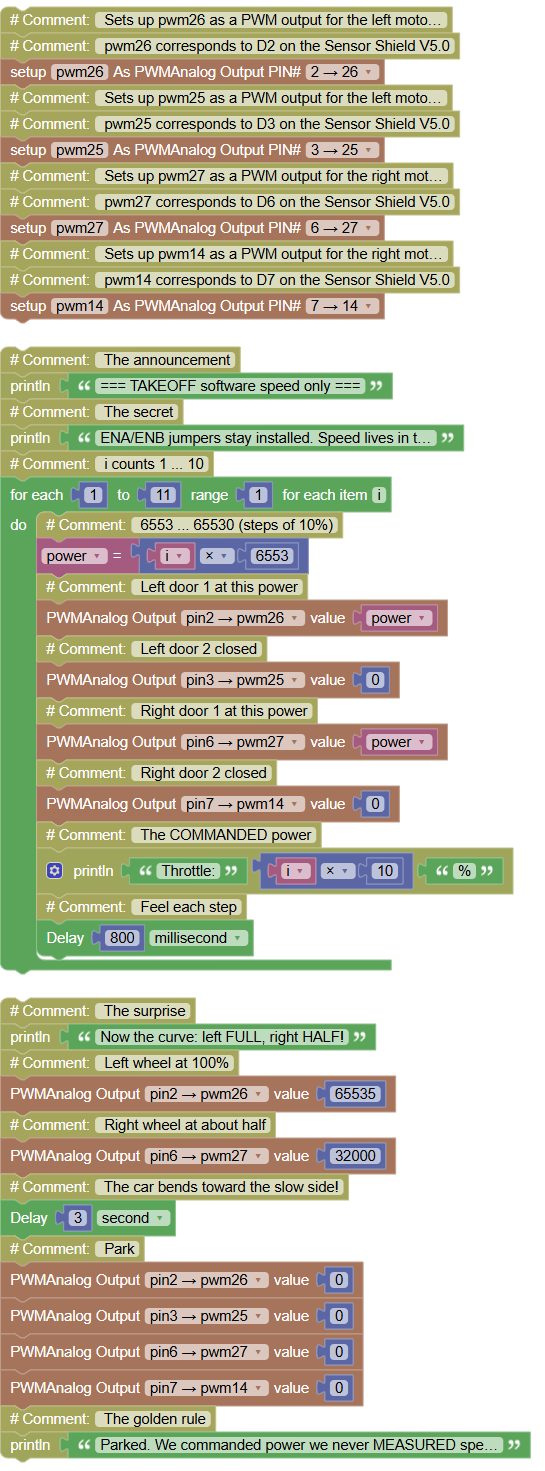
speed by PWM takeoff ramp then the big discovery: two wheels at different speeds bend the car.
Concepts:
PWM on H-Bridge Doors · Software-Only Speed · Differential Steering · Command ≠ Measurement
import machine	# Controls the board's pins
import time	# Controls pauses and timing

# Sets up pwm26 as a PWM output for the left motor, door 1 (L298N IN1)
# pwm26 corresponds to D2 on the Sensor Shield V5.0
pwm26 = machine.PWM(machine.Pin(26))
# Sets up pwm25 as a PWM output for the left motor, door 2 (L298N IN2)
# pwm25 corresponds to D3 on the Sensor Shield V5.0
pwm25 = machine.PWM(machine.Pin(25))
# Sets up pwm27 as a PWM output for the right motor, door 1 (L298N IN3)
# pwm27 corresponds to D6 on the Sensor Shield V5.0
pwm27 = machine.PWM(machine.Pin(27))
# Sets up pwm14 as a PWM output for the right motor, door 2 (L298N IN4)
# pwm14 corresponds to D7 on the Sensor Shield V5.0
pwm14 = machine.PWM(machine.Pin(14))

print("=== TAKEOFF software speed only ===")	# The announcement
print("ENA/ENB jumpers stay installed. Speed lives in the code!")	# The secret
for i in range(1, 11, 1):	# i counts 1 ... 10
    power = i * 6553	# 6553 ... 65530 (steps of 10%)
    pwm26.duty_u16(power)	# Left door 1 at this power
    pwm25.duty_u16(0)	# Left door 2 closed
    pwm27.duty_u16(power)	# Right door 1 at this power
    pwm14.duty_u16(0)	# Right door 2 closed
    print("Throttle:", i * 10, "%")	# The COMMANDED power
    time.sleep_ms(800)	# Feel each step
print("Now the curve: left FULL, right HALF!")	# The surprise
pwm26.duty_u16(65535)	# Left wheel at 100%
pwm27.duty_u16(32000)	# Right wheel at about half
time.sleep(3)	# The car bends toward the slow side!
pwm26.duty_u16(0)	# Park
pwm25.duty_u16(0)
pwm27.duty_u16(0)
pwm14.duty_u16(0)
print("Parked. We commanded power we never MEASURED speed.")	# The golden rule
Serial Monitor:
=== TAKEOFF software speed only ===
ENA/ENB jumpers stay installed. Speed lives in the code!
Throttle: 10 %
Throttle: 20 %
...
Throttle: 100 %
Now the curve: left FULL, right HALF!
Parked. We commanded power we never MEASURED speed.
💡 Note: three lessons in one exercise. ① The jumpers never moved: PWM on the door pins is enough the flicker trick now drives a vehicle, exactly as it drove the lamp and fan. ② The curve secret: two wheels at different speeds → the car bends toward the slower one. Tanks, excavators and robot vacuums steer exactly this way no steering wheel, just differential speed. ③ Command ≠ measurement: the Serial printed 50%, but nobody measured the wheels the motor has no sensor. The dead zone returns too: below ~20% the wheels hum and stall; find your car's floor and remember it.
🎮 The First Dance

Goal:
a complete choreography forward, stop, PIVOT in place, stop, reverse. The pivot is the party trick: left forward + right backward = the car spins on its own center.
Concepts:
Choreographed States · Spin-in-Place · Combining Directions
import machine	# Controls the board's pins
import time	# Controls pauses and timing

# Sets up pwm26 as a PWM output for the left motor, door 1 (L298N IN1)
# pwm26 corresponds to D2 on the Sensor Shield V5.0
pwm26 = machine.PWM(machine.Pin(26))
# Sets up pwm25 as a PWM output for the left motor, door 2 (L298N IN2)
# pwm25 corresponds to D3 on the Sensor Shield V5.0
pwm25 = machine.PWM(machine.Pin(25))
# Sets up pwm27 as a PWM output for the right motor, door 1 (L298N IN3)
# pwm27 corresponds to D6 on the Sensor Shield V5.0
pwm27 = machine.PWM(machine.Pin(27))
# Sets up pwm14 as a PWM output for the right motor, door 2 (L298N IN4)
# pwm14 corresponds to D7 on the Sensor Shield V5.0
pwm14 = machine.PWM(machine.Pin(14))

print("=== THE CAR'S FIRST DANCE ===")	# The show begins
print("Step 1: FORWARD")	# Move one
pwm26.duty_u16(50000)	# Left pushes forward
pwm25.duty_u16(0)
pwm27.duty_u16(50000)	# Right pushes forward
pwm14.duty_u16(0)
time.sleep(2)	# Two seconds ahead
print("Step 2: STOP")	# Freeze
pwm26.duty_u16(0)
pwm25.duty_u16(0)
pwm27.duty_u16(0)
pwm14.duty_u16(0)
time.sleep(1)	# One second of drama
print("Step 3: PIVOT RIGHT")	# The spin!
pwm26.duty_u16(50000)	# Left pushes FORWARD...
pwm25.duty_u16(0)
pwm27.duty_u16(0)	# ...right pushes BACKWARD
pwm14.duty_u16(50000)	# The car rotates on its center!
time.sleep(1)	# One second of spinning
print("Step 4: STOP")	# Freeze again
pwm26.duty_u16(0)
pwm25.duty_u16(0)
pwm27.duty_u16(0)
pwm14.duty_u16(0)
time.sleep(1)
print("Step 5: BACKWARD")	# Reverse
pwm26.duty_u16(0)
pwm25.duty_u16(50000)	# Left door 2 open
pwm27.duty_u16(0)
pwm14.duty_u16(50000)	# Right door 2 open
time.sleep(2)	# Two seconds back
print("Step 6: STOP dance complete!")	# The finale
pwm26.duty_u16(0)
pwm25.duty_u16(0)
pwm27.duty_u16(0)
pwm14.duty_u16(0)
Serial Monitor:
=== THE CAR'S FIRST DANCE ===
Step 1: FORWARD
Step 2: STOP
Step 3: PIVOT RIGHT
Step 4: STOP
Step 5: BACKWARD
Step 6: STOP dance complete!
💡 Note: take the car OFF the stand for the pivot it's the first move that needs the floor to grip. And study what the pivot really is: forward and backward at the same time, one wheel each. Nothing new was invented; the dance is just the door table from 27.2, rearranged. That is what choreography means in code: known states, sequenced with intention. Which step of the dance would you change to make the car spin LEFT instead?
🎮 The PC-Driven Car
Goal:
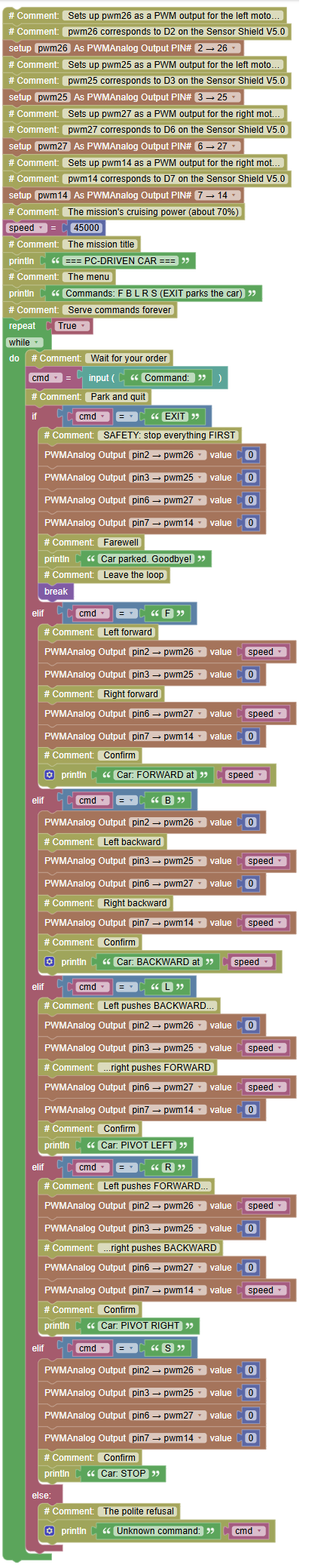
the graduation demo. Type F, B, L, R, S from the PC and the car obeys; EXIT parks it safely. Your full architecture in one program: COMMAND → CONTROLLER → DRIVER → ACTUATOR, with the Serial narrating every step.
Concepts:
Command Menu · Four-Door Control · Pivot Turns · Safety Exit · Complete Synthesis
import machine	# Controls the board's pins
import time	# Controls pauses and timing

# Sets up pwm26 as a PWM output for the left motor, door 1 (L298N IN1)
# pwm26 corresponds to D2 on the Sensor Shield V5.0
pwm26 = machine.PWM(machine.Pin(26))
# Sets up pwm25 as a PWM output for the left motor, door 2 (L298N IN2)
# pwm25 corresponds to D3 on the Sensor Shield V5.0
pwm25 = machine.PWM(machine.Pin(25))
# Sets up pwm27 as a PWM output for the right motor, door 1 (L298N IN3)
# pwm27 corresponds to D6 on the Sensor Shield V5.0
pwm27 = machine.PWM(machine.Pin(27))
# Sets up pwm14 as a PWM output for the right motor, door 2 (L298N IN4)
# pwm14 corresponds to D7 on the Sensor Shield V5.0
pwm14 = machine.PWM(machine.Pin(14))

speed = 45000	# The mission's cruising power (about 70%)

print("=== PC-DRIVEN CAR ===")	# The mission title
print("Commands: F B L R S (EXIT parks the car)")	# The menu
while True:	# Serve commands forever
    cmd = input("Command: ")	# Wait for your order
    if cmd == "EXIT":	# Park and quit
        pwm26.duty_u16(0)	# SAFETY: stop everything FIRST
        pwm25.duty_u16(0)
        pwm27.duty_u16(0)
        pwm14.duty_u16(0)
        print("Car parked. Goodbye!")	# Farewell
        break	# Leave the loop
    elif cmd == "F":	# Forward
        pwm26.duty_u16(speed)	# Left forward
        pwm25.duty_u16(0)
        pwm27.duty_u16(speed)	# Right forward
        pwm14.duty_u16(0)
        print("Car: FORWARD at", speed)	# Confirm
    elif cmd == "B":	# Backward
        pwm26.duty_u16(0)
        pwm25.duty_u16(speed)	# Left backward
        pwm27.duty_u16(0)
        pwm14.duty_u16(speed)	# Right backward
        print("Car: BACKWARD at", speed)	# Confirm
    elif cmd == "L":	# Pivot left
        pwm26.duty_u16(0)	# Left pushes BACKWARD...
        pwm25.duty_u16(speed)
        pwm27.duty_u16(speed)	# ...right pushes FORWARD
        pwm14.duty_u16(0)
        print("Car: PIVOT LEFT")	# Confirm
    elif cmd == "R":	# Pivot right
        pwm26.duty_u16(speed)	# Left pushes FORWARD...
        pwm25.duty_u16(0)
        pwm27.duty_u16(0)	# ...right pushes BACKWARD
        pwm14.duty_u16(speed)
        print("Car: PIVOT RIGHT")	# Confirm
    elif cmd == "S":	# Full stop
        pwm26.duty_u16(0)
        pwm25.duty_u16(0)
        pwm27.duty_u16(0)
        pwm14.duty_u16(0)
        print("Car: STOP")	# Confirm
    else:	# Unknown word
        print("Unknown command:", cmd)	# The polite refusal
Serial Monitor:
=== PC-DRIVEN CAR ===
Commands: F B L R S (EXIT parks the car)
Command: F
Car: FORWARD at 45000
Command: R
Car: PIVOT RIGHT
Command: S
Car: STOP
Command: X
Unknown command: X
Command: EXIT
Car parked. Goodbye!
💡 Note the graduation exercise: everything you own appears one last time. The command menu and input() (Module 1) · the else safety net (Mini-Assistant) · break (Security System) · door-table control (this module) · the safety-first exit (Command Fan). Two upgrades to try: ① a wheel spins the wrong way on F? Swap that motor's two wires at the L298N output a real hardware fix, not a code fix; ② add a FAST command with a speed memory like the fan's you already know the pattern. Then the demo: an obstacle course on the floor, one driver per team, the class narrating. You typed letters on a keyboard, and a vehicle moved. That is the whole promise of robotics, delivered and Level 1's finale is ready for it.