
D1 R32 Wi-Fi
🎮 CONNECT · The Robot with Internet
Module Goal: connect your robot to your network and through it, to the world. This module also teaches the most important address in modern life: the IP address.
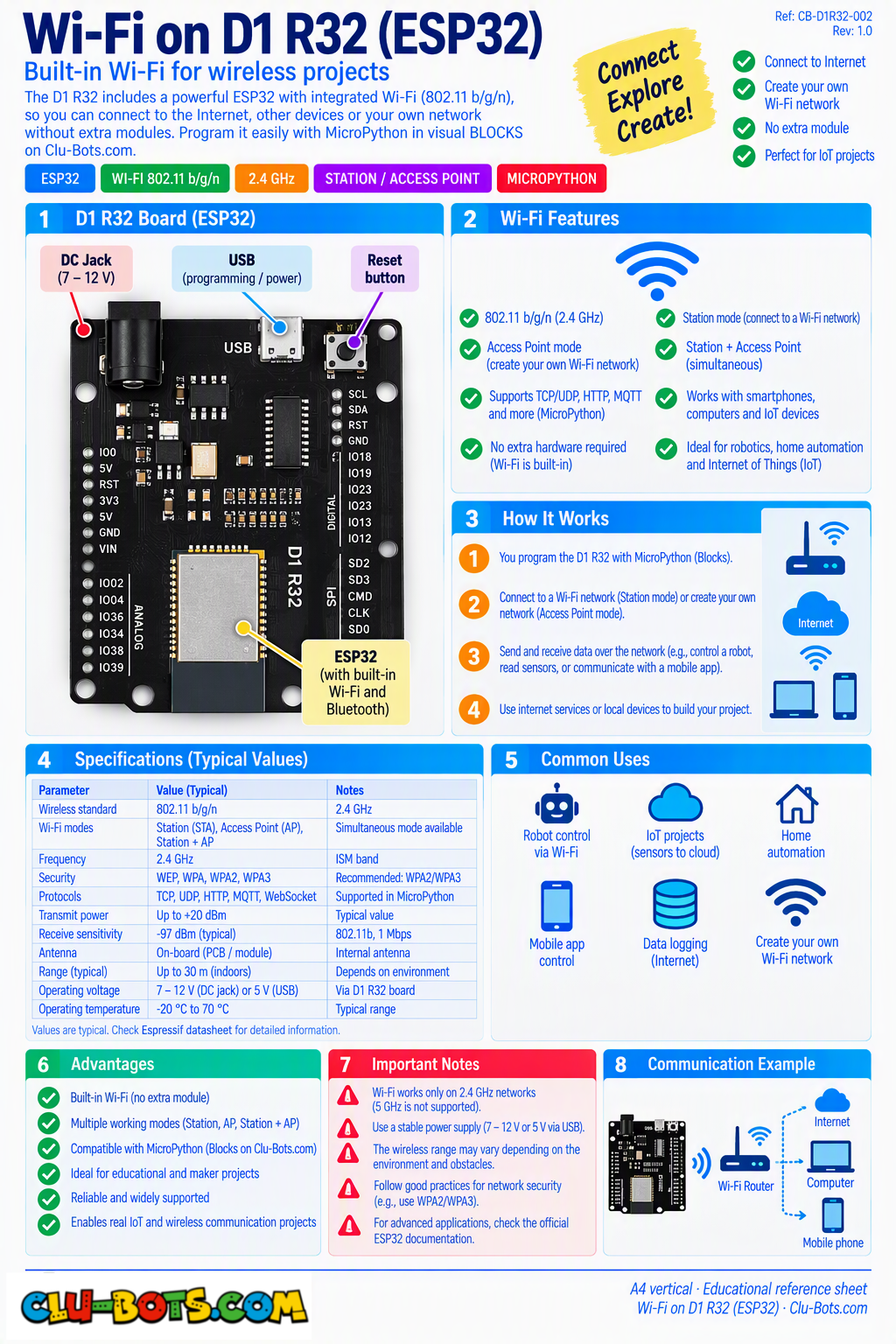
Connect: nothing! Same as Bluetooth the Wi-Fi radio lives inside the board. You need a network name and password (ask your instructor, or use a phone's personal hotspot as a private classroom network a great option to avoid network rules).
📦 CONCEPT BOX The IP address: your robot's house number
When your robot joins a network, the router hands it a unique number called an IP address something like 192.168.1.57. Think of the network as a street and the IP as the house number: any message for that address gets delivered to exactly one device, and no two devices on the same street share a number.
Your robot will do three things on this street:
- Scan listen for the names of every network in the air (your router is not the only one shouting!).
- Connect join one network with name + password, and receive its house number.
- Talk send a request to a website and receive its answer. The website also has an IP a house on a much bigger street called the Internet.
The four numbers your router gives you (ifconfig) are worth knowing: your IP (house number), the gateway (the router's door to the outside), the mask (how big the street is) and the DNS (the phonebook that turns names like clu-block.org into numbers).
Goal:
join the network and receive your robot's house number.
Concepts:
Wi-Fi Station Mode · Connection Waiting Loop · ifconfig
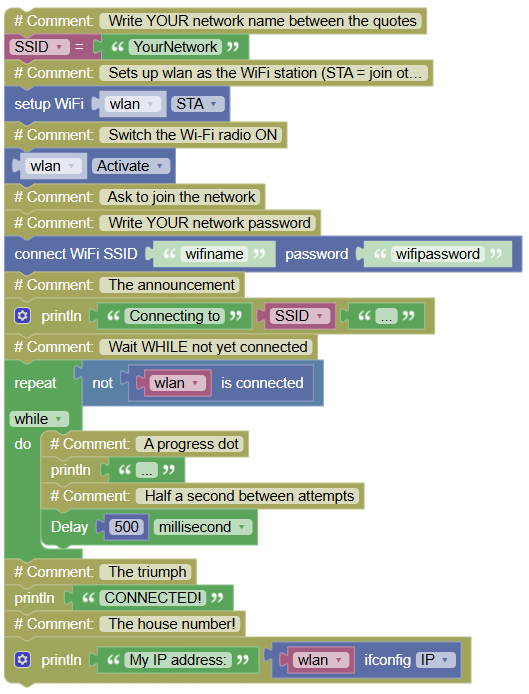
import mixiot	# Controls the Wi-Fi connection
import network	# Controls the Wi-Fi hardware
import time	# Controls pauses and timing

SSID = "YourNetwork"	# Write YOUR network name between the quotes

# Sets up wlan as the WiFi station (STA = join other networks)
wlan = network.WLAN(network.STA_IF)
wlan.active(True)	# Switch the Wi-Fi radio ON
mixiot.wlan_connect('wifiname','wifipassword')	# Ask to join the network & Write YOUR network password
print("Connecting to", SSID, "...")	# The announcement
while not wlan.isconnected():	# Wait WHILE not yet connected
    print("...")	# A progress dot
    time.sleep_ms(500)	# Half a second between attempts
print("CONNECTED!")	# The triumph
print("My IP address:", wlan.ifconfig()[0])	# The house number!
Serial Monitor:
Connecting to YourNetwork ...
...
...
CONNECTED! My IP address: 192.168.1.57
💡 Note: two blocks carry this exercise network.WLAN(network.STA_IF) puts the radio in station mode (a guest joining networks, instead of hosting one), and ifconfig()[0] asks the router for your assigned house number. The waiting loop is your old friend while not ... the same patient guard that waited for your button press in Module 5, now waiting for a router's decision.
🎮 DISCOVER · The Network Census
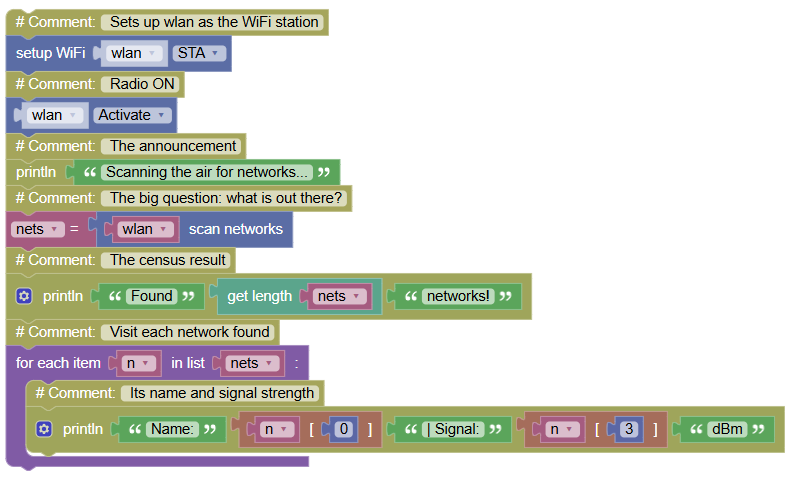
Goal:
scan the air and list every network within reach, with its signal strength.
Concepts:
Network Scanning · Reading Lists · Signal Interpretation
import network	# Controls the Wi-Fi hardware
import time	# Controls pauses and timing

# Sets up wlan as the WiFi station
wlan = network.WLAN(network.STA_IF)
wlan.active(True)	# Radio ON
print("Scanning the air for networks...")	# The announcement
nets = wlan.scan()	# The big question: what is out there?
print("Found", len(nets), "networks!")	# The census result
for n in nets:	# Visit each network found
    print("Name:", n[0], "| Signal:", n[3], "dBm")	# Its name and signal strength
Serial Monitor:
Scanning the air for networks...
Found 6 networks!
Name: b'HOME_WIFI' | Signal: -47 dBm
Name: b'NEIGHBOR_2G' | Signal: -71 dBm
Name: b'CLASSES_NET' | Signal: -38 dBm
💡 Note: two firsts hide here. ① scan() returns a list and for n in nets: visits each member one by one; n[0] is the name, n[3] the signal. Lists are a bigger world (Level 2!), today you only peek inside. ② The signal is negative and closer to zero is STRONGER: -38 is excellent, -71 is struggling. Why negative? It is measured in dBm, a logarithmic scale anchored at an extreme reference for you, just memorize the rule: closer to zero = closer to the router. And b'...' wrapping the names? Bytes again the raw costume of over-the-air data.
🎮 INTERPRET · The Connection Report Card
Goal:
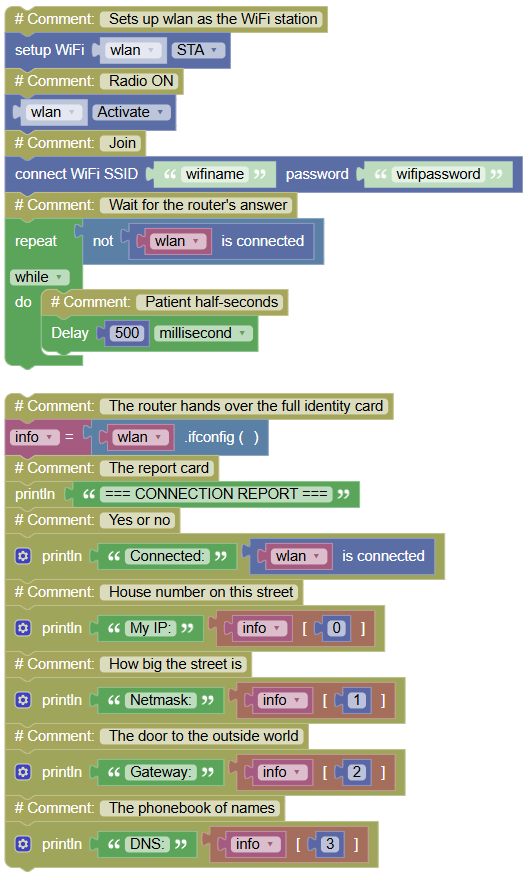
present your robot's full network identity all four numbers from the router, explained.
Concepts:
ifconfig Fields · Network Vocabulary · Presentation
import mixiot	# Controls the Wi-Fi connection
import network	# Controls the Wi-Fi hardware
import time	# Controls pauses and timing

# Sets up wlan as the WiFi station
wlan = network.WLAN(network.STA_IF)
wlan.active(True)	# Radio ON
mixiot.wlan_connect('wifiname','wifipassword')	# Join
while not wlan.isconnected():	# Wait for the router's answer
    time.sleep_ms(500)	# Patient half-seconds

info = wlan.ifconfig()	# The router hands over the full identity card
print("=== CONNECTION REPORT ===")	# The report card
print("Connected:", wlan.isconnected())	# Yes or no
print("My IP:", info[0])	# House number on this street
print("Netmask:", info[1])	# How big the street is
print("Gateway:", info[2])	# The door to the outside world
print("DNS:", info[3])	# The phonebook of names
Serial Monitor:
=== CONNECTION REPORT ===
Connected: True
My IP: 192.168.1.57
Netmask: 255.255.255.0
Gateway: 192.168.1.1
DNS: 192.168.1.1
💡 Note: ifconfig() returns all four values as ONE list, and [0]...[3] pick each field the same list indexing you met in the scan. Memorize the story, not the numbers: IP = your house, gateway = the street's exit door, DNS = the phonebook. When your home internet "breaks", the culprit is almost always one of these four and now you can read the diagnosis yourself.
🎮 COMMUNICATE · Talking to a Website
Goal:
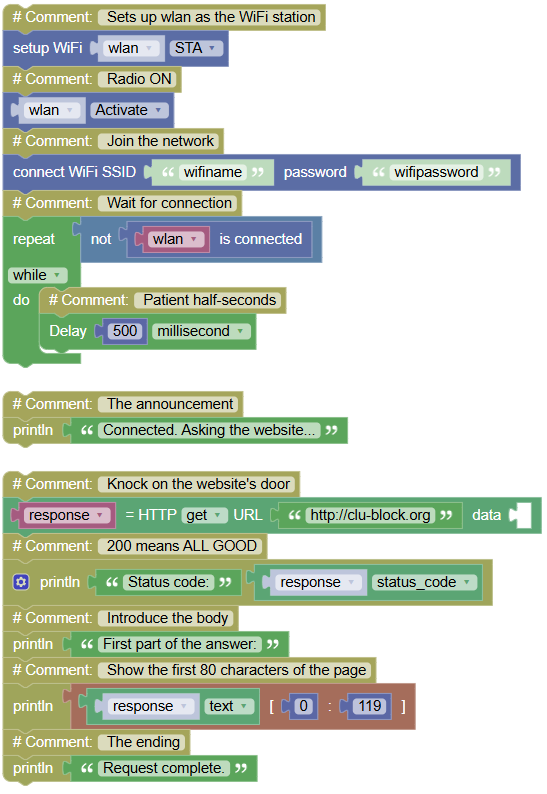
send a request across the internet and receive an answer the in-transform-out shape, at planetary scale.
Concepts:
HTTP Request · Status Codes · Response Body · Closing Connections
import mixiot	# Controls the Wi-Fi connection
import network	# Controls the Wi-Fi hardware
import time	# Controls pauses and timing
import urequests	# Controls web requests

# Sets up wlan as the WiFi station
wlan = network.WLAN(network.STA_IF)
wlan.active(True)	# Radio ON
mixiot.wlan_connect('wifiname','wifipassword')	# Join the network
while not wlan.isconnected():	# Wait for connection
    time.sleep_ms(500)	# Patient half-seconds
print("Connected. Asking the website...")	# The announcement

response = urequests.get("http://clu-block.org")	# Knock on the website's door
print("Status code:", response.status_code)	# 200 means ALL GOOD
print("First part of the answer:")	# Introduce the body
print(response.text[0:119])	# Show the first 80 characters of the page
print("Request complete.")	# The ending
Serial Monitor:
Connected. Asking the website...
Status code: 200
First part of the answer: ...
...
Request complete.
💡 Note: the whole internet in three lines. urequests.get(url) sends your request; status_code is the website's verdict 200 = here you go, 404 = not found, 500 = the site is having a bad day; and response.text is the actual page content (sliced to 80 characters with the same [0:80] trick as the barcode module). Do not skip response.close() each open request holds memory, and 32.5 repeats requests forever: without the goodbye, your robot runs out of room. Closing what you open a habit worth more than it looks.
🎮 The Robot Health Check
Goal:
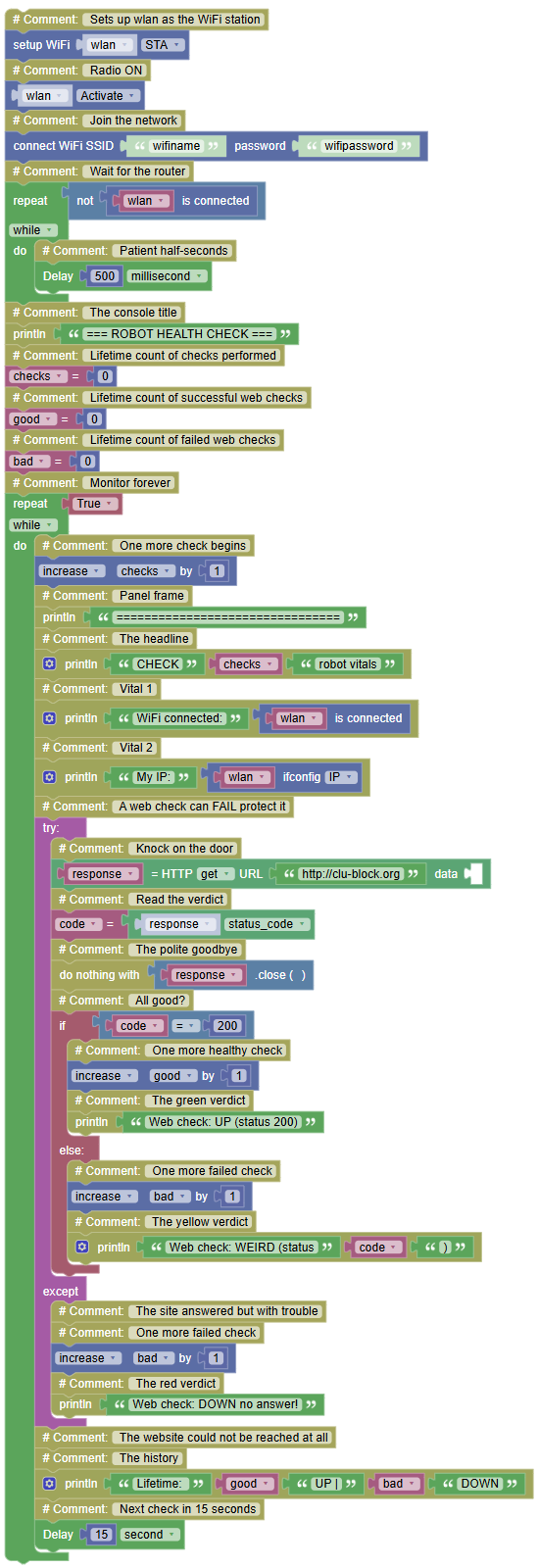
the complete diagnostic console every 15 seconds the robot checks its own vitals: still connected? Still my IP? Can I still reach the web? A formatted panel with verdicts and lifetime counters.
Concepts:
Periodic Diagnostics · Verdict Logic · Lifetime Counters · Full Assembly
import mixiot	# Controls the Wi-Fi connection
import network	# Controls the Wi-Fi hardware
import time	# Controls pauses and timing
import urequests	# Controls web requests

# Sets up wlan as the WiFi station
wlan = network.WLAN(network.STA_IF)
wlan.active(True)	# Radio ON
mixiot.wlan_connect('wifiname','wifipassword')	# Join the network
while not wlan.isconnected():	# Wait for the router
    time.sleep_ms(500)	# Patient half-seconds

print("=== ROBOT HEALTH CHECK ===")	# The console title
checks = 0	# Lifetime count of checks performed
good = 0	# Lifetime count of successful web checks
bad = 0	# Lifetime count of failed web checks

while True:	# Monitor forever
    checks += 1	# One more check begins
    print("================================")	# Panel frame
    print("CHECK", checks, "robot vitals")	# The headline
    print("WiFi connected:", wlan.isconnected())	# Vital 1
    print("My IP:", wlan.ifconfig()[0])	# Vital 2
    try:	# A web check can FAIL protect it
        response = urequests.get("http://clu-block.org")	# Knock on the door
        code = response.status_code	# Read the verdict
        response.close()	# The polite goodbye
        if code == 200:	# All good?
            good += 1	# One more healthy check
            print("Web check: UP (status 200)")	# The green verdict
        else:	# The site answered but with trouble
            bad += 1	# One more failed check
            print("Web check: WEIRD (status", code, ")")	# The yellow verdict
    except:	# The website could not be reached at all
        bad += 1	# One more failed check
        print("Web check: DOWN no answer!")	# The red verdict
    print("Lifetime: ", good, "UP |", bad, "DOWN")	# The history
    time.sleep(15)	# Next check in 15 seconds
Serial Monitor:
=== ROBOT HEALTH CHECK ===
CHECK 1 robot vitals
WiFi connected: True
My IP: 192.168.1.57
Web check: UP (status 200)
Lifetime: 1 UP | 0 DOWN
CHECK 2 robot vitals
WiFi connected: True
My IP: 192.168.1.57
Web check: DOWN no answer!
Lifetime: 1 UP | 1 DOWN
💡 Note: one brand-new word with a big job try: wraps the web request so that a failed connection *doesn't crash the program*; the `except:` catches the failure and turns it into a red verdict instead. This is the professional version of the else safety net: not just unknown commands, but **expected failures handled with dignity**. Count what you assembled: the connection report (32.3), the request (32.4), the verdict funnels, the lifetime counters, the timed panel. Real monitoring systems server dashboards, uptime pages, smoke alarms for the internet are this exact program with nicer fonts. And with that, the robot has a voice (IR), a phone (Bluetooth) and a passport (Wi-Fi). One family remains: robots talking to ROBOTS. ---