
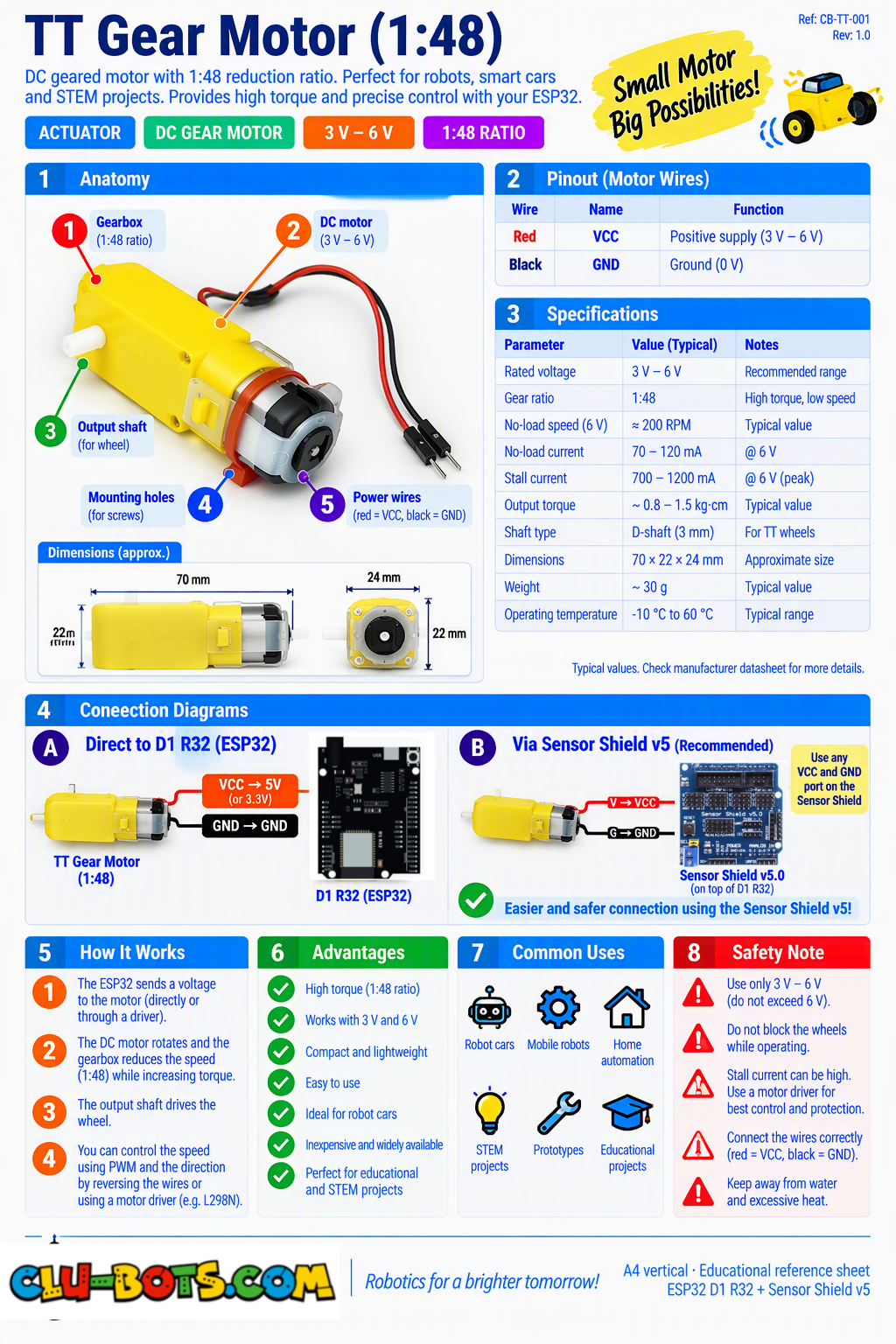
Smart Car Robot Gear Motor (TT Motor, 1:48)
🎮 Make the Motor Rotate

Goal
Run the TT motor in one direction for a few seconds, stop it, and report both commanded states to the PC.
Concepts
Motor Driver · Digital Output · Direction · Timing · Serial Output
import machine  # Controls the board hardware
import time     # Controls pauses and timing

# Sets up pin26 as an output for motor control
# pin26 corresponds to D2 on the Sensor Shield V5.0
pin26 = machine.Pin(26, machine.Pin.OUT)

# Sets up pin25 as an output for motor control
# pin25 corresponds to D3 on the Sensor Shield V5.0
pin25 = machine.Pin(25, machine.Pin.OUT)

pin26.value(1)  # Sets the first control signal HIGH

pin25.value(0)  # Sets the second control signal LOW

print('Motor: FORWARD')  # Reports the commanded state

time.sleep(3)  # Runs the motor for 3 seconds

pin26.value(0)  # Sets the first control signal LOW

pin25.value(0)  # Sets the second control signal LOW

print('Motor: STOP')  # Reports the commanded state
🎮 Forward, Stop and Reverse
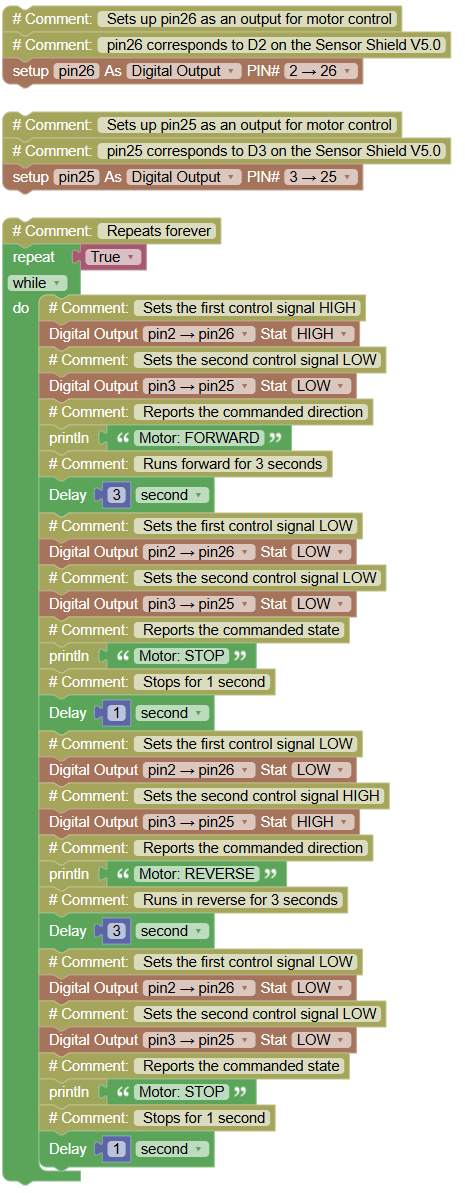
Goal
Show more lines and simultaneously report each commanded state through Serial.
Concepts
Motor Driver · Direction · Sequence · Timing · Serial Output
import machine  # Controls the board hardware
import time     # Controls pauses and timing

# Sets up pin26 as an output for motor control
# pin26 corresponds to D2 on the Sensor Shield V5.0
pin26 = machine.Pin(26, machine.Pin.OUT)

# Sets up pin25 as an output for motor control
# pin25 corresponds to D3 on the Sensor Shield V5.0
pin25 = machine.Pin(25, machine.Pin.OUT)

while True:  # Repeats forever

    pin26.value(1)  # Sets the first control signal HIGH

    pin25.value(0)  # Sets the second control signal LOW

    print('Motor: FORWARD')  # Reports the commanded direction

    time.sleep(3)  # Runs forward for 3 seconds

    pin26.value(0)  # Sets the first control signal LOW

    pin25.value(0)  # Sets the second control signal LOW

    print('Motor: STOP')  # Reports the commanded state

    time.sleep(1)  # Stops for 1 second

    pin26.value(0)  # Sets the first control signal LOW

    pin25.value(1)  # Sets the second control signal HIGH

    print('Motor: REVERSE')  # Reports the commanded direction

    time.sleep(3)  # Runs in reverse for 3 seconds

    pin26.value(0)  # Sets the first control signal LOW

    pin25.value(0)  # Sets the second control signal LOW

    print('Motor: STOP')  # Reports the commanded state

    time.sleep(1)  # Stops for 1 second
🎮 Change the Commanded Motor Speed

Goal
Use PWM directly through the programmed motor-control signals to experiment with: PWM command: 25% PWM command: 50% PWM command: 75% PWM command: 100%
Concepts
PWM · Duty Cycle · Motor Driver · Commanded Power · Serial Output There is no separate speed-control pin in this exercise.
import machine  # Controls the board hardware
import time     # Controls pauses and timing

# Sets up pin26 as PWM for motor control
# pin26 corresponds to D2 on the Sensor Shield V5.0
pwm26 = machine.PWM(machine.Pin(26))

# Sets up pin25 as an output for motor control
# pin25 corresponds to D3 on the Sensor Shield V5.0
pin25 = machine.Pin(25, machine.Pin.OUT)

pwm26.freq(1000)  # Sets the PWM frequency

pin25.value(0)  # Keeps the opposite control signal LOW

pin26.duty_u16(16384)  # Commands approximately 25% PWM

print('PWM command: 25%')  # Reports the commanded value

time.sleep(3)  # Runs at this setting for 3 seconds

pin26.duty_u16(32768)  # Commands approximately 50% PWM

print('PWM command: 50%')  # Reports the commanded value

time.sleep(3)  # Runs at this setting for 3 seconds

pin26.duty_u16(49151)  # Commands approximately 75% PWM

print('PWM command: 75%')  # Reports the commanded value

time.sleep(3)  # Runs at this setting for 3 seconds

pin26.duty_u16(65535)  # Commands 100% PWM

print('PWM command: 100%')  # Reports the commanded value

time.sleep(3)  # Runs at this setting for 3 seconds

pin26.duty_u16(0)  # Stops the PWM output

print('Motor: STOP')  # Reports the commanded state
🎮 Programmed Movement Sequence

Goal
Create this repeating movement pattern: Step 1 → FORWARD → PWM 75% → 3 s Step 2 → STOP → 1 s Step 3 → REVERSE → PWM 50% → 2 s Step 4 → STOP → 1 s
Concepts
PWM · Direction · Sequence · Timing · Physical Motion · Serial Output Again, speed is controlled in software through GPIO26/GPIO25, not through a separate speed pin.
import machine  # Controls the board hardware
import time     # Controls pauses and timing

# Sets up pin26 as PWM for the first motor control signal
# pin26 corresponds to D2 on the Sensor Shield V5.0
pwm26 = machine.PWM(machine.Pin(26))

# Sets up pin25 as PWM for the second motor control signal
# pin25 corresponds to D3 on the Sensor Shield V5.0
pwm25 = machine.PWM(machine.Pin(25))

pwm26.freq(1000)  # Sets the first PWM frequency

pwm25.freq(1000)  # Sets the second PWM frequency

while True:  # Repeats the movement pattern

    pwm26.duty_u16(49151)  # Commands forward at approximately 75%

    pwm25.duty_u16(0)  # Keeps the opposite control signal off

    print('Step 1 | FORWARD | PWM 75%')  # Reports the step

    time.sleep(3)  # Runs forward for 3 seconds

    pwm26.duty_u16(0)  # Stops the first control signal

    pwm25.duty_u16(0)  # Stops the second control signal

    print('Step 2 | STOP')  # Reports the step

    time.sleep(1)  # Stops for 1 second

    pwm26.duty_u16(0)  # Keeps the first control signal off

    pwm25.duty_u16(32768)  # Commands reverse at approximately 50%

    print('Step 3 | REVERSE | PWM 50%')  # Reports the step

    time.sleep(2)  # Runs in reverse for 2 seconds

    pwm26.duty_u16(0)  # Stops the first control signal

    pwm25.duty_u16(0)  # Stops the second control signal

    print('Step 4 | STOP')  # Reports the step

    print('---')  # Separates each sequence

    time.sleep(1)  # Stops for 1 second
🎮 PC-Controlled TT Motor
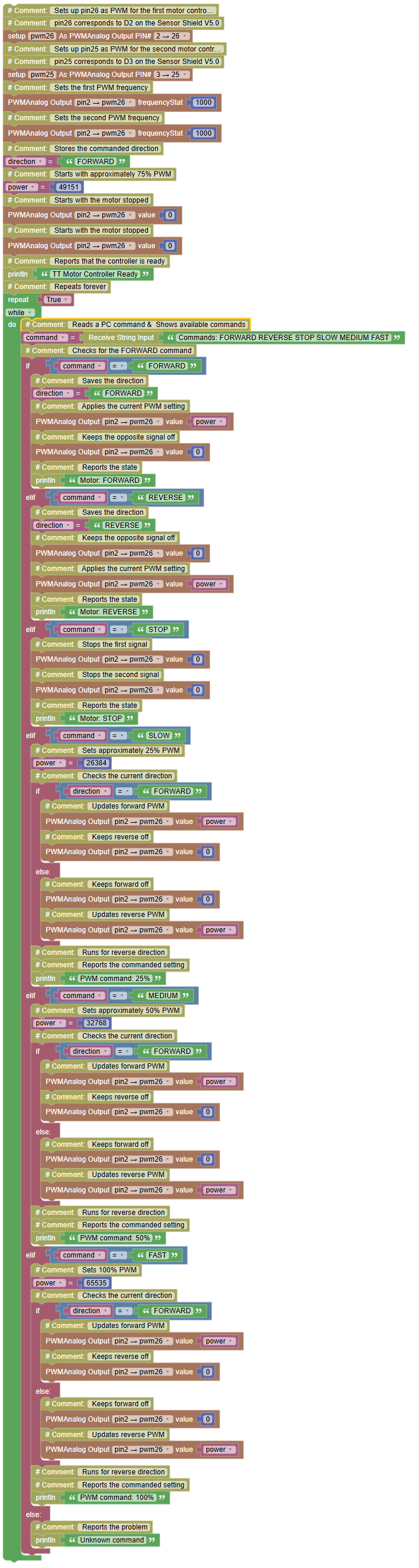
Goal
Create a motor that receives commands from the PC: FORWARD REVERSE STOP SLOW MEDIUM FAST. The ESP32 interprets the commands, controls the TT motor, and sends the resulting commanded state back to the PC.
Concepts
Serial Input · Strings · Commands · Decisions · PWM · Direction · Physical Actuator
import machine  # Controls the board hardware
import sys      # Allows commands to be received from the PC

# Sets up pin26 as PWM for the first motor control signal
# pin26 corresponds to D2 on the Sensor Shield V5.0
pwm26 = machine.PWM(machine.Pin(26))

# Sets up pin25 as PWM for the second motor control signal
# pin25 corresponds to D3 on the Sensor Shield V5.0
pwm25 = machine.PWM(machine.Pin(25))

pwm26.freq(1000)  # Sets the first PWM frequency

pwm25.freq(1000)  # Sets the second PWM frequency

direction = 'FORWARD'  # Stores the commanded direction

power = 49151  # Starts with approximately 75% PWM

pwm26.duty_u16(0)  # Starts with the motor stopped

pwm25.duty_u16(0)  # Starts with the motor stopped

print('TT Motor Controller Ready')  # Reports that the controller is ready

while True:  # Repeats forever

        command = input('Commands: FORWARD REVERSE STOP SLOW MEDIUM FAST')
  # Reads a PC command & Shows available commands

    if command == 'FORWARD':  # Checks for the FORWARD command

        direction = 'FORWARD'  # Saves the direction

        pwm26.duty_u16(power)  # Applies the current PWM setting

        pwm25.duty_u16(0)  # Keeps the opposite signal off

        print('Motor: FORWARD')  # Reports the state

    elif command == 'REVERSE':  # Checks for the REVERSE command

        direction = 'REVERSE'  # Saves the direction

        pwm26.duty_u16(0)  # Keeps the opposite signal off

        pwm25.duty_u16(power)  # Applies the current PWM setting

        print('Motor: REVERSE')  # Reports the state

    elif command == 'STOP':  # Checks for the STOP command

        pwm26.duty_u16(0)  # Stops the first signal

        pwm25.duty_u16(0)  # Stops the second signal

        print('Motor: STOP')  # Reports the state

    elif command == 'SLOW':  # Checks for the SLOW command

        power = 26384  # Sets approximately 25% PWM

        if direction == 'FORWARD':  # Checks the current direction

            pwm26.duty_u16(power)  # Updates forward PWM

            pwm25.duty_u16(0)  # Keeps reverse off

        else:  # Runs for reverse direction

            pwm26.duty_u16(0)  # Keeps forward off

            pwm25.duty_u16(power)  # Updates reverse PWM

        print('PWM command: 25%')  # Reports the commanded setting

    elif command == 'MEDIUM':  # Checks for the MEDIUM command

        power = 32768  # Sets approximately 50% PWM

        if direction == 'FORWARD':  # Checks the current direction

            pwm26.duty_u16(power)  # Updates forward PWM

            pwm25.duty_u16(0)  # Keeps reverse off

        else:  # Runs for reverse direction

            pwm26.duty_u16(0)  # Keeps forward off

            pwm25.duty_u16(power)  # Updates reverse PWM

        print('PWM command: 50%')  # Reports the commanded setting

    elif command == 'FAST':  # Checks for the FAST command

        power = 65535  # Sets 100% PWM

        if direction == 'FORWARD':  # Checks the current direction

            pwm26.duty_u16(power)  # Updates forward PWM

            pwm25.duty_u16(0)  # Keeps reverse off

        else:  # Runs for reverse direction

            pwm26.duty_u16(0)  # Keeps forward off

            pwm25.duty_u16(power)  # Updates reverse PWM

        print('PWM command: 100%')  # Reports the commanded setting

    else:  # Runs for an unknown command

        print('Unknown command')  # Reports the problem