
L9110 Fan Module
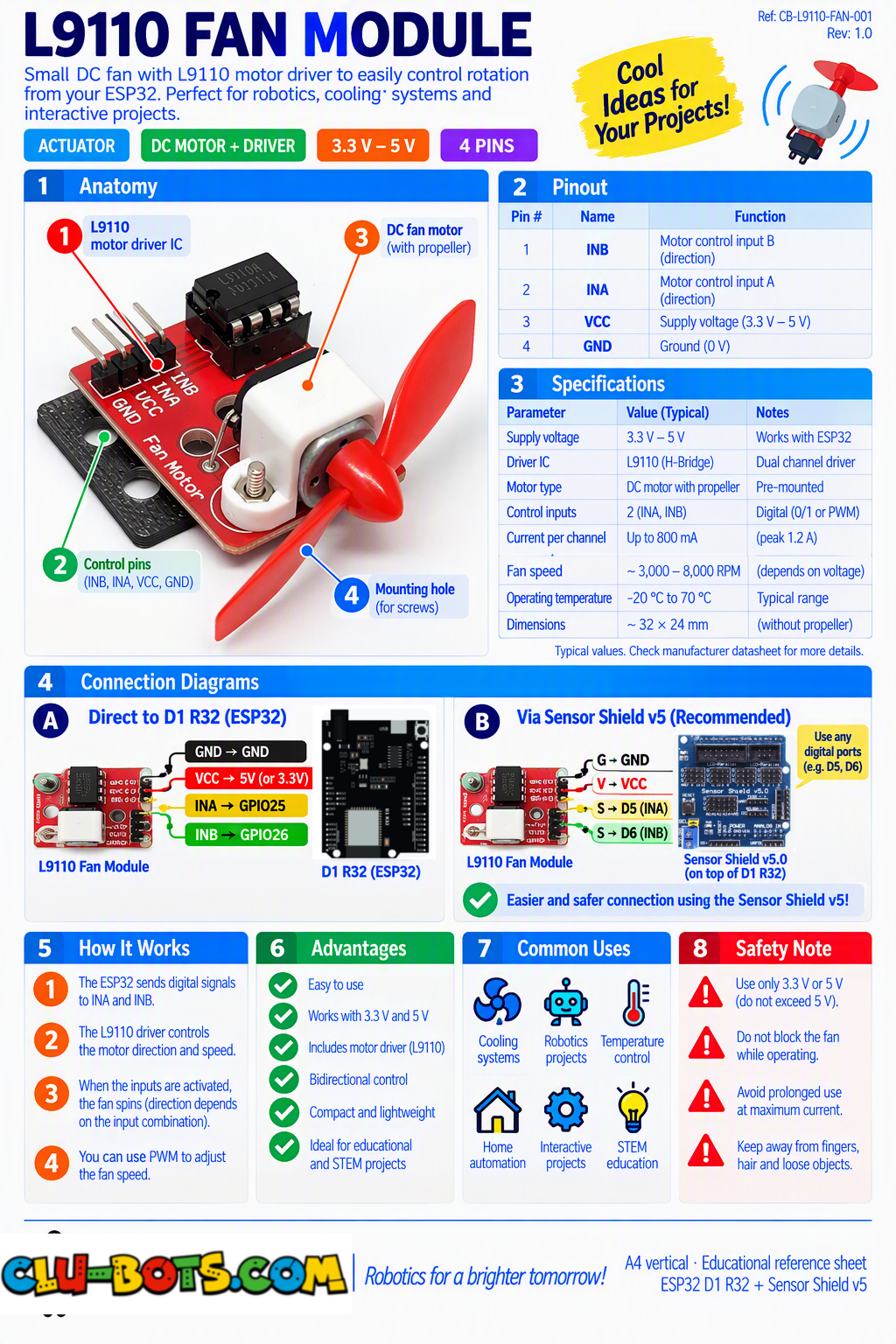
🎮 Run Forward and Stop
Goal
Run one DC motor forward for 2 seconds and then stop it.
Concepts
Digital Output · Motor Driver · Direction · Timing · Stop
import machine  # Controls the board hardware
import time     # Controls pauses and timing

# Sets up GPIO26 as an output for motor input A-IA
# GPIO26 corresponds to D2 on the Sensor Shield V5.0
motor_a = machine.Pin(26, machine.Pin.OUT)

# Sets up GPIO25 as an output for motor input A-IB
# GPIO25 corresponds to D3 on the Sensor Shield V5.0
motor_b = machine.Pin(25, machine.Pin.OUT)

motor_a.value(1)  # Sets the first motor input HIGH

motor_b.value(0)  # Sets the second motor input LOW

time.sleep(2)  # Runs the motor for 2 seconds

motor_a.value(0)  # Sets the first motor input LOW

motor_b.value(0)  # Sets the second motor input LOW
🎮 Forward, Backward and Stop
Goal
Control the motor in Forward, Backward, and Stop states while reporting each state to the PC.
Concepts
Digital Output · Motor Direction · Sequence · Timing · Serial Output
import machine  # Controls the board hardware
import time     # Controls pauses and timing

# Sets up GPIO26 as an output for motor input A-IA
# GPIO26 corresponds to D2 on the Sensor Shield V5.0
motor_a = machine.Pin(26, machine.Pin.OUT)

# Sets up GPIO25 as an output for motor input A-IB
# GPIO25 corresponds to D3 on the Sensor Shield V5.0
motor_b = machine.Pin(25, machine.Pin.OUT)

while True:  # Repeats forever

    motor_a.value(1)  # Sets the first input HIGH

    motor_b.value(0)  # Sets the second input LOW

    print('Forward')  # Reports the motor state

    time.sleep(2)  # Runs forward for 2 seconds

    motor_a.value(0)  # Sets the first input LOW

    motor_b.value(0)  # Sets the second input LOW

    print('Stop')  # Reports the motor state

    time.sleep(1)  # Stops for 1 second

    motor_a.value(0)  # Sets the first input LOW

    motor_b.value(1)  # Sets the second input HIGH

    print('Backward')  # Reports the motor state

    time.sleep(2)  # Runs backward for 2 seconds

    motor_a.value(0)  # Sets the first input LOW

    motor_b.value(0)  # Sets the second input LOW

    print('Stop')  # Reports the motor state

    time.sleep(1)  # Stops for 1 second
🎮 Experiment with Motor Speed
Goal
Use PWM to experiment with different motor speed settings.
Concepts
PWM · Motor Speed · Variables · Duty Cycle · Serial Output PWM can be used with suitable L9110 control wiring to vary motor speed.
import machine  # Controls the board hardware
import time     # Controls pauses and timing

# Sets up GPIO26 as PWM for motor input A-IA
# GPIO26 corresponds to D2 on the Sensor Shield V5.0
motor_speed = machine.PWM(machine.Pin(26))

# Sets up GPIO25 as an output for motor input A-IB
# GPIO25 corresponds to D3 on the Sensor Shield V5.0
motor_direction = machine.Pin(25, machine.Pin.OUT)

motor_speed.freq(1000)  # Sets the PWM frequency

motor_direction.value(0)  # Selects one motor direction

print('Speed: Low')  # Reports the speed setting

motor_speed.duty_u16(20000)  # Sets a low PWM value

time.sleep(2)  # Runs for 2 seconds

print('Speed: Medium')  # Reports the speed setting

motor_speed.duty_u16(40000)  # Sets a medium PWM value

time.sleep(2)  # Runs for 2 seconds

print('Speed: High')  # Reports the speed setting

motor_speed.duty_u16(60000)  # Sets a high PWM value

time.sleep(2)  # Runs for 2 seconds

motor_speed.duty_u16(0)  # Stops the PWM signal

print('Stop')  # Reports that the motor stopped
🎮 Forward → Stop → Backward → Stop
Goal
Create a repeating Forward → Stop → Backward → Stop motor movement sequence.
Concepts
Digital Output · Motor Direction · Sequence · Loop · Timing · Serial Output
import machine  # Controls the board hardware
import time     # Controls pauses and timing

# Sets up GPIO26 as an output for motor input A-IA
# GPIO26 corresponds to D2 on the Sensor Shield V5.0
motor_a = machine.Pin(26, machine.Pin.OUT)

# Sets up GPIO25 as an output for motor input A-IB
# GPIO25 corresponds to D3 on the Sensor Shield V5.0
motor_b = machine.Pin(25, machine.Pin.OUT)

while True:  # Repeats forever

    motor_a.value(1)  # Sets the first input HIGH

    motor_b.value(0)  # Sets the second input LOW

    print('Step 1: Forward')  # Reports sequence step 1

    time.sleep(2)  # Runs forward for 2 seconds

    motor_a.value(0)  # Sets the first input LOW

    motor_b.value(0)  # Sets the second input LOW

    print('Step 2: Stop')  # Reports sequence step 2

    time.sleep(1)  # Stops for 1 second

    motor_a.value(0)  # Sets the first input LOW

    motor_b.value(1)  # Sets the second input HIGH

    print('Step 3: Backward')  # Reports sequence step 3

    time.sleep(2)  # Runs backward for 2 seconds

    motor_a.value(0)  # Sets the first input LOW

    motor_b.value(0)  # Sets the second input LOW

    print('Step 4: Stop')  # Reports sequence step 4

    time.sleep(1)  # Stops for 1 second
🎮 Programmed Motor Movement Routine
Goal
Create a programmed movement routine while the PC displays the current direction, speed setting, and sequence step.
Concepts
PWM · Motor Direction · Motor Speed · Sequence · Timing · Serial Output
import machine  # Controls the board hardware
import time     # Controls pauses and timing

# Sets up GPIO26 as PWM for motor input A-IA
# GPIO26 corresponds to D2 on the Sensor Shield V5.0
motor_a = machine.PWM(machine.Pin(26))

# Sets up GPIO25 as PWM for motor input A-IB
# GPIO25 corresponds to D3 on the Sensor Shield V5.0
motor_b = machine.PWM(machine.Pin(25))

motor_a.freq(1000)  # Sets the first PWM frequency

motor_b.freq(1000)  # Sets the second PWM frequency

while True:  # Repeats the routine forever

    motor_a.duty_u16(25000)  # Runs forward at a low setting

    motor_b.duty_u16(0)  # Keeps the opposite input off

    print('Step: 1')  # Shows the sequence step

    print('Direction: Forward')  # Shows the direction

    print('Speed: Low')  # Shows the speed setting

    time.sleep(2)  # Runs this step for 2 seconds

    motor_a.duty_u16(0)  # Stops the first PWM signal

    motor_b.duty_u16(0)  # Stops the second PWM signal

    print('Step: 2')  # Shows the sequence step

    print('Direction: Stop')  # Shows the motor state

    print('Speed: 0')  # Shows the speed setting

    time.sleep(1)  # Stops for 1 second

    motor_a.duty_u16(50000)  # Runs forward at a higher setting

    motor_b.duty_u16(0)  # Keeps the opposite input off

    print('Step: 3')  # Shows the sequence step

    print('Direction: Forward')  # Shows the direction

    print('Speed: High')  # Shows the speed setting

    time.sleep(2)  # Runs this step for 2 seconds

    motor_a.duty_u16(0)  # Keeps the first input off

    motor_b.duty_u16(35000)  # Runs in the opposite direction

    print('Step: 4')  # Shows the sequence step

    print('Direction: Backward')  # Shows the direction

    print('Speed: Medium')  # Shows the speed setting

    time.sleep(2)  # Runs this step for 2 seconds

    motor_a.duty_u16(0)  # Stops the first PWM signal

    motor_b.duty_u16(0)  # Stops the second PWM signal

    print('Step: 5')  # Shows the sequence step

    print('Direction: Stop')  # Shows the motor state

    print('Speed: 0')  # Shows the speed setting

    print('---')  # Separates each routine

    time.sleep(1)  # Waits before repeating