
HS‑SR04 Ultrasonic
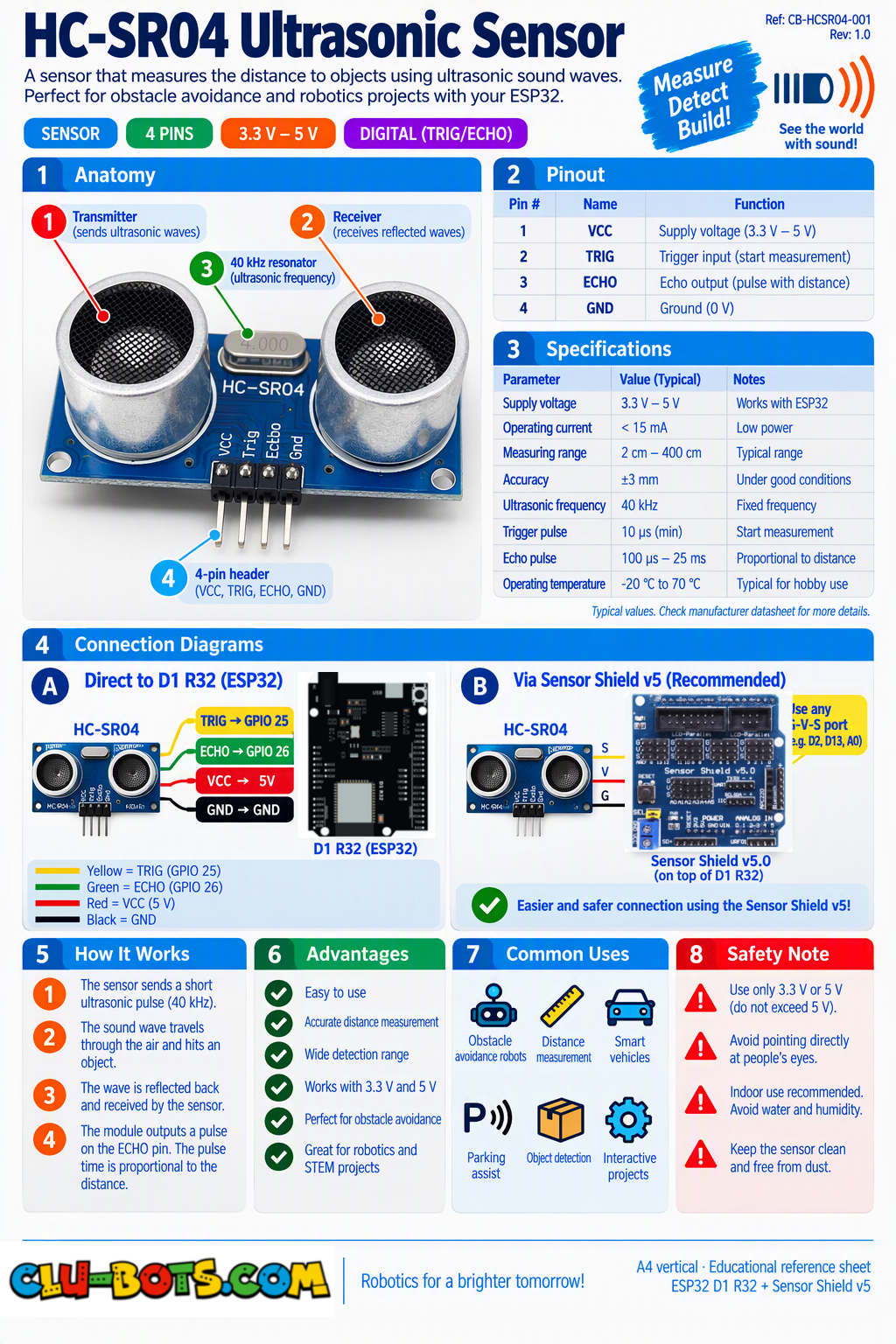
🎮 Measure Distance
Module Goal: measure distance using sound echoes exactly like a bat hunting in the dark. By the end, your screen becomes a parking sensor.
⚠️ SAFETY BOX the voltage divider: the HC-SR04's Echo pin answers with 5 volts, but ESP32 pins only tolerate 3.3 volts. Connecting Echo directly can damage your board. The fix is two resistors: a 1 kΩ from Echo toward D3, then a 2 kΩ from that same junction down to GND, and the junction goes to D3. The two resistors split the voltage down to a safe 3.3 V. If your kit includes the small blue adapter board or an "HC-SR04+" (3.3 V-safe), connect Echo directly but verify before powering on. Building the divider first is a 2-minute job that protects your whole course.
📦 CONCEPT BOX How does a bat measure distance?
A bat screams and listens. The sound flies out, hits a moth, bounces back. The bat's brain does one calculation: how long did the echo take? Longer echo = farther moth.
Your sensor does the same with an inaudible squeal at 40,000 Hz:
- The Trig pin fires: "send the pulse!"
- Sound travels out, hits the wall, bounces back.
- The Echo pin stays ON for exactly the time the round trip took.
- The library converts that time into centimeters using the speed of sound (343 meters per second that's 34.3 centimeters per millisecond!).
Sound is fast but not instant that slowness is the gift. Light would return too fast to time; sound takes just long enough to measure with a cheap clock. This is called time-of-flight measurement, and sonar, radar and laser rangefinders all live on the same idea.
Goal:
hear the bat speak distance in centimeters, once per second.
Concepts:
Ultrasonic Sensing · Time of Flight · Serial Reporting
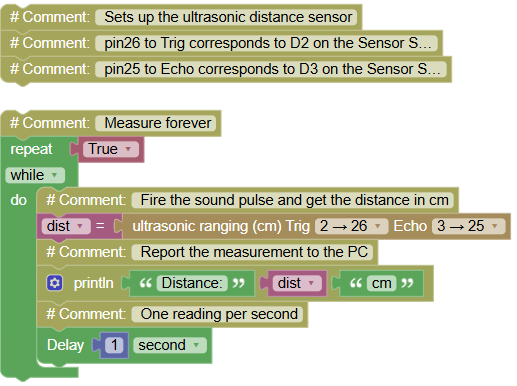
import sonar  # Controls the ultrasonic sensor
import time   # Controls pauses and timing

# Sets up the ultrasonic distance sensor
# pin26 to Trig corresponds to D2 on the Sensor Shield V5.0
# pin25 to Echo corresponds to D3 on the Sensor Shield V5.0

while True:  # Measure forever
    dist = sonar.Sonar(26, 25).checkdist()  # Fire the sound pulse and get the distance in cm
    print("Distance:", dist, "cm")  # Report the measurement to the PC
    time.sleep(1)  # One reading per second
Serial Monitor (move your hand toward the sensor bit by bit):
Distance: 87.3 cm
Distance: 42.1 cm
Distance: 15.6 cm
Distance: 7.9 cm
💡 Note: the block builds the sensor fresh on every line like borrowing a brand-new measuring tape for each reading. Slightly wasteful, perfectly clear. Two physical limits to discover by experiment: wave your hand closer than 2 cm and the readings go crazy (the echo returns before the sensor is ready to listen!), and beyond 4 meters the echo is too weak. Every sensor has a comfort zone yours is 2 cm to 400 cm.
🎮 Close, Medium or Far
Goal:
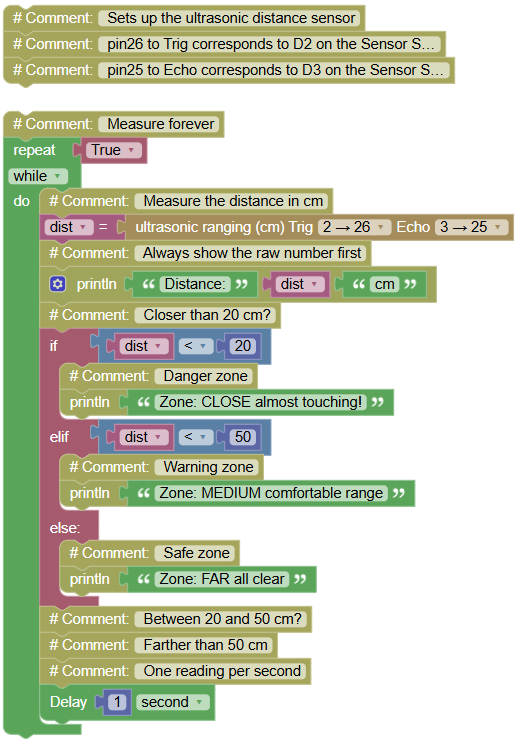
turn centimeters into three zones: CLOSE, MEDIUM, FAR.
Concepts:
Zone Classification · if / elif / else on Analog Data
import sonar  # Controls the ultrasonic sensor
import time   # Controls pauses and timing

# Sets up the ultrasonic distance sensor
# pin26 to Trig corresponds to D2 on the Sensor Shield V5.0
# pin25 to Echo corresponds to D3 on the Sensor Shield V5.0

while True:  # Measure forever
    dist = sonar.Sonar(26, 25).checkdist()  # Measure the distance in cm
    print("Distance:", dist, "cm")  # Always show the raw number first
    if dist < 20:  # Closer than 20 cm?
        print("Zone: CLOSE almost touching!")  # Danger zone
    elif dist < 50:  # Between 20 and 50 cm?
        print("Zone: MEDIUM comfortable range")  # Warning zone
    else:  # Farther than 50 cm
        print("Zone: FAR all clear")  # Safe zone
    time.sleep(1)  # One reading per second
Serial Monitor:
Distance: 71.2 cm
Zone: FAR all clear
Distance: 33.8 cm
Zone: MEDIUM comfortable range
Distance: 9.4 cm
Zone: CLOSE almost touching!
💡 Note: your zone funnel (12.2, 13.2, 16.2) now classifies distance and notice you chose the thresholds yourself. Why 20 and 50? Because zones should match a purpose: 20 cm is where a real robot must brake, 50 cm is where it should slow down. Thresholds are engineering decisions, not magic numbers change your mission, change your fences.
🎮 The Wall Alert
Goal:
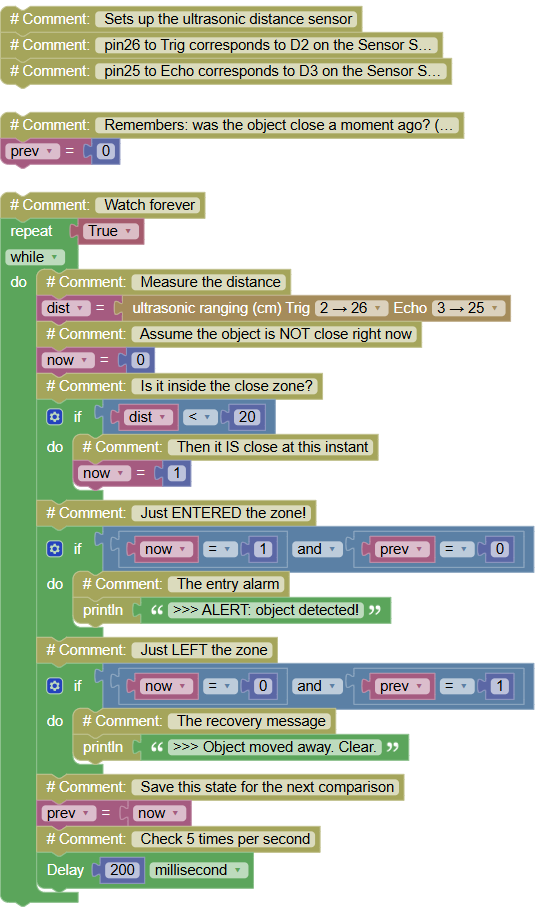
shout only at the INSTANT something enters the close zone silence while it stays.
Concepts:
Zone Edges · State Memory · Alert + Recovery
import sonar  # Controls the ultrasonic sensor
import time   # Controls pauses and timing

# Sets up the ultrasonic distance sensor
# pin26 to Trig corresponds to D2 on the Sensor Shield V5.0
# pin25 to Echo corresponds to D3 on the Sensor Shield V5.0

prev = 0  # Remembers: was the object close a moment ago? (0 = no)

while True:  # Watch forever
    dist = sonar.Sonar(26, 25).checkdist()  # Measure the distance
    now = 0  # Assume the object is NOT close right now
    if dist < 20:  # Is it inside the close zone?
        now = 1  # Then it IS close at this instant
    if now == 1 and prev == 0:  # Just ENTERED the zone!
        print(">>> ALERT: object detected!")  # The entry alarm
    if now == 0 and prev == 1:  # Just LEFT the zone
        print(">>> Object moved away. Clear.")  # The recovery message
    prev = now  # Save this state for the next comparison
    time.sleep_ms(200)  # Check 5 times per second
Serial Monitor (approach, hold, retreat, approach again):
>>> ALERT: object detected!
(nothing while you stay close...)
>>> Object moved away. Clear.
>>> ALERT: object detected!
💡 Note: the entry/recovery pair your sixth deployment of the edge pattern, now guarding space instead of pins. Feel the difference from 19.2: the zone version repeats CLOSE forever; this version speaks once per event. A robot doesn't want to hear "wall! wall! wall!" every 200 milliseconds it wants one alarm per arrival so it can decide what to do without noise drowning its thoughts.
🎮 The Full Statistics
Goal:
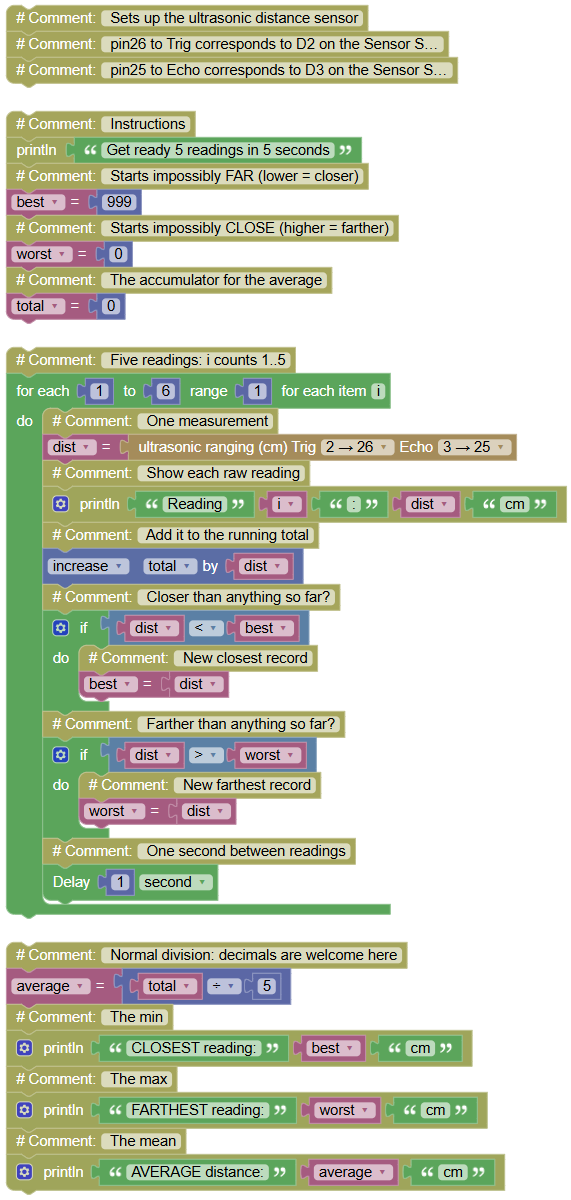
take 5 readings and produce the complete report: closest, farthest and average.
Concepts:
Best-So-Far (both directions!) · Accumulator · Real Division
import sonar  # Controls the ultrasonic sensor
import time   # Controls pauses and timing

# Sets up the ultrasonic distance sensor
# pin26 to Trig corresponds to D2 on the Sensor Shield V5.0
# pin25 to Echo corresponds to D3 on the Sensor Shield V5.0

print("Get ready 5 readings in 5 seconds")  # Instructions
best = 999  # Starts impossibly FAR (lower = closer)
worst = 0   # Starts impossibly CLOSE (higher = farther)
total = 0   # The accumulator for the average

for i in range(1, 6, 1):  # Five readings: i counts 1..5
    dist = sonar.Sonar(26, 25).checkdist()  # One measurement
    print("Reading", i, ":", dist, "cm")  # Show each raw reading
    total += dist  # Add it to the running total
    if dist < best:  # Closer than anything so far?
        best = dist  # New closest record
    if dist > worst:  # Farther than anything so far?
        worst = dist  # New farthest record
    time.sleep(1)  # One second between readings

average = total / 5  # Normal division: decimals are welcome here
print("CLOSEST reading:", best, "cm")  # The min
print("FARTHEST reading:", worst, "cm")  # The max
print("AVERAGE distance:", average, "cm")  # The mean
Serial Monitor (wave your hand around during the 5 seconds):
Get ready 5 readings in 5 seconds
Reading 1 : 95.1 cm
Reading 2 : 60.4 cm
Reading 3 : 34.9 cm
Reading 4 : 41.2 cm
Reading 5 : 52.0 cm
CLOSEST reading: 34.9 cm
FARTHEST reading: 95.1 cm
AVERAGE distance: 56.72 cm
💡 Note: the best-so-far pattern worked twice at once closest (< against a huge start) and farthest (> against a zero start). Same skeleton, mirrored direction: that's what it means to own a pattern. And one tiny math upgrade: this program divides with / instead of //. The single slash keeps the decimals (56.72), the double slash would have thrown them away (56). Rulers need decimals; counters don't now you choose per mission.
🎮 The Parking Sensor
Goal:
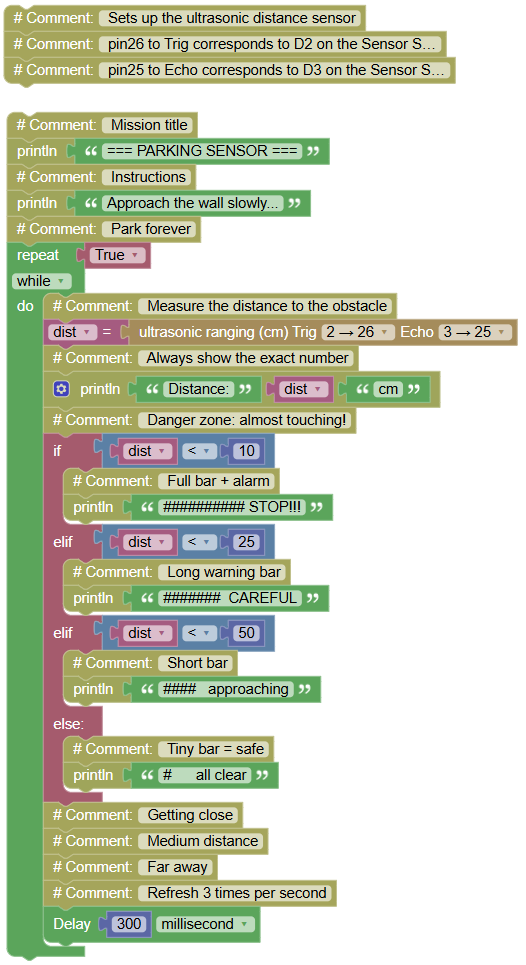
the full product a bar of # symbols that GROWS as you approach, plus a STOP alarm at the danger line. This is the demo you show visitors.
Concepts:
Data Visualization · Zone Ladder · Live Feedback Loop
import sonar  # Controls the ultrasonic sensor
import time   # Controls pauses and timing
# Sets up the ultrasonic distance sensor
# pin26 to Trig corresponds to D2 on the Sensor Shield V5.0
# pin25 to Echo corresponds to D3 on the Sensor Shield V5.0
sensor = sonar.Sonar(26, 25)

print("=== PARKING SENSOR ===")  # Mission title
print("Approach the wall slowly...")  # Instructions
while True:  # Park forever
    dist = sonar.Sonar(26, 25).checkdist()  # Measure the distance to the obstacle
    print("Distance:", dist, "cm")  # Always show the exact number
    if dist < 10:  # Danger zone: almost touching!
        print("########## STOP!!!")  # Full bar + alarm
    elif dist < 25:  # Getting close
        print("#######  CAREFUL")  # Long warning bar
    elif dist < 50:  # Medium distance
        print("####   approaching")  # Short bar
    else:  # Far away
        print("#      all clear")  # Tiny bar = safe
    time.sleep_ms(300)  # Refresh 3 times per second
Serial Monitor (the beeping you can SEE):
Distance: 96.0 cm
# all clear
Distance: 44.2 cm
#### approaching
Distance: 21.7 cm
####### CAREFUL
Distance: 6.3 cm
########## STOP!!!
💡 Note: park an invisible object (a chair) and have a classmate find it using ONLY your screen if they can, your instrument works. Every element is old knowledge: zones (19.2), bars (12.5), fast refresh. New was only the design: four zones, four bars, one ladder. Notice the bar lengths are hand-drawn, not calculated fixed strings are simpler and just as convincing. In Level 2 this exact program gains a real buzzer whose beeps speed up as you approach... just like a real car.