
PIR Human Body Motion
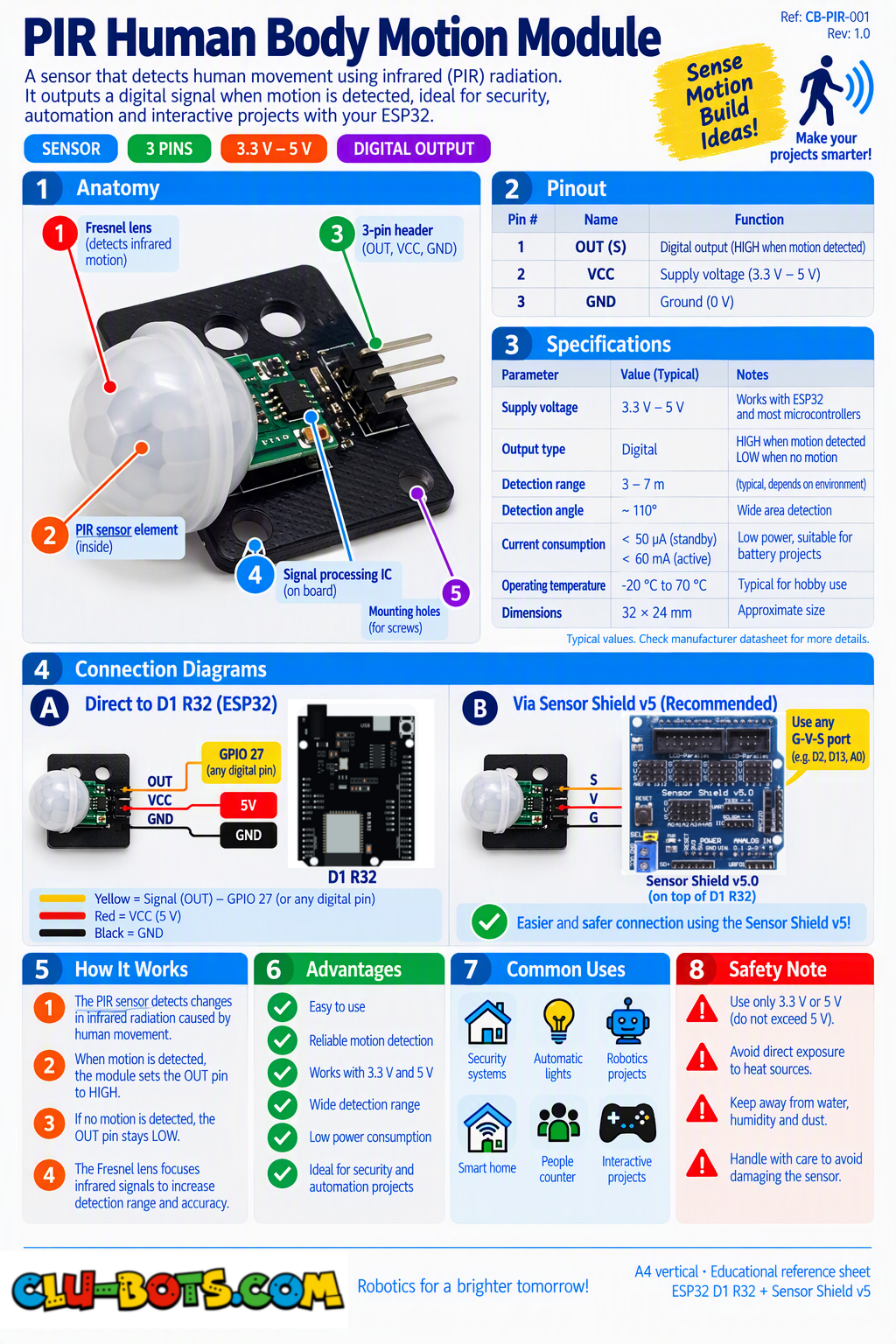
🎮 Display the Raw Motion State
Goal
Read the motion sensor and display its raw 0 or 1 value on the PC.
Concepts
Digital Input · HIGH/LOW · Loop · Serial Output
import machine  # Controls the board hardware
import time     # Controls pauses and timing

pin26 = machine.Pin(26, machine.Pin.IN)  # D2 reads the motion sensor

while True:  # Repeats forever

    state = pin26.value()  # Reads the sensor state

    print(state)  # Sends 0 or 1 to the PC

    time.sleep(0.2)  # Waits before reading again
🎮 Motion or No Motion
Goal
Interpret the sensor value and display Motion or No motion on the PC.
Concepts
Digital Input · If/Else · Motion Detection · Loop · Serial Output
import machine  # Controls the board hardware
import time     # Controls pauses and timing

pin26 = machine.Pin(26, machine.Pin.IN)  # D2 reads the motion sensor

while True:  # Repeats forever

    state = pin26.value()  # Reads the sensor state

    if state == 1:  # Checks if motion is detected
        print('Motion')  # Reports motion to the PC

    else:  # Runs when no motion is detected
        print('No motion')  # Reports no motion to the PC

    time.sleep(0.2)  # Waits before reading again
🎮 Detect Motion Start and End
Goal
Report only when a new motion event begins and when that motion event ends.
Concepts
Digital Input · Variables · Comparison · State Change · Serial Output
import machine  # Controls the board hardware
import time     # Controls pauses and timing

pin26 = machine.Pin(26, machine.Pin.IN)  # D2 reads the motion sensor

last_state = 0  # Stores the previous sensor state

while True:  # Repeats forever

    state = pin26.value()  # Reads the current sensor state

    if state == 1 and last_state == 0:  # Checks if motion begins
        print('Motion started')  # Reports the start to the PC

    if state == 0 and last_state == 1:  # Checks if motion ends
        print('Motion ended')  # Reports the end to the PC

    last_state = state  # Saves the current state

    time.sleep(0.05)  # Waits before reading again
🎮 Measure Motion Duration
Goal
Measure how long each detected motion event lasts and display the duration on the PC.
Concepts
Digital Input · Timing · Variables · Motion Duration · Serial Output
import machine  # Controls the board hardware
import time     # Controls pauses and timing

pin26 = machine.Pin(26, machine.Pin.IN)  # D2 reads the motion sensor

while True:  # Repeats forever

    if pin26.value() == 1:  # Checks if motion begins

        start = time.ticks_ms()  # Saves the start time

        print('Motion started')  # Reports the start to the PC

        while pin26.value() == 1:  # Waits while motion stays active
            time.sleep(0.01)  # Adds a short pause

        end = time.ticks_ms()  # Saves the end time

        duration = time.ticks_diff(end, start)  # Calculates the duration

        print('Motion ended')  # Reports the end to the PC

        print('Duration:', duration, 'ms')  # Shows the duration

    time.sleep(0.05)  # Waits before checking again
🎮 Motion Activity Monitor
Goal
Create a motion activity monitor that displays the event number, duration of each motion event, and time since the previous event.
Concepts
Digital Input · Counter · Timing · Variables · Motion Events · Serial Output
import machine  # Controls the board hardware
import time     # Controls pauses and timing

pin26 = machine.Pin(26, machine.Pin.IN)  # D2 reads the motion sensor

count = 0  # Stores the number of motion events

last_motion = time.ticks_ms()  # Stores the previous motion time

while True:  # Repeats forever

    if pin26.value() == 1:  # Checks if motion begins

        start = time.ticks_ms()  # Saves the start time

        elapsed = time.ticks_diff(start, last_motion)  # Finds time between events

        count += 1  # Adds one to the event counter

        print('Motion event:', count)  # Shows the event number

        print('Time between:', elapsed, 'ms')  # Shows time between events

        while pin26.value() == 1:  # Waits while motion stays active
            time.sleep(0.01)  # Adds a short pause

        end = time.ticks_ms()  # Saves the end time

        duration = time.ticks_diff(end, start)  # Calculates the duration

        print('Duration:', duration, 'ms')  # Shows the motion duration

        last_motion = start  # Saves this event time

    time.sleep(0.05)  # Waits before checking again