
0.91 inch OLED Display 128X32
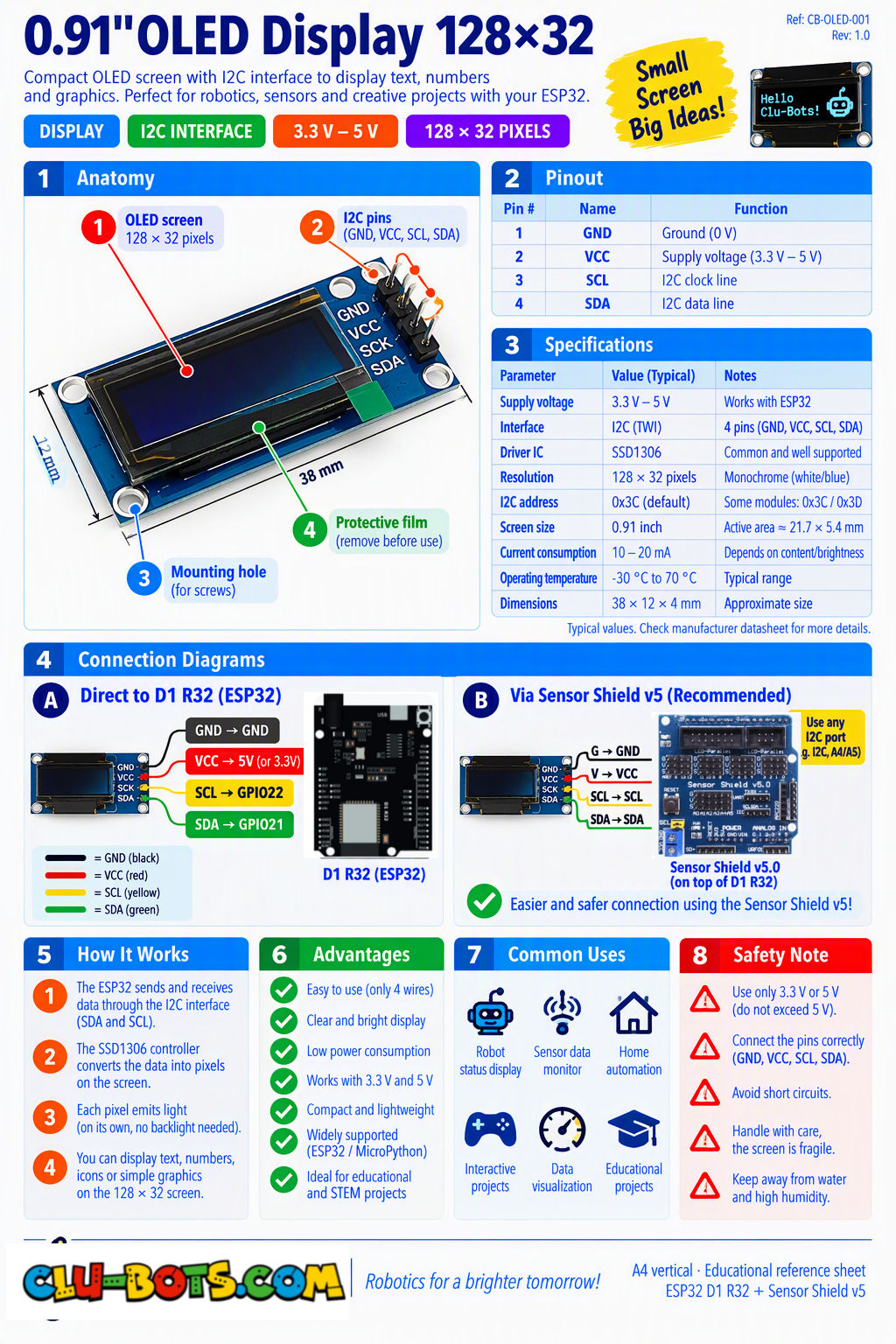
🎮 Display Clu-Block
Goal
Display the text Clu-Block on the OLED screen.
Concepts
I2C · OLED Display · Text Output · Pixels
import machine # Controls the board hardware
import oled128x64 # Controls the OLED display


# Sets up the I2C connection for the OLED
# GPIO25 corresponds to 3 on the Sensor Shield V5.0
# GPIO26 corresponds to 2 on the Sensor Shield V5.0
# Sets up the OLED as a 128 x 32 pixel display
i2c_extend = machine.SoftI2C(scl = machine.Pin(26), sda = machine.Pin(25), freq = 100000)
oled = oled128x64.OLED(i2c_extend,address=0x3c,font_address=0x3A0000)

oled.fill(0)  # Clears the screen

oled.text('Clu-Block', 30, 12)  # Places the text on the screen

oled.show()  # Displays the text
🎮 Display a Running Counter
Goal
Display a counter on the OLED that increases continuously.
Concepts
I2C · OLED Display · Variable · Counter · Loop · Timing
import machine   # Controls the board hardware
import oled128x64   # Controls the OLED display
import time     # Controls pauses and timing


# Sets up the I2C connection for the OLED
# GPIO25 corresponds to 3 on the Sensor Shield V5.0
# GPIO26 corresponds to 2 on the Sensor Shield V5.0
# Sets up the OLED as a 128 x 32 pixel display
i2c_extend = machine.SoftI2C(scl = machine.Pin(26), sda = machine.Pin(25), freq = 100000)
oled = oled128x64.OLED(i2c_extend,address=0x3c,font_address=0x3A0000)

count = 0  # Starts the counter at zero

while True:  # Repeats forever

    oled.fill(0)  # Clears the old screen

    oled.text('Counter:', 0, 5)  # Shows the title

    oled.text(str(count), 0, 18)  # Shows the counter value

    oled.show()  # Updates the screen

    print('Counter:', count)  # Sends the value to the PC

    count += 1  # Adds one to the counter

    time.sleep(1)  # Waits 1 second
🎮 Create a Progress Bar
Goal
Create a changing progress bar that moves from 0% to 100%.
Concepts
I2C · OLED Graphics · Loop · Percentage · Progress Bar
import machine   # Controls the board hardware
import oled128x64   # Controls the OLED display
import time     # Controls pauses and timing


# Sets up the I2C connection for the OLED
# GPIO25 corresponds to 3 on the Sensor Shield V5.0
# GPIO26 corresponds to 2 on the Sensor Shield V5.0
# Sets up the OLED as a 128 x 32 pixel display
i2c_extend = machine.SoftI2C(scl = machine.Pin(26), sda = machine.Pin(25), freq = 100000)
oled = oled128x64.OLED(i2c_extend,address=0x3c,font_address=0x3A0000)

while True:  # Repeats forever

    for percent in range(0, 101, 10):  # Changes from 0% to 100%

        oled.fill(0)  # Clears the old screen

        oled.text('Progress:' + str(percent) + '%', 0, 2)  # Shows the percentage

        oled.rect(4, 18, 120, 10, 1)  # Draws the bar outline

        width = percent  # Uses percentage as the bar width

        oled.fill_rect(6, 20, width, 6, 1)  # Fills the progress bar

        oled.show()  # Updates the screen

        print('Progress:', percent, '%')  # Sends the value to the PC

        time.sleep(0.5)  # Waits before the next change
🎮 Text and Graphic Indicator
Goal
Combine text and a simple graphical indicator on the same OLED screen.
Concepts
I2C · OLED Display · Text · Graphics · Screen Layout
import machine   # Controls the board hardware
import ssd1306 # Controls the OLED display

# Sets up the I2C connection for the OLED
# GPIO25 corresponds to 3 on the Sensor Shield V5.0
# GPIO26 corresponds to 2 on the Sensor Shield V5.0
# Sets up the OLED as a 128 x 32 pixel display
i2c_extend = machine.SoftI2C(scl = machine.Pin(26), sda = machine.Pin(25), freq = 100000)
oled = oled128x64.OLED(i2c_extend,address=0x3c,font_address=0x3A0000)

oled.fill(0)  # Clears the screen

oled.text('System Ready', 0, 2)  # Shows the status text

oled.rect(0, 18, 100, 10, 1)  # Draws the indicator outline

oled.fill_rect(2, 20, 70, 6, 1)  # Fills part of the indicator

oled.show()  # Displays the complete screen

print('System Ready')  # Sends the status to the PC

print('Level: 70%')  # Sends the indicator value to the PC
🎮 Animated Status Display
Goal
Create a small animated status display and send its changing values to the PC through Serial.
Concepts
I2C · OLED Graphics · Animation · Counter · Loop · Serial Output
import machine  # Controls the board hardware
import ssd1306  # Controls the OLED display
import time     # Controls pauses and timing

# Sets up the I2C connection for the OLED
# GPIO25 corresponds to 3 on the Sensor Shield V5.0
# GPIO26 corresponds to 2 on the Sensor Shield V5.0
# Sets up the OLED as a 128 x 32 pixel display
i2c_extend = machine.SoftI2C(scl = machine.Pin(26), sda = machine.Pin(25), freq = 100000)
oled = oled128x64.OLED(i2c_extend,address=0x3c,font_address=0x3A0000)

while True:  # Repeats forever

    for level in range(0, 101, 10):  # Changes the level from 0 to 100

        oled.fill(0)  # Clears the previous screen

        oled.text('Clu-Block', 0, 2)  # Shows the title

        oled.text('Level:' + str(level) + '%', 0, 13)  # Shows the value

        oled.rect(0, 24, 110, 8, 1)  # Draws the indicator outline

        oled.fill_rect(2, 26, level, 4, 1)  # Draws the changing indicator

        oled.show()  # Updates the screen

        print('Status: Running')  # Sends the status to the PC

        print('Level:', level, '%')  # Sends the level to the PC

        print('---')  # Separates each report

        time.sleep(0.3)  # Waits before the next animation step