
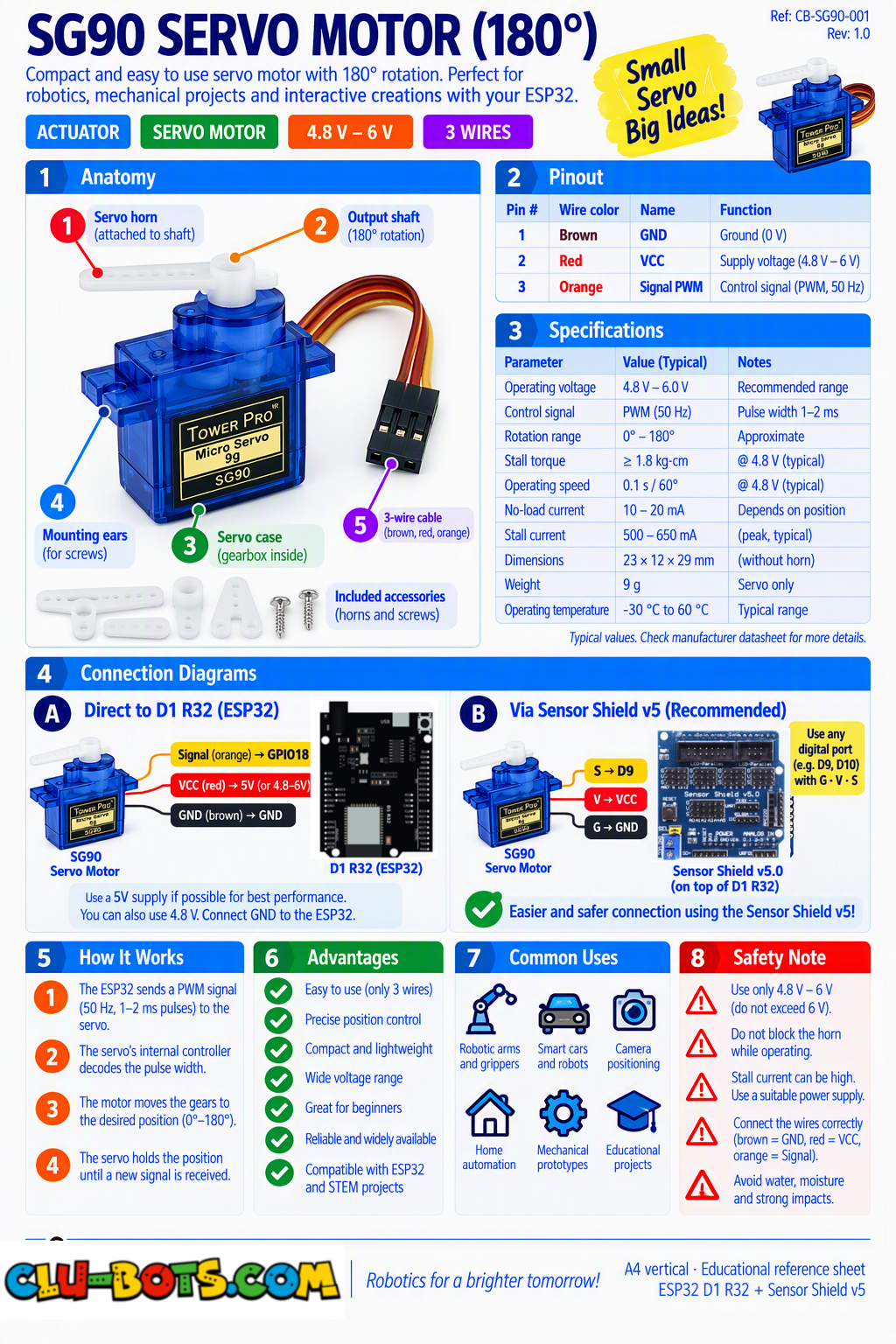
SG90 Servo Motor (180°)
🎮 The Robotic Arm
Module Goal: command not a spin, but a position. This motor knows where its arm is and holds it there against your finger. It is the joint of every robot arm, every claw, every steering mechanism you will ever build.
⚠️ Power note: one small servo on USB power is fine for gentle moves. If the servo buzzes, strains, or the board resets the servo is hungry: power it from an external 5V source.
📦 CONCEPT BOX What makes a SERVO different?
You now know the TT motor: give it power, it spins and it has no idea where it points. The servo is a different animal. Inside its little blue box live four things: a motor, a gearbox, a position sensor, and a tiny brain.
When you command servo.servo180_angle(26, 90), the brain reads the sensor, compares it with your command, and drives the motor until the arm reaches exactly 90 degrees then holds it. Push the arm with your finger and the servo fights back. That holding force is called torque, and it is the servo's superpower.
The command travels as pulses on the signal wire a cousin of PWM where the pulse width encodes the angle. The library does that encoding for you: you speak in degrees, it speaks in pulses.
The course now has three motors, three personalities:
| Motor | You command | It knows its position? |
|---|---|---|
| TT motor + L298N | power + direction | ❌ No nobody knows |
| SG90 (this module) | an angle | ✅ Yes it measures and holds |
| MG90S (next module) | a speed | ❌ Position but yes to speed |
Goal:
the arm wakes up and visits its three landmarks: 0°, 90° and 180°.
Concepts:
Position Command · Angle Range · Holding Torque
import servo	# Controls the servo motor
import time	# Controls pauses and timing

# Commands the 180 degree servo connected to pin 26
# pin26 corresponds to D2 on the Sensor Shield V5.0

print("The arm wakes up...")	# The announcement
servo.servo180_angle(26, 0)	# Command the arm to 0 degrees (one end)
print("Angle: 0")	# Narrate the position
time.sleep(1)	# Hold there one second
servo.servo180_angle(26, 90)	# Command the middle
print("Angle: 90")	# Narrate
time.sleep(1)	# Hold one second
servo.servo180_angle(26, 180)	# Command the other end
print("Angle: 180")	# Narrate
time.sleep(1)	# Hold one second
servo.servo180_angle(26, 90)	# Return to rest in the middle
print("At rest in the middle.")	# The calm ending
💡 Note: three commands, three positions but here is the experiment that matters: while the arm holds at 90°, gently push it with your finger. It resists and returns! A TT motor could never do that it has no idea where "90" is. Also try to move the arm by hand with the board disconnected: it moves freely. The servo only rules when the brain is powered.
🎮 The Smooth Sweep
Goal:
glide the arm from 0° to 180° and back in small steps no jumping.
Concepts:
Stepped Loops · Negative Steps · Smooth Motion
import servo	# Controls the servo motor
import time	# Controls pauses and timing

# Commands the 180 degree servo connected to pin 26
# pin26 corresponds to D2 on the Sensor Shield V5.0

print("The sweep begins...")	# The show starts
for angle in range(0, 181, 10):	# angle climbs: 0, 10, 20 ... 180
    servo.servo180_angle(26, angle)	# Move to the current angle
    time.sleep_ms(120)	# Small pause between steps
print("Top reached now back down")	# Narrate the turn
for angle in range(180, -1, -10):	# angle DESCENDS: 180, 170 ... 0
    servo.servo180_angle(26, angle)	# Move to the current angle
    time.sleep_ms(120)	# Small pause between steps
print("Sweep complete.")	# The ending
💡 Note: the second loop's secret is the third number: -10 makes range count BACKWARDS 180, 170, 160... down to 0. You met backward counting in the siren (Module 4); now it moves a real arm. Try changing the step from 10 to 2: the sweep becomes silky but takes twice as long. Smoothness costs time every animation in this course has traded one for the other.
🎮 Fast and Slow, and the Servo's Memory
Goal:
travel the SAME distance (0° → 90°) at two speeds then ask the servo what angle it holds.
Concepts:
Speed = Steps × Waits · Asking the Commanded Angle
import servo	# Controls the servo motor
import time	# Controls pauses and timing

# Commands the 180 degree servo connected to pin 26
# pin26 corresponds to D2 on the Sensor Shield V5.0

print("Slow version: 0 to 90 in tiny steps")	# The first style
for angle in range(0, 91, 5):	# Tiny steps of 5 degrees
    servo.servo180_angle(26, angle)	# Move
    time.sleep_ms(150)	# Long, lazy pauses
print("Arrived slowly. Now the fast version!")	# Narrate the change
servo.servo180_angle(26, 0)	# Jump back to the start instantly
time.sleep(1)	# One second to prepare
servo.servo180_angle(26, 90)	# ONE command: the whole trip at once!
print("Arrived instantly.")	# The contrast is the lesson
time.sleep(1)	# Pause
angle = servo.servo180_angle(26)	# ASK the servo which angle it holds
print("The servo reports its angle:", angle)	# Show its memory
💡 Note: two ways to be "slow" and one way to be instant and all three are just choices of steps and waits. The last two lines are new: the getter servo.servo180_angle(26) (one argument instead of two) asks instead of commands it returns the angle the program last ordered. Inside the real servo, a sensor physically enforces that position; in your program, the library remembers it. Command and ask every device in Level 2 will offer you both doors.
🎮 The Greeting Wave
Goal:
a personality routine the arm waves hello three times, then takes a deep bow.
Concepts:
Choreography on Angles · Holding Poses · Character Design
import servo	# Controls the servo motor
import time	# Controls pauses and timing

# Commands the 180 degree servo connected to pin 26
# pin26 corresponds to D2 on the Sensor Shield V5.0

print("The robot greets you!")	# The scene opens
servo.servo180_angle(26, 90)	# Neutral position first
time.sleep(1)	# A moment of preparation
for wave in range(1, 4, 1):	# Three waves
    print("Wave", wave)	# Count each one
    servo.servo180_angle(26, 45)	# Tilt to one side
    time.sleep_ms(400)	# Hold the pose briefly
    servo.servo180_angle(26, 135)	# Tilt to the other side
    time.sleep_ms(400)	# Hold again
servo.servo180_angle(26, 90)	# Back to neutral before the bow
time.sleep_ms(500)	# A dramatic pause
print("...and now, a deep bow.")	# Narrate the ceremony
servo.servo180_angle(26, 10)	# The bow: almost to the table
time.sleep(1)	# Hold the bow one full second
servo.servo180_angle(26, 90)	# Rise back up
print("It is an honor to meet you.")	# The closing line
💡 Note: 45°–135° is a comfortable wave zone; 10° is the bow. These poses are design decisions, not math you chose them by feel, like a choreographer. Notice how the arm robot feels alive with zero new commands: only angles, waits and order. Give your arm a name and a personality teams with named robots care more, and caring is half of learning.
🎮 The Obedient Arm
Goal:
type any angle from 0 to 180 and the arm moves there and confirms. Invalid angles get refused politely. Your first program that reads a NUMBER from the PC and your first input validation.
Concepts:
Text-to-Number Conversion · Input Validation · Command Counter
import servo	# Controls the servo motor
import time	# Controls pauses and timing

# Commands the 180 degree servo connected to pin 26
# pin26 corresponds to D2 on the Sensor Shield V5.0

print("=== OBEDIENT ARM ===")	# The mission title
print("Type an angle from 0 to 180 (EXIT quits)")	# The menu
commands = 0	# Counts the orders the arm has served
while True:	# Serve forever
    text = input("Angle: ")	# Wait for your typed text
    if text == "EXIT":	# The quit command
        servo.servo180_angle(26, 90)	# SAFETY: return the arm to rest first
        print("Arm at rest. Orders served:", commands)	# The shift report
        break	# Leave the loop
    angle = int(text)	# NEW: convert the typed TEXT into a whole NUMBER
    if angle < 0 or angle > 180:	# Outside the servo's range?
        print("Refused:", angle, "is not between 0 and 180")	# The polite refusal
    else:	# A valid angle
        servo.servo180_angle(26, angle)	# Move the arm there
        commands += 1	# One more order served
        print("Arm moved to", angle, "degrees")	# Confirm
Serial Monitor:
=== OBEDIENT ARM ===
Type an angle from 0 to 180 (EXIT quits)
Angle: 45
Arm moved to 45 degrees
Angle: 200
Refused: 200 is not between 0 and 180
Angle: 180
Arm moved to 180 degrees
Angle: EXIT
Arm at rest. Orders served: 2
💡 Note: two firsts live here. ① int(text) the Text-to-Number block: input() always hands you TEXT, even if you typed digits; int() translates "45" into the number 45. Now you can do math on what humans type. ② Validation: the guard angle < 0 or angle > 180 checks the command BEFORE obeying a program that refuses impossible orders is a safe program. Detective experiment: type banana instead of a number and watch the program crash! Turning text into numbers can fail handling that failure gracefully is a Level 2 skill; for now, know that it exists and that real engineers plan for it.