
Digital Push Button
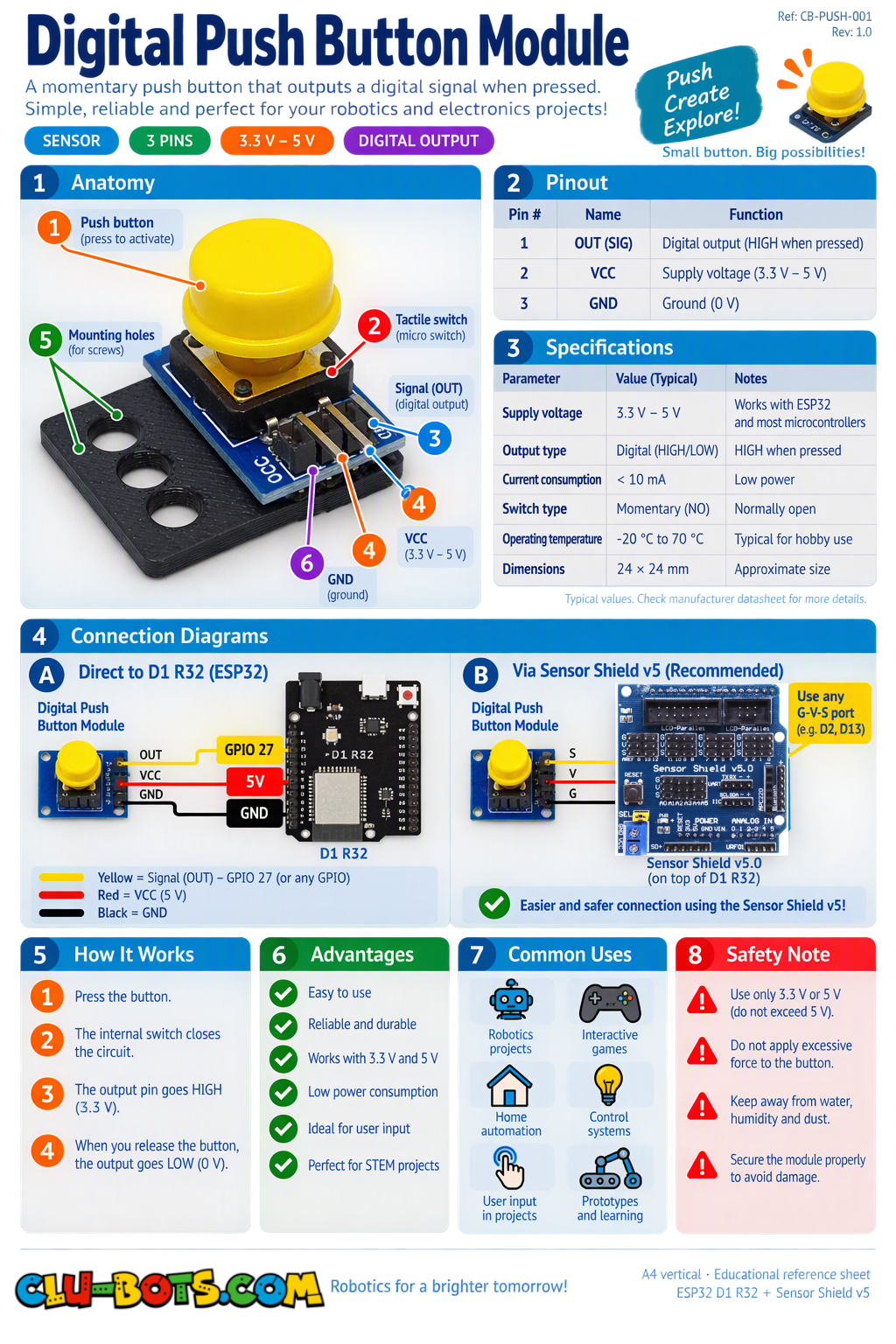
🎮 Read the Raw Button State
Goal
Read the button and display its raw HIGH/LOW value on the PC.
Concepts
Digital Input · HIGH/LOW · Loop · Serial Output
import machine  # Controls the board hardware
import time     # Controls pauses and timing

# Sets GPIO26 as an input for the button
# GPIO26 corresponds to D2 on the Sensor Shield V5.0
pin26 = machine.Pin(26, machine.Pin.IN)

while True:  # Repeats forever

    state = pin26.value()  # Reads the button state

    print(state)  # Sends 0 or 1 to the PC

    time.sleep(0.2)  # Waits before reading again
🎮 Pressed or Released
Goal
Display Pressed or Released instead of the raw 0 or 1.
Concepts
Digital Input · If/Else · Loop · Serial Output
import machine  # Controls the board hardware
import time     # Controls pauses and timing

# Sets GPIO26 as an input for the button
# GPIO26 corresponds to D2 on the Sensor Shield V5.0
pin26 = machine.Pin(26, machine.Pin.IN)

while True:  # Repeats forever

    state = pin26.value()  # Reads the button state

    if state == 1:  # Checks if the button is pressed
        print('Pressed')  # Sends the message to the PC

    else:  # Runs when the button is not pressed
        print('Released')  # Sends the message to the PC

    time.sleep(0.2)  # Waits before reading again
🎮 Detect Only a New Press
Goal
Display New press detected only once each time the button is newly pressed.
Concepts
Digital Input · Variables · Comparison · State Change · Serial Output
import machine  # Controls the board hardware
import time     # Controls pauses and timing

# Sets GPIO26 as an input for the button
# GPIO26 corresponds to D2 on the Sensor Shield V5.0
pin26 = machine.Pin(26, machine.Pin.IN)

last_state = 0  # Stores the previous button state

while True:  # Repeats forever

    state = pin26.value()  # Reads the current button state

    if state == 1 and last_state == 0:  # Checks for a new press
        print('New press detected')  # Sends the message to the PC

    last_state = state  # Saves the current state for next time

    time.sleep(0.05)  # Waits briefly before reading again
🎮 Short Press or Long Press
Goal
Measure how long the button is held and classify it as a Short press or Long press. A press longer than 1 second is considered a long press.
Concepts
Digital Input · Timing · Variables · If/Else · Serial Output
import machine  # Controls the board hardware
import time     # Controls pauses and timing

# Sets GPIO26 as an input for the button
# GPIO26 corresponds to D2 on the Sensor Shield V5.0
pin26 = machine.Pin(26, machine.Pin.IN)

while True:  # Repeats forever

    if pin26.value() == 1:  # Checks if the button was pressed

        start = time.ticks_ms()  # Saves the press start time

        while pin26.value() == 1:  # Waits while the button is held
            time.sleep(0.01)  # Adds a very short pause

        end = time.ticks_ms()  # Saves the release time

        duration = time.ticks_diff(end, start)  # Calculates press time

        print('Time:', duration, 'ms')  # Sends the time to the PC

        if duration >= 1000:  # Checks for 1 second or longer
            print('Long press')  # Reports a long press

        else:  # Runs for presses shorter than 1 second
            print('Short press')  # Reports a short press

    time.sleep(0.05)  # Waits before checking again
🎮 Count Short and Long Presses
Goal
Count short and long button presses separately and display both totals on the PC.
Concepts
Digital Input · Timing · Counters · Variables · If/Else · Serial Output
import machine  # Controls the board hardware
import time     # Controls pauses and timing

# Sets GPIO26 as an input for the button
# GPIO26 corresponds to D2 on the Sensor Shield V5.0
pin26 = machine.Pin(26, machine.Pin.IN)

short_count = 0  # Stores the number of short presses
long_count = 0   # Stores the number of long presses

while True:  # Repeats forever

    if pin26.value() == 1:  # Checks if the button was pressed

        start = time.ticks_ms()  # Saves the press start time

        while pin26.value() == 1:  # Waits while the button is held
            time.sleep(0.01)  # Adds a very short pause

        end = time.ticks_ms()  # Saves the release time

        duration = time.ticks_diff(end, start)  # Calculates press time

        if duration >= 1000:  # Checks for a long press

            long_count += 1  # Adds one to the long press counter

            print('Long press')  # Reports the press type

        else:  # Runs for a short press

            short_count += 1  # Adds one to the short press counter

            print('Short press')  # Reports the press type

        print('Short total:', short_count)  # Shows short presses
        print('Long total:', long_count)    # Shows long presses

    time.sleep(0.05)  # Waits before checking again