
D1 R32
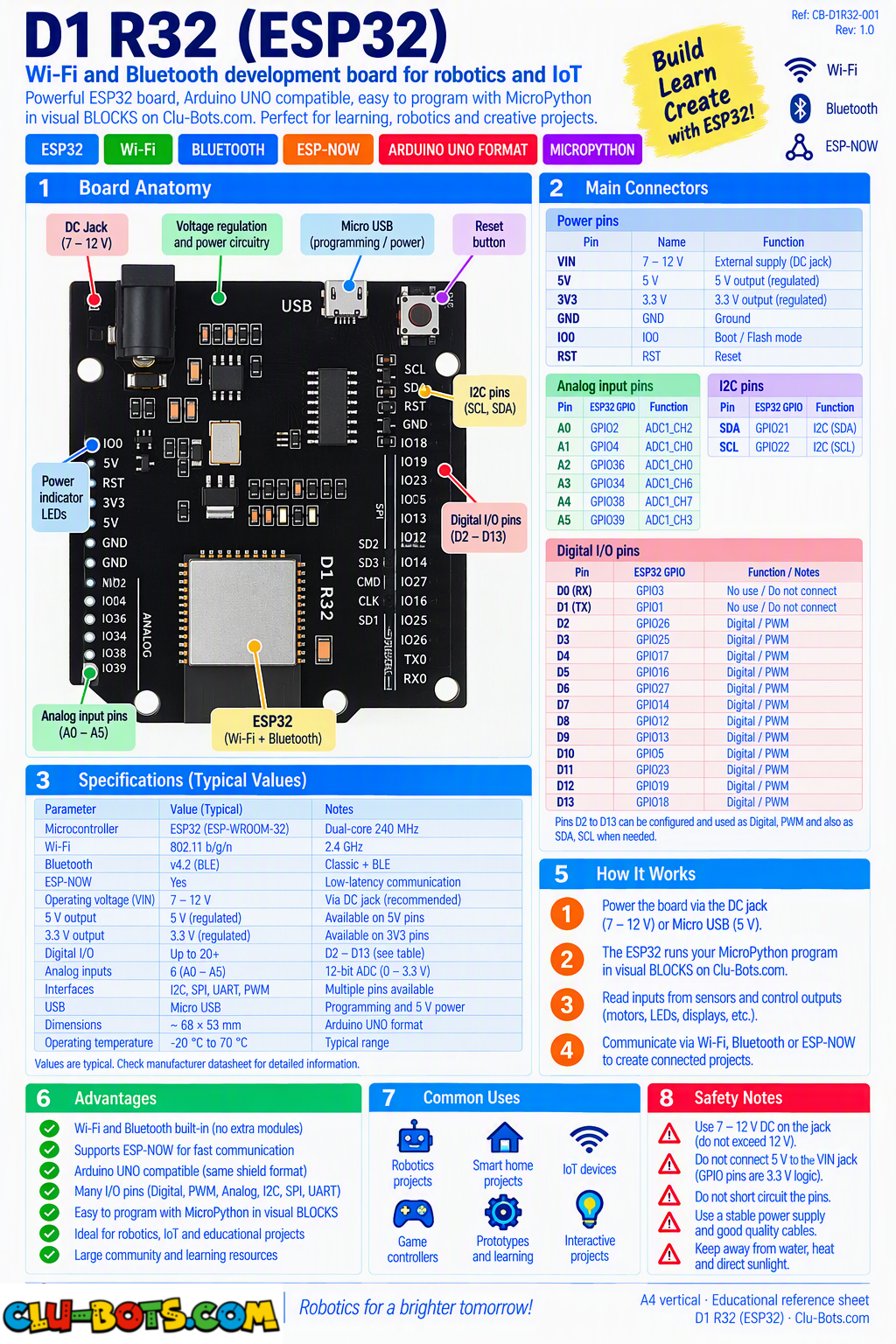
🎮 Blink the Built-In LED
Goal
Turn the built-in LED ON and OFF and report each state through Serial.
Concepts
Digital Output · GPIO · LED · Timing · Serial Output
import machine  # Controls the board hardware
import time     # Controls pauses and timing

# Sets up GPIO2 as a digital output
# GPIO2 controls the onboard LED
pin2 = machine.Pin(2, machine.Pin.OUT)

while True:  # Repeats forever

    pin2.value(1)  # Turns the LED on

    print('LED ON')  # Reports the LED state

    time.sleep(1)  # Waits for 1 second

    pin2.value(0)  # Turns the LED off

    print('LED OFF')  # Reports the LED state

    time.sleep(1)  # Waits for 1 second
🎮 Message + Running Counter
Goal
Send a message and a running counter from the ESP32 to the PC.
Concepts
Serial Output · Variables · Counter · Loop · Timing
import time  # Controls pauses and timing

count = 0  # Creates the counter

print('Hello from Clu-Block!')  # Sends a message to the PC

while True:  # Repeats forever

    count += 1  # Adds one to the counter

    print('Count:', count)  # Sends the current value to the PC

    time.sleep(1)  # Waits for 1 second
🎮 Display Elapsed Time
Goal
Measure how much time has passed since the program started rather than treating time only as a sleep() or delay.
Concepts
Milliseconds · Elapsed Time · Variables · Calculation · Serial Output This uses the actual Clu-Blocks Pro timing generation:
import time  # Provides the time functions

start_time = time.ticks_ms()  # Records the starting time

while True:  # Repeats forever

    elapsed = time.ticks_diff(time.ticks_ms(), start_time)  # Calculates elapsed milliseconds

    print('Elapsed time:', elapsed, 'ms')  # Reports the elapsed time

    time.sleep(1)  # Waits before displaying again
🎮 PC → ESP32
Goal
Send a simple command from the PC to the ESP32 and have the ESP32 interpret it and respond. For example: PC: HELLO ESP32: Hello from Clu-Bots!
Concepts
Serial Input · Strings · Variables · Comparison · Decision · Serial Output
input('prompt')
while True:  # Repeats forever

    command = input('Command: ')  # Receives a command from the PC

    if command == 'HELLO':  # Checks for the HELLO command

        print('Hello from Clu-Block!')  # Sends a response

    else:  # Runs when another command is entered

        print('Unknown command')  # Reports an unsupported command
🎮 Serial Command Interface
Goal
Create the student's first small controller interface. The PC supports: TIME LED ON LED OFF STATUS . The ESP32 interprets each command, performs the corresponding action, and returns a response.
Concepts
Serial Input · Commands · Decisions · GPIO · Elapsed Time · State · Serial Output
import machine  # Controls the board hardware
import time     # Provides timing functions

# Sets up GPIO2 as a digital output
# GPIO2 controls the onboard LED
pin2 = machine.Pin(2, machine.Pin.OUT)

start_time = time.ticks_ms()  # Records when the program starts

led_state = 'OFF'  # Stores the commanded LED state

pin2.value(0)  # Starts with the LED off

print('Clu-Block Controller Ready')  # Reports that the controller is ready

print('Commands: TIME LED ON LED OFF STATUS')  # Shows supported commands

while True:  # Repeats forever

    command = input('PC > ')  # Receives a command from the PC

    if command == 'TIME':  # Checks for the TIME command

        elapsed = time.ticks_diff(time.ticks_ms(), start_time)  # Calculates elapsed milliseconds

        seconds = elapsed // 1000  # Converts milliseconds to whole seconds

        print('ESP32 >', seconds, 'seconds')  # Reports elapsed time

    elif command == 'LED ON':  # Checks for LED ON

        pin2.value(1)  # Turns the onboard LED on

        led_state = 'ON'  # Stores the new state

        print('ESP32 > LED is ON')  # Reports the state

    elif command == 'LED OFF':  # Checks for LED OFF

        pin2.value(0)  # Turns the onboard LED off

        led_state = 'OFF'  # Stores the new state

        print('ESP32 > LED is OFF')  # Reports the state

    elif command == 'STATUS':  # Checks for STATUS

        print('ESP32 > LED:', led_state)  # Reports the stored LED state

    else:  # Runs for an unsupported command

        print('ESP32 > Unknown command')  # Reports the problem