
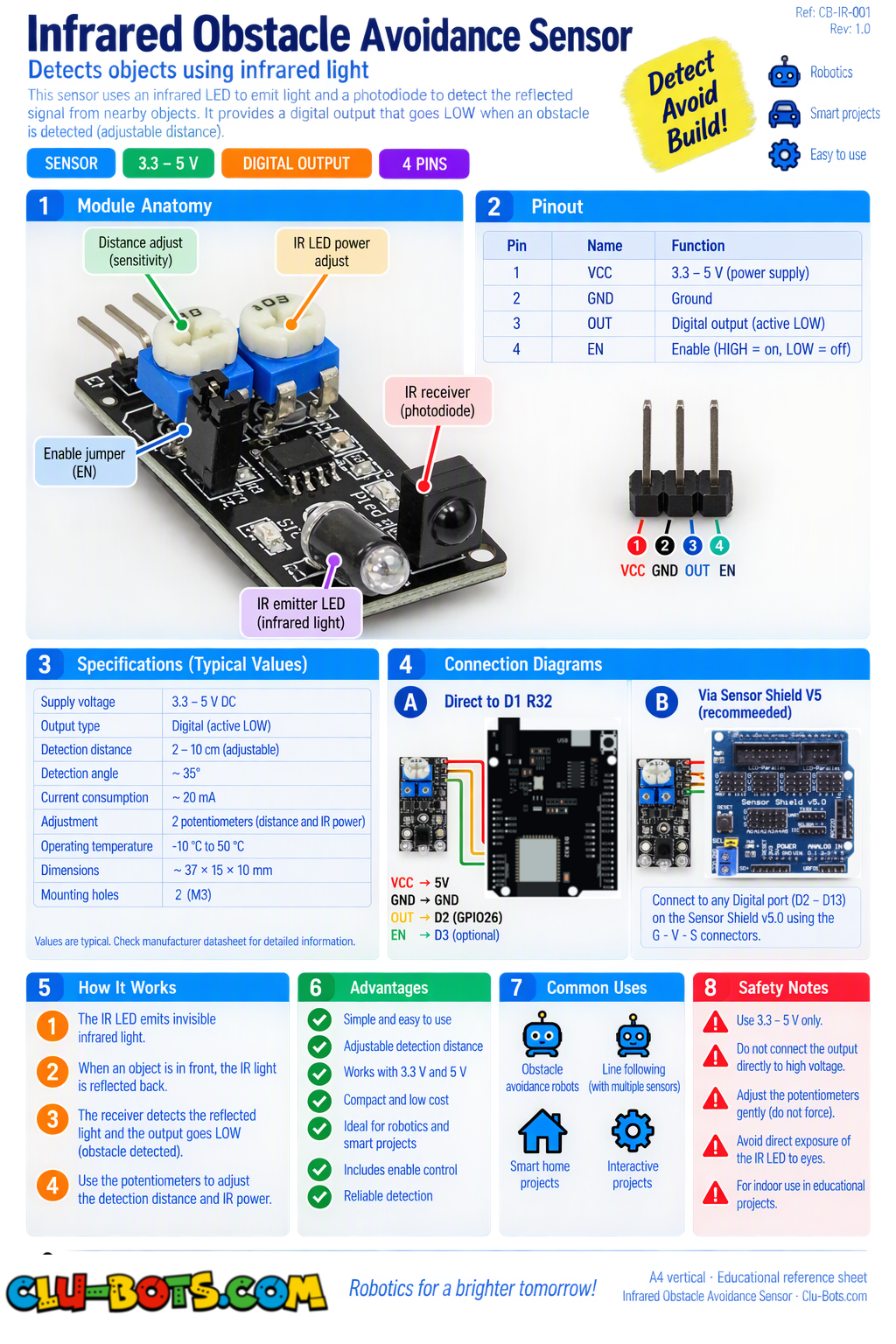
Infrared Obstacle Avoidance
🎮 Display the Raw Sensor State
Goal
Read the obstacle sensor and display its raw 0 or 1 value on the PC.
Concepts
Digital Input · HIGH/LOW · Loop · Serial Output
import machine  # Controls the board hardware
import time     # Controls pauses and timing

pin26 = machine.Pin(26, machine.Pin.IN)  # D2 reads the obstacle sensor

while True:  # Repeats forever

    state = pin26.value()  # Reads the sensor state

    print(state)  # Sends 0 or 1 to the PC

    time.sleep(0.2)  # Waits before reading again
🎮 Obstacle or Clear
Goal
Interpret the sensor value and display Obstacle or Clear on the PC.
Concepts
Digital Input · If/Else · Loop · Serial Output
import machine  # Controls the board hardware
import time     # Controls pauses and timing

pin26 = machine.Pin(26, machine.Pin.IN)  # D2 reads the obstacle sensor

while True:  # Repeats forever

    state = pin26.value()  # Reads the sensor state

    if state == 0:  # Checks if an obstacle is detected
        print('Obstacle')  # Reports the obstacle to the PC

    else:  # Runs when no obstacle is detected
        print('Clear')  # Reports a clear path to the PC

    time.sleep(0.2)  # Waits before reading again
🎮 Detect Only New Obstacles
Goal
Report New obstacle only once when an object enters the sensor's detection area.
Concepts
Digital Input · Variables · Comparison · State Change · Serial Output
import machine  # Controls the board hardware
import time     # Controls pauses and timing

pin26 = machine.Pin(26, machine.Pin.IN)  # D2 reads the obstacle sensor

last_state = 1  # Stores the previous sensor state

while True:  # Repeats forever

    state = pin26.value()  # Reads the current sensor state

    if state == 0 and last_state == 1:  # Checks for a new obstacle
        print('New obstacle')  # Reports the new detection

    last_state = state  # Saves the current state

    time.sleep(0.05)  # Waits before reading again
🎮 Count Obstacles and Measure Time
Goal
Count new obstacle events and display the time since the previous detection.
Concepts
Digital Input · Counter · Timing · State Change · Serial Output
import machine  # Controls the board hardware
import time     # Controls pauses and timing

pin26 = machine.Pin(26, machine.Pin.IN)  # D2 reads the obstacle sensor

last_state = 1  # Stores the previous sensor state

last_obstacle = time.ticks_ms()  # Stores the previous detection time

count = 0  # Stores the number of obstacle events

while True:  # Repeats forever

    state = pin26.value()  # Reads the current sensor state

    if state == 0 and last_state == 1:  # Checks for a new obstacle

        now = time.ticks_ms()  # Gets the current time

        elapsed = time.ticks_diff(now, last_obstacle)  # Finds elapsed time

        count += 1  # Adds one to the obstacle counter

        print('Obstacle:', count)  # Shows the event number

        print('Time:', elapsed, 'ms')  # Shows time since the last event

        last_obstacle = now  # Saves the current detection time

    last_state = state  # Saves the current sensor state

    time.sleep(0.05)  # Waits before reading again
🎮 Obstacle Activity and Sensitivity Monitor
Goal
Create an obstacle activity monitor that counts detections, measures the time between them, and lets the student experiment with the sensor's adjustable sensitivity.
Concepts
Digital Input · Counter · Timing · State Change · Sensor Sensitivity · Serial Output The potentiometer on this type of sensor can be adjusted to change its detection range.
import machine  # Controls the board hardware
import time     # Controls pauses and timing

pin26 = machine.Pin(26, machine.Pin.IN)  # D2 reads the obstacle sensor

last_state = 1  # Stores the previous sensor state

last_obstacle = time.ticks_ms()  # Stores the previous detection time

count = 0  # Stores the number of obstacle events

while True:  # Repeats forever

    state = pin26.value()  # Reads the current sensor state

    if state == 0 and last_state == 1:  # Checks for a new obstacle

        now = time.ticks_ms()  # Gets the current time

        elapsed = time.ticks_diff(now, last_obstacle)  # Finds elapsed time

        count += 1  # Adds one to the detection counter

        print('Obstacle detected')  # Reports the obstacle

        print('Event:', count)  # Shows the event number

        print('Time between:', elapsed, 'ms')  # Shows time between events

        last_obstacle = now  # Saves the current detection time

    if state == 1 and last_state == 0:  # Checks if the obstacle moved away

        print('Clear')  # Reports that the path is clear

    last_state = state  # Saves the current sensor state

    time.sleep(0.05)  # Waits before reading again