
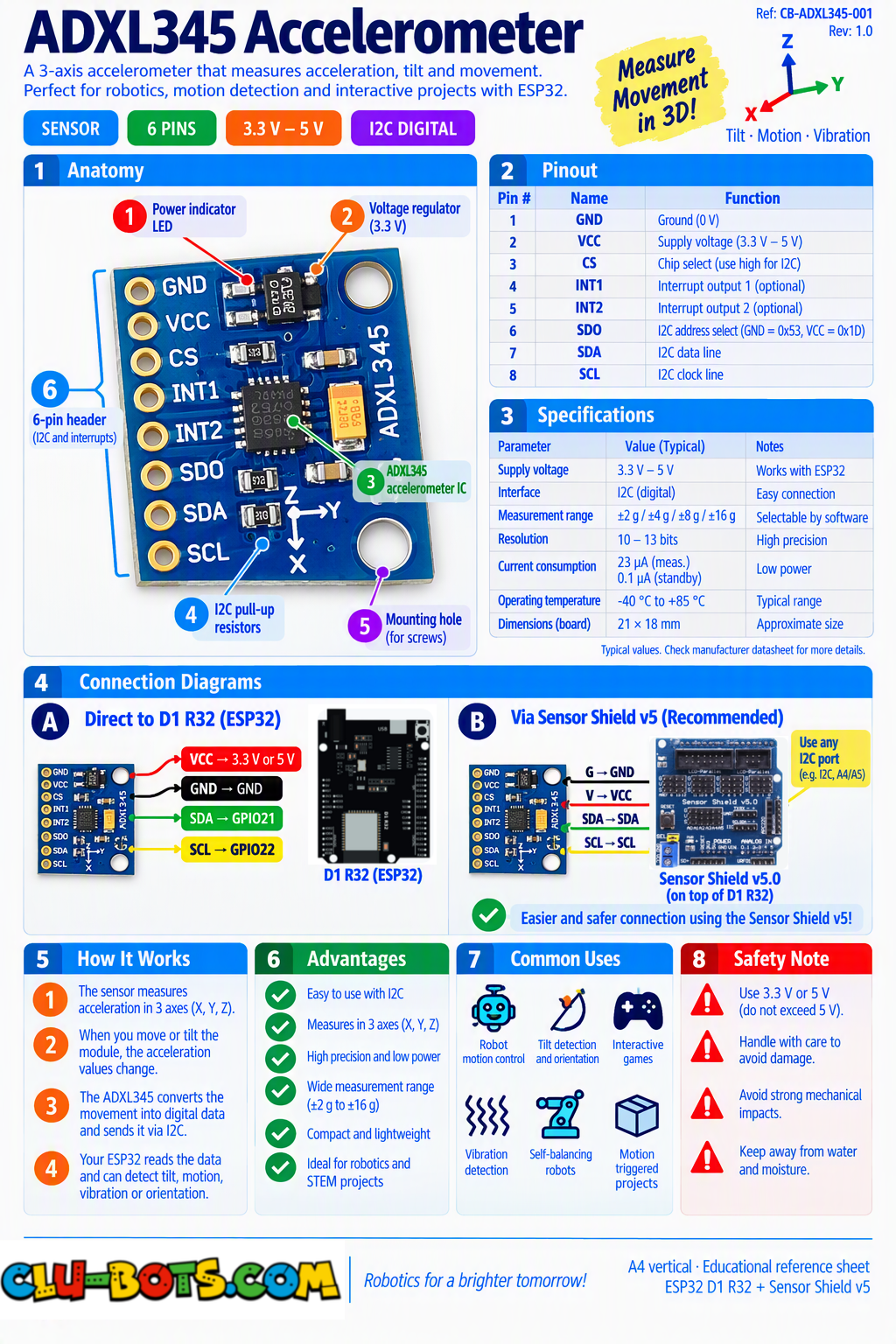
ADXL345 Accelerometer (GY‑291 Module)
🎮 The Balance Master
Module Goal: sense movement in THREE dimensions at once the sensor inside phones that rotates your screen, counts your steps, and knows when you shake it. This module also introduces your robot's first data bus: I2C.
📦 CONCEPT BOX I2C: the data bus
Until today, every sensor had its own wire(s) to the board: one pin per job. The ADXL345 uses I2C (pronounced "I-squared-C") a system where two shared wires carry data to MANY devices:
- SCL (clock): the heartbeat wire it ticks, and everyone moves in step.
- SDA (data): the message wire the actual bits travel here.
Every device on the bus has an address (a house number). The ESP32 calls out: "Device 0x53, give me your X reading" and only that device answers. You could hang a screen, more sensors and a clock on the same two wires, all sharing politely.
Look at your toolbox: the OLED and LCD screens speak I2C too. Same two wires, different house numbers. Once you know the bus, an entire world of devices opens with just two pins.
One vocabulary note: the chip measures acceleration in mg (milli-gravity). Sitting flat, it reads about 1000 mg on one axis that's planet Earth pulling at it. The sensor feels gravity itself that's how it knows which way is down.
Goal:
meet your three axes X, Y and Z, live on the screen.
Concepts:
3-Axis Sensing · I2C Bus Setup · mg Units · Gravity as a Reading
import machine	# Controls the board hardware
import adxl345	# Controls the ADXL345 sensor
import time	# Controls pauses and timing
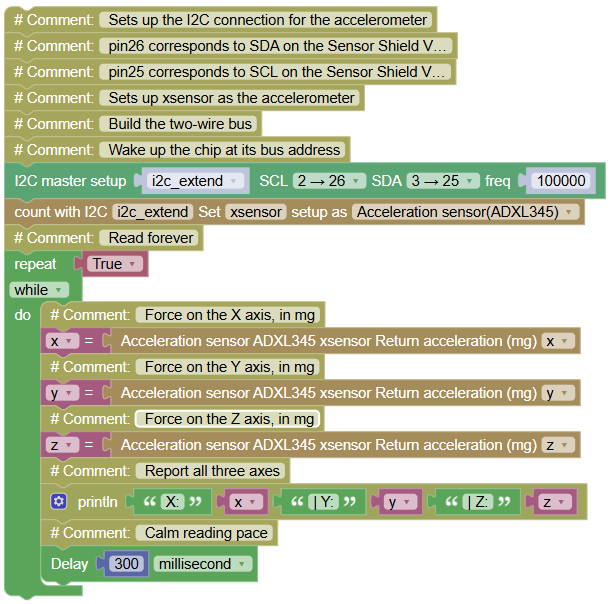
# Sets up the I2C connection for the accelerometer
# pin26 corresponds to SDA on the Sensor Shield V5.0
# pin25 corresponds to SCL on the Sensor Shield V5.0
# Sets up xsensor as the accelerometer
i2c_extend = machine.SoftI2C(scl = machine.Pin(26), sda = machine.Pin(25), freq = 100000)  # Build the two-wire bus
xsensor = adxl345.ADXL345(i2c_extend)  # Wake up the chip at its bus address
while True:  # Read forever
    x = xsensor.readX()  # Force on the X axis, in mg
    y = xsensor.readY()  # Force on the Y axis, in mg
    z = xsensor.readZ()  # Force on the Z axis, in mg
    print("X:", x, "| Y:", y, "| Z:", z)  # Report all three axes
    time.sleep_ms(300)  # Calm reading pace
Serial Monitor (keep the board flat on the table):
X: 12 | Y: -8 | Z: 987
X: 10 | Y: -12 | Z: 990
X: 14 | Y: -5 | Z: 985
💡 Note: notice the setup has two steps first build the bus (i2c_extend), then wake the device on it (xsensor). That's exactly the two Clu-Block blocks from the toolbox (I2C setup + accelerometer setup): build the road, then call the house. And look at Z almost 1000 mg even though nothing moves! That's gravity, measured. Tilt the board on its edge and watch the 1000 migrate to X or Y: gravity didn't move your sensor's orientation did. Small jitters (±10) are the sensor's breathing remember jitter and dead zones; they return next.
🎮 INTERPRET
Goal:
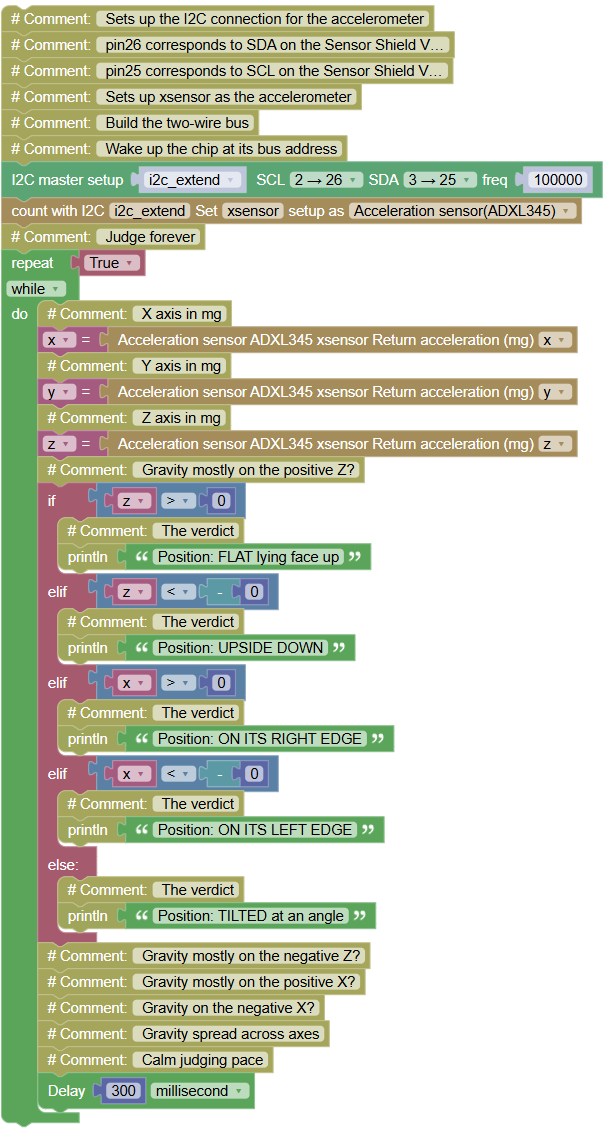
teach the program the board's position: FLAT, EDGE, UPSIDE DOWN or TILTED.
Concepts:
Orientation Zones · Gravity as a Compass
import machine	# Controls the board hardware
import adxl345	# Controls the ADXL345 sensor
import time	# Controls pauses and timing
# Sets up the I2C connection for the accelerometer
# pin26 corresponds to SDA on the Sensor Shield V5.0
# pin25 corresponds to SCL on the Sensor Shield V5.0
# Sets up xsensor as the accelerometer
i2c_extend = machine.SoftI2C(scl = machine.Pin(26), sda = machine.Pin(25), freq = 100000)  # Build the two-wire bus
xsensor = adxl345.ADXL345(i2c_extend)  # Wake up the chip at its bus address
while True:  # Judge forever
    x = xsensor.readX()  # X axis in mg
    y = xsensor.readY()  # Y axis in mg
    z = xsensor.readZ()  # Z axis in mg
    if z > 0:  # Gravity mostly on the positive Z?
        print("Position: FLAT lying face up")  # The verdict
    elif z < -0:  # Gravity mostly on the negative Z?
        print("Position: UPSIDE DOWN")  # The verdict
    elif x > 0:  # Gravity mostly on the positive X?
        print("Position: ON ITS RIGHT EDGE")  # The verdict
    elif x < -0:  # Gravity on the negative X?
        print("Position: ON ITS LEFT EDGE")  # The verdict
    else:  # Gravity spread across axes
        print("Position: TILTED at an angle")  # The verdict
    time.sleep_ms(300)  # Calm judging pace
Serial Monitor (rotate the board slowly through its positions):
Position: FLAT lying face up
Position: TILTED at an angle
Position: ON ITS RIGHT EDGE
Position: UPSIDE DOWN
💡 Note: the 800 threshold is the dead-zone philosophy in 3D: below it, jitter is ignored; above it, gravity has clearly taken a side. Notice the absence of calibration the chip already converted everything, and gravity is a universal reference: 1000 mg means "down" on every ADXL345 on the planet. This is how your phone knows portrait from landscape one axis wearing the gravity crown at a time.
🎮 The Shake Detector
Goal:
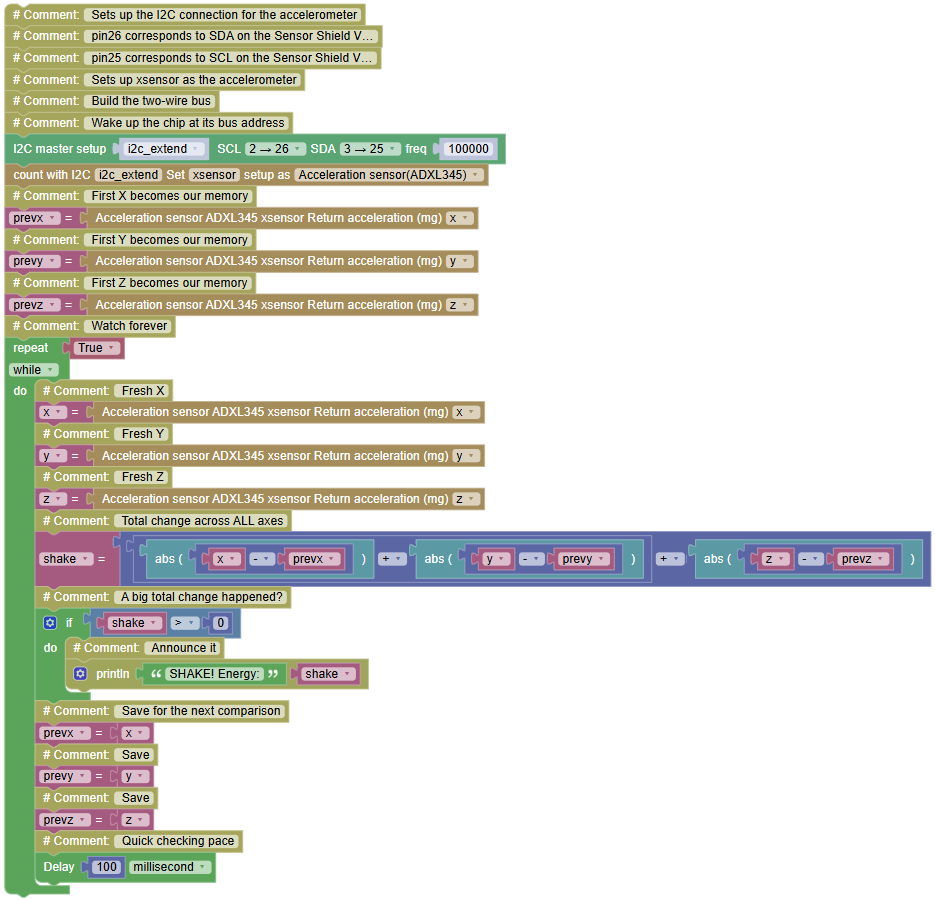
detect sudden movement a genuine SHAKE even while ignoring the calm jitter.
Concepts:
abs() · Multi-Axis Change · Delta in 3D
import machine	# Controls the board hardware
import adxl345	# Controls the ADXL345 sensor
import time	# Controls pauses and timing
# Sets up the I2C connection for the accelerometer
# pin26 corresponds to SDA on the Sensor Shield V5.0
# pin25 corresponds to SCL on the Sensor Shield V5.0
# Sets up xsensor as the accelerometer
i2c_extend = machine.SoftI2C(scl = machine.Pin(26), sda = machine.Pin(25), freq = 100000)  # Build the two-wire bus
xsensor = adxl345.ADXL345(i2c_extend)  # Wake up the chip at its bus address
prevx = xsensor.readX()  # First X becomes our memory
prevy = xsensor.readY()  # First Y becomes our memory
prevz = xsensor.readZ()  # First Z becomes our memory
while True:  # Watch forever
    x = xsensor.readX()  # Fresh X
    y = xsensor.readY()  # Fresh Y
    z = xsensor.readZ()  # Fresh Z
    shake = abs(x - prevx) + abs(y - prevy) + abs(z - prevz)  # Total change across ALL axes
    if shake > 0:  # A big total change happened?
        print("SHAKE! Energy:", shake)  # Announce it
    prevx = x  # Save for the next comparison
    prevy = y  # Save
    prevz = z  # Save
    time.sleep_ms(100)  # Quick checking pace
Serial Monitor (board flat... then shake it):
(nothing during calm...)
SHAKE! Energy: 4120
SHAKE! Energy: 2890
(nothing again...)
💡 Note: one new command with a huge job: abs() removes the minus sign abs(-3000) is 3000. Why care? Because a shake pushes each axis sometimes UP, sometimes DOWN; comparing signed values would let up-and-down cancel out to "no movement"! abs(x - prevx) measures how far each axis moved, whichever direction. Three movements added together (shake) is the shake's total energy small wiggle ~500, real shake ~4000. You just built the "shake to do X" feature from your phone.
🎮 The Shake Tournament

Goal:
count shakes properly (one shake = one count, thanks to an ignore window) and crown the STRONGEST shake.
Concepts:
Event Debouncing in 3D · Best-So-Far · Energy Records
import machine	# Controls the board hardware
import adxl345	# Controls the ADXL345 sensor
import time	# Controls pauses and timing
# Sets up the I2C connection for the accelerometer
# pin26 corresponds to SDA on the Sensor Shield V5.0
# pin25 corresponds to SCL on the Sensor Shield V5.0
# Sets up xsensor as the accelerometer
i2c_extend = machine.SoftI2C(scl = machine.Pin(26), sda = machine.Pin(25), freq = 100000)  # Build the two-wire bus
xsensor = adxl345.ADXL345(i2c_extend)  # Wake up the chip at its bus address
print("=== SHAKE TOURNAMENT ===")  # Title
shakes = 0  # Counts shakes
record = 0  # Remembers the strongest shake so far
prevx = xsensor.readX()  # Starting memory
prevy = xsensor.readY()  # Starting memory
prevz = xsensor.readZ()  # Starting memory
while True:  # Judge forever
    x = xsensor.readX()  # Fresh X
    y = xsensor.readY()  # Fresh Y
    z = xsensor.readZ()  # Fresh Z
    shake = abs(x - prevx) + abs(y - prevy) + abs(z - prevz)  # Total movement energy
    prevx = x  # Save the memory
    prevy = y  # Save
    prevz = z  # Save
    if shake > 1:  # A genuine shake!
        shakes += 1  # One more shake
        print("SHAKE", shakes, "- energy:", shake)  # Report it
        if shake > record:  # Stronger than the champion?
            record = shake  # New champion!
            print(">>> NEW RECORD strongest shake yet!")  # Celebrate
        time.sleep_ms(800)  # THE IGNORE WINDOW: one shake = one count
    time.sleep_ms(50)  # Fast checking
Serial Monitor (shake gently, then violently):
=== SHAKE TOURNAMENT ===
SHAKE 1 - energy: 3120
>>> NEW RECORD strongest shake yet!
SHAKE 2 - energy: 2890
SHAKE 3 - energy: 6480
>>> NEW RECORD strongest shake yet!
💡 Note: the ignore window (debouncing, learned with the clap sensor) returns because one physical shake produces MANY readings above threshold, and without the window you'd count one shake as ten. Count, then rest 800 ms, then judge again. And the record variable makes the program care about quality, not just quantity: how hard was the hardest shake? Step counters in fitness bands do this exact work detect, debounce, measure, remember.
🎮 The Electronic Dice
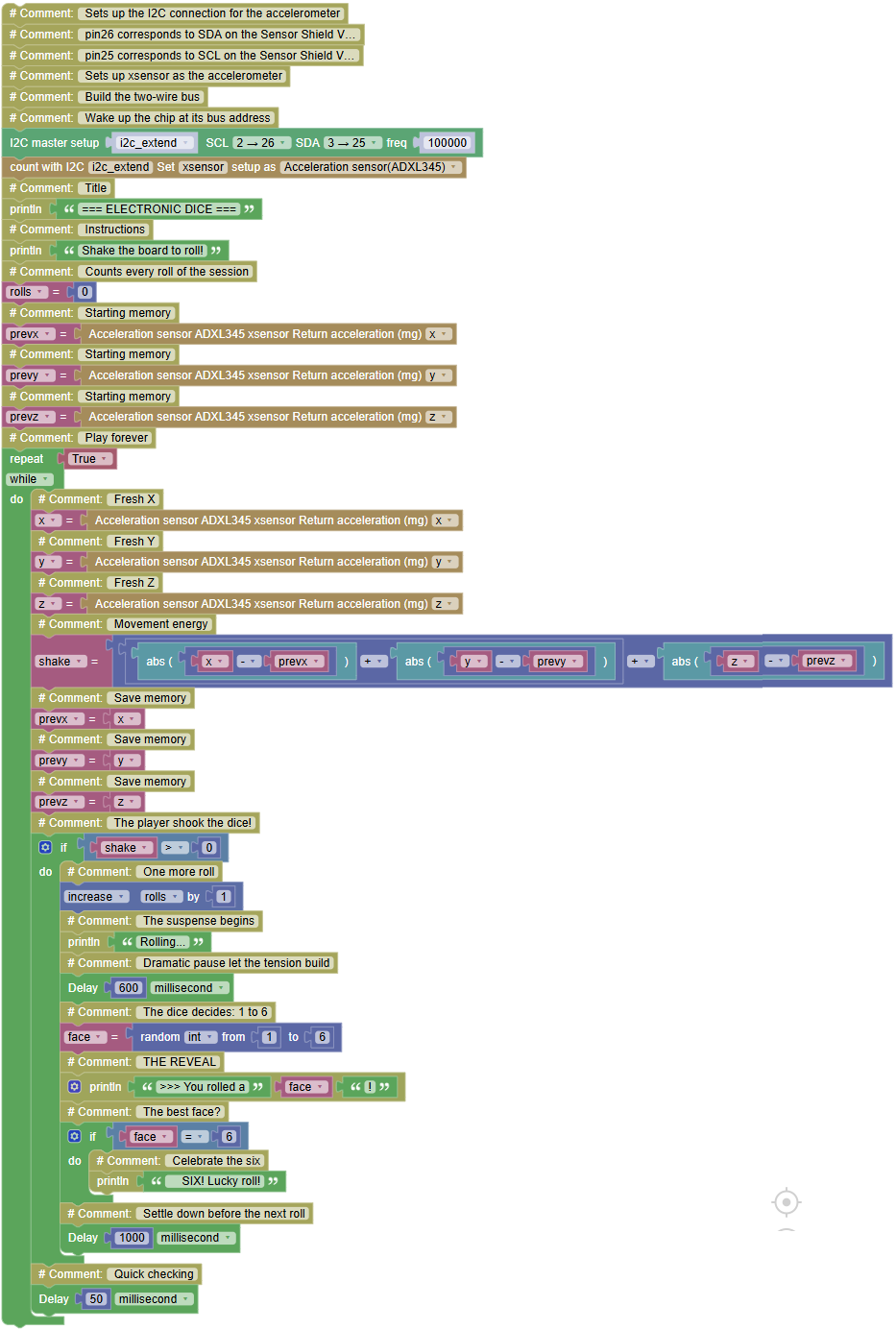
Goal:
the classic shake the board, suspense builds, and the dice rolls a number from 1 to 6. Every group builds one; every group plays everyone else's.
Concepts:
Random + Sensor Trigger · Suspense Timing · Game Design
import machine	# Controls the board hardware
import adxl345	# Controls the ADXL345 sensor
import time	# Controls pauses and timing
import random   # Controls random numbers
# Sets up the I2C connection for the accelerometer
# pin26 corresponds to SDA on the Sensor Shield V5.0
# pin25 corresponds to SCL on the Sensor Shield V5.0
# Sets up xsensor as the accelerometer
i2c_extend = machine.SoftI2C(scl = machine.Pin(26), sda = machine.Pin(25), freq = 100000)  # Build the two-wire bus
xsensor = adxl345.ADXL345(i2c_extend)  # Wake up the chip at its bus address
print("=== ELECTRONIC DICE ===")  # Title
print("Shake the board to roll!")  # Instructions
rolls = 0  # Counts every roll of the session
prevx = xsensor.readX()  # Starting memory
prevy = xsensor.readY()  # Starting memory
prevz = xsensor.readZ()  # Starting memory
while True:  # Play forever
    x = xsensor.readX()  # Fresh X
    y = xsensor.readY()  # Fresh Y
    z = xsensor.readZ()  # Fresh Z
    shake = abs(x - prevx) + abs(y - prevy) + abs(z - prevz)  # Movement energy
    prevx = x  # Save memory
    prevy = y  # Save memory
    prevz = z  # Save memory
    if shake > 0:  # The player shook the dice!
        rolls += 1  # One more roll
        print("Rolling...")  # The suspense begins
        time.sleep_ms(600)  # Dramatic pause let the tension build
        face = random.randint(1, 6)  # The dice decides: 1 to 6
        print(">>> You rolled a", face, "!")  # THE REVEAL
        if face == 6:  # The best face?
            print("    SIX! Lucky roll!")  # Celebrate the six
        time.sleep_ms(1000)  # Settle down before the next roll
    time.sleep_ms(50)  # Quick checking
Serial Monitor:
=== ELECTRONIC DICE ===
Shake the board to roll!
Rolling...
>>> You rolled a 4 !
Rolling...
>>> You rolled a 6 !
SIX! Lucky roll!
Rolling...
>>> You rolled a 2 !
💡 Note: two random worlds meet the random library (R2-D2, reflex game) and the shake trigger (21.3). Notice the honest engineering in the design: the shake only triggers the roll; the number itself comes from the random generator. A real dice app works identically physics opens the door, math decides the result. Add a session score (rolls already counts who rolled the most sixes?). And appreciate what you built from nothing: a sensor, a memory trick, an ignore window, a random number, and timing for drama. That's a complete toy and a complete program.