
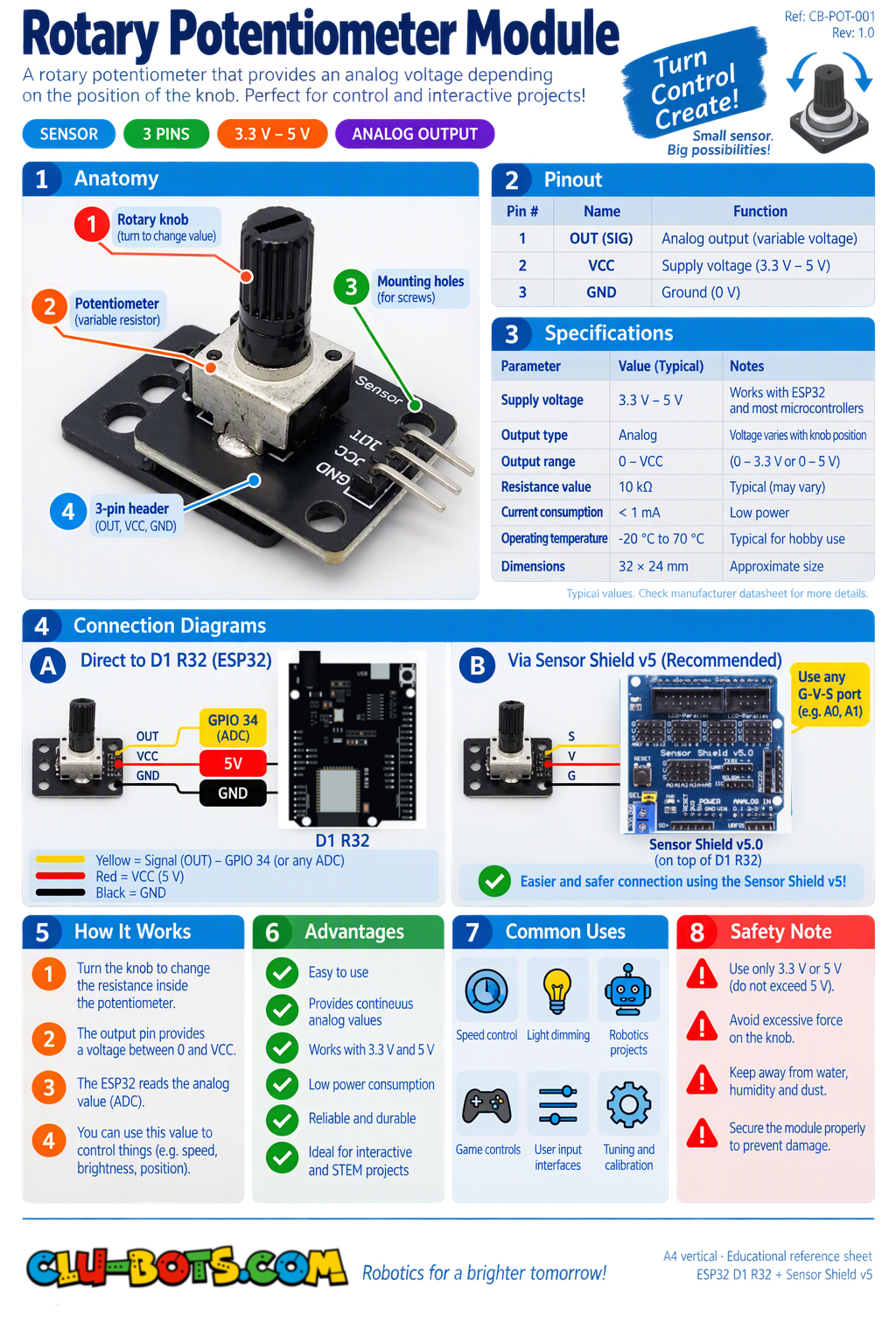
Rotary Potentiometer
🎮 isplay the Raw Analog Value
Goal
Read the potentiometer and display its raw analog value on the PC.
Concepts
Analog Input · ADC · Raw Value · Loop · Serial Output
import machine  # Controls the board hardware
import time     # Controls pauses and timing

adc2 = machine.ADC(machine.Pin(2))  # A0 reads the potentiometer

adc2.atten(machine.ADC.ATTN_11DB)  # Sets the analog input range

while True:  # Repeats forever

    value = adc2.read_u16()  # Reads the potentiometer value

    print(value)  # Sends the raw value to the PC

    time.sleep(0.2)  # Waits before reading again
🎮 Convert the Reading to Percentage
Goal
Convert the raw potentiometer reading into a value from 0% to 100%.
Concepts
Analog Input · ADC · Mapping · Percentage · Serial Output
import machine              # Controls the board hardware
import time                 # Controls pauses and timing
from mixpy import math_map  # Converts values between ranges

adc2 = machine.ADC(machine.Pin(2))  # A0 reads the potentiometer

adc2.atten(machine.ADC.ATTN_11DB)  # Sets the analog input range

while True:  # Repeats forever

    value = adc2.read_u16()  # Reads the raw analog value

    percent = int(math_map(value, 0, 65535, 0, 100))  # Converts to 0-100%

    print(percent, '%')  # Sends the percentage to the PC

    time.sleep(0.2)  # Waits before reading again
🎮 Low, Medium or High
Goal
Classify the potentiometer position as Low, Medium or High. Concepts Analog Input ·
Conditions ·
Comparison · Ranges · Serial Output
import machine  # Controls the board hardware
import time     # Controls pauses and timing

adc2 = machine.ADC(machine.Pin(2))  # A0 reads the potentiometer

adc2.atten(machine.ADC.ATTN_11DB)  # Sets the analog input range

while True:  # Repeats forever

    value = adc2.read_u16()  # Reads the potentiometer value

    if value < 21845:  # Checks the lower range
        print('Low')  # Reports the low zone

    elif value < 43690:  # Checks the middle range
        print('Medium')  # Reports the medium zone

    else:  # Runs for the upper range
        print('High')  # Reports the high zone

    time.sleep(0.2)  # Waits before reading again
🎮 Detect Rotation Direction
Goal
Detect whether the potentiometer is moving clockwise or counter-clockwise by comparing its current and previous readings.
Concepts
Analog Input · Variables · Comparison · Direction · Serial Output
import machine  # Controls the board hardware
import time     # Controls pauses and timing

adc2 = machine.ADC(machine.Pin(2))  # A0 reads the potentiometer

adc2.atten(machine.ADC.ATTN_11DB)  # Sets the analog input range

last_value = adc2.read_u16()  # Saves the starting value

while True:  # Repeats forever

    value = adc2.read_u16()  # Reads the current value

    if value > last_value + 500:  # Checks for a clear increase
        print('Clockwise')  # Reports one direction

    elif value < last_value - 500:  # Checks for a clear decrease
        print('Counter-clockwise')  # Reports the other direction

    last_value = value  # Saves the current value

    time.sleep(0.1)  # Waits before reading again
🎮 PC Knob Monitor
Goal
Create a knob monitor that displays the raw value, percentage, zone and direction of movement on the PC.
Concepts
Analog Input · Mapping · Ranges · Comparison · Direction · Serial Output
import machine              # Controls the board hardware
import time                 # Controls pauses and timing
from mixpy import math_map  # Converts values between ranges

adc2 = machine.ADC(machine.Pin(2))  # A0 reads the potentiometer

adc2.atten(machine.ADC.ATTN_11DB)  # Sets the analog input range

last_value = adc2.read_u16()  # Saves the starting value

while True:  # Repeats forever

    value = adc2.read_u16()  # Reads the raw value

    percent = int(math_map(value, 0, 65535, 0, 100))  # Converts to percentage

    print('Raw:', value)  # Shows the raw value

    print('Percentage:', percent, '%')  # Shows the percentage

    if percent < 33:  # Checks the lower zone
        print('Zone: Low')  # Reports the low zone

    elif percent < 67:  # Checks the middle zone
        print('Zone: Medium')  # Reports the medium zone

    else:  # Runs for the upper zone
        print('Zone: High')  # Reports the high zone

    if value > last_value + 500:  # Checks for an increase
        print('Direction: Clockwise')  # Reports the direction

    elif value < last_value - 500:  # Checks for a decrease
        print('Direction: Counter-clockwise')  # Reports the direction

    else:  # Runs when there is little change
        print('Direction: Stopped')  # Reports no movement

    last_value = value  # Saves the current value

    print('---')  # Separates each report

    time.sleep(0.2)  # Waits before reading again