
RGB LED
🎮 The Traffic Light of Colors
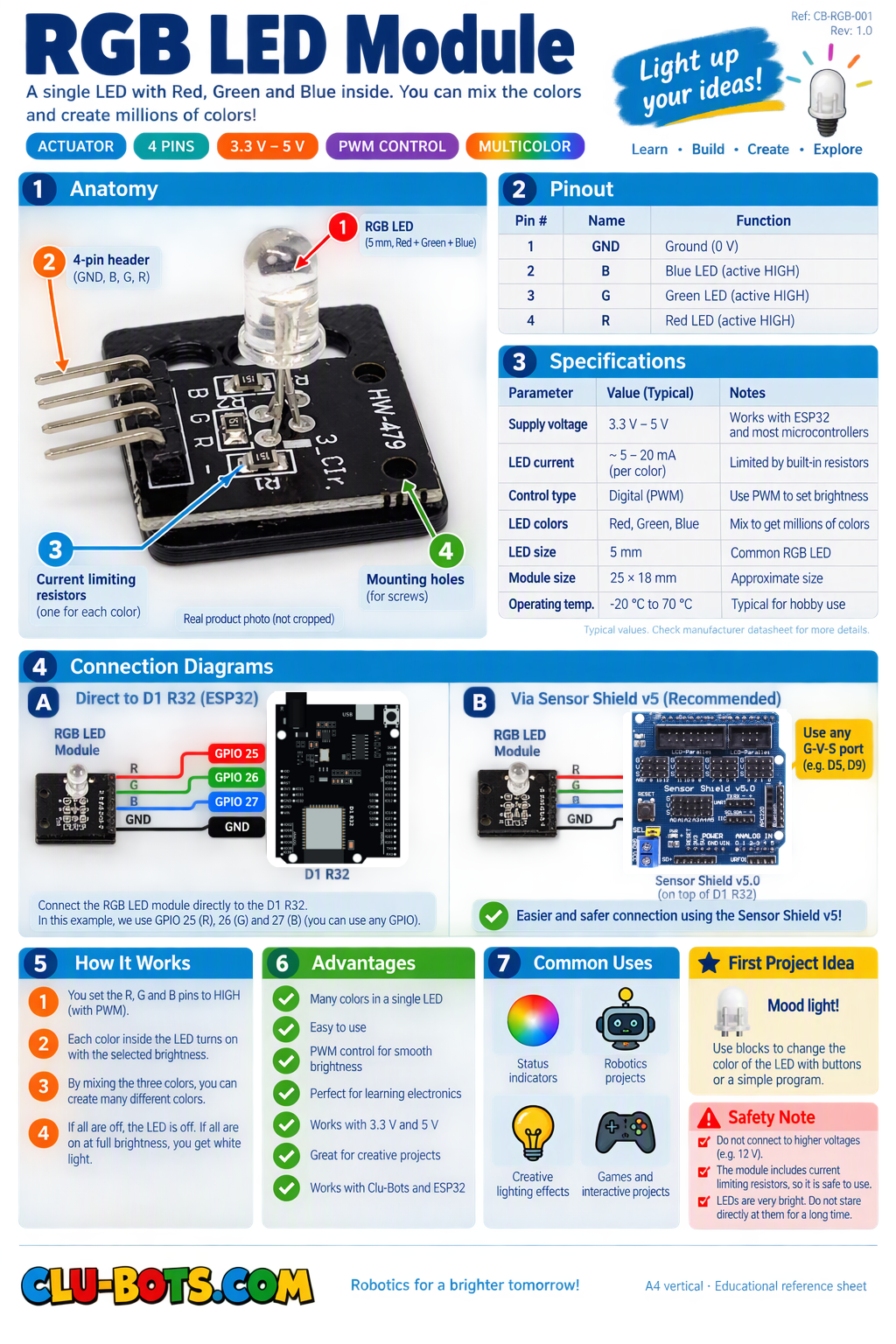
Module Goal: discover that one lamp hides three lamps inside and that light mixes differently than paint: red + green makes YELLOW. That is real physics.
Goal:
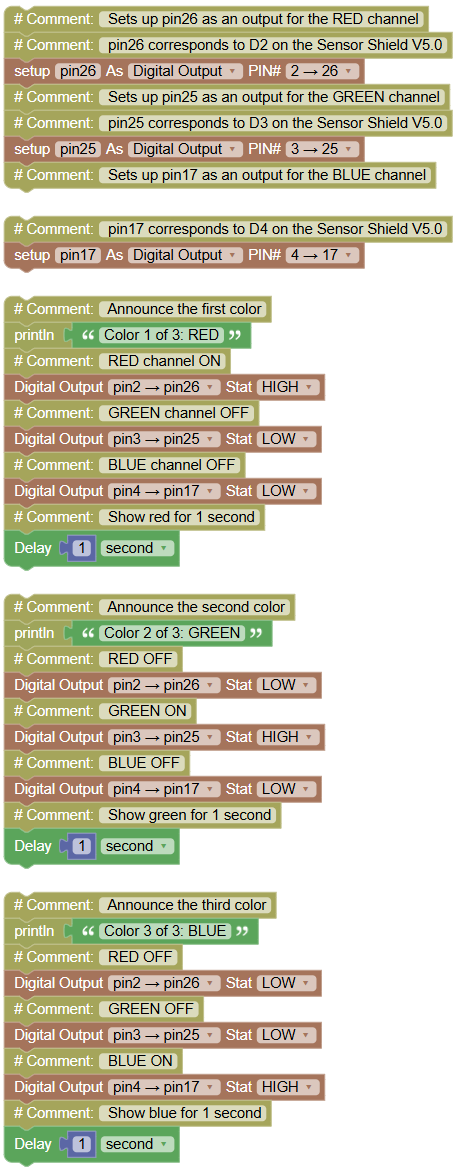
discover the three lamps hiding inside one module by lighting each one alone.
Concepts:
Multiple Digital Outputs · Channel Control · Sequencing
🔍 Detective rule: if your module is common anode, everything is inverted (0 = ON). Swap 1↔0 and 65535↔0 in your code. Same personality check as always: test first, adjust second.
import machine  # Library that controls the board's pins
import time # Library that lets us pause the program

# Sets up pin26 as an output for the RED channel
# pin26 corresponds to D2 on the Sensor Shield V5.0
pin26 = machine.Pin(26, machine.Pin.OUT)
# Sets up pin25 as an output for the GREEN channel
# pin25 corresponds to D3 on the Sensor Shield V5.0
pin25 = machine.Pin(25, machine.Pin.OUT)
# Sets up pin17 as an output for the BLUE channel

# pin17 corresponds to D4 on the Sensor Shield V5.0
pin17 = machine.Pin(17, machine.Pin.OUT)

print("Color 1 of 3: RED") # Announce the first color
pin26.value(1) # RED channel ON
pin25.value(0) # GREEN channel OFF
pin17.value(0) # BLUE channel OFF
time.sleep(1)  # Show red for 1 second

print("Color 2 of 3: GREEN")  # Announce the second color
pin26.value(0) # RED OFF
pin25.value(1) # GREEN ON
pin17.value(0) # BLUE OFF
time.sleep(1)   # Show green for 1 second

print("Color 3 of 3: BLUE") # Announce the third color
pin26.value(0)  # RED OFF
pin25.value(0)   # GREEN OFF
pin17.value(1)   # BLUE ON
time.sleep(1)    # Show blue for 1 second
Serial Monitor:
Color 1 of 3: RED
Color 2 of 3: GREEN
Color 3 of 3: BLUE
💡 Note: one module, three wires, three independent switches. Every color this module will ever produce is just a table of 1s and 0s on those three channels. Notice something important: before each color you must turn OFF the previous channels forgetting that is the most common bug in this exercise, and finding it yourself is the best way to learn debugging.
🎮 The Color Recipes
Goal:
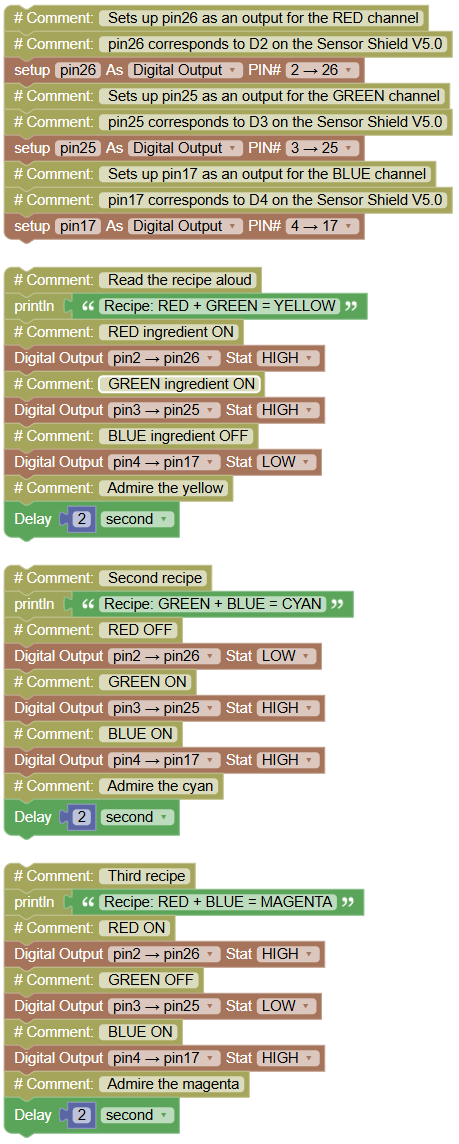
mix two channels at the same time and create yellow, cyan and magenta.
Concepts:
Channel Mixing · Additive Color · Combinations
import machine  # Library that controls the board's pins
import time # Library that lets us pause the program

# Sets up pin26 as an output for the RED channel
# pin26 corresponds to D2 on the Sensor Shield V5.0
pin26 = machine.Pin(26, machine.Pin.OUT)
# Sets up pin25 as an output for the GREEN channel
# pin25 corresponds to D3 on the Sensor Shield V5.0
pin25 = machine.Pin(25, machine.Pin.OUT)
# Sets up pin17 as an output for the BLUE channel
# pin17 corresponds to D4 on the Sensor Shield V5.0
pin17 = machine.Pin(17, machine.Pin.OUT)

print("Recipe: RED + GREEN = YELLOW") # Read the recipe aloud
pin26.value(1)  # RED ingredient ON
pin25.value(1)  # GREEN ingredient ON
pin17.value(0)  # BLUE ingredient OFF
time.sleep(2)   # Admire the yellow

print("Recipe: GREEN + BLUE = CYAN") # Second recipe
pin26.value(0)  # RED OFF
pin25.value(1)  # GREEN ON
pin17.value(1)  # BLUE ON
time.sleep(2)   # Admire the cyan

print("Recipe: RED + BLUE = MAGENTA")  # Third recipe
pin26.value(1)  # RED ON
pin25.value(0)  # GREEN OFF
pin17.value(1)  # BLUE ON
time.sleep(2)   # Admire the magenta
💡 Note: here is the surprise of the day: mix red and green paint and you get a muddy brown. Mix red and green light and you get yellow! Light mixes by addition (more light = brighter), paint mixes by absorption. Draw the mixing triangle in your notebook: the three corners are R, G, B, and the edges are your three recipes. What is the center? All three ON white light.
🎮 The Rainbow
Goal:
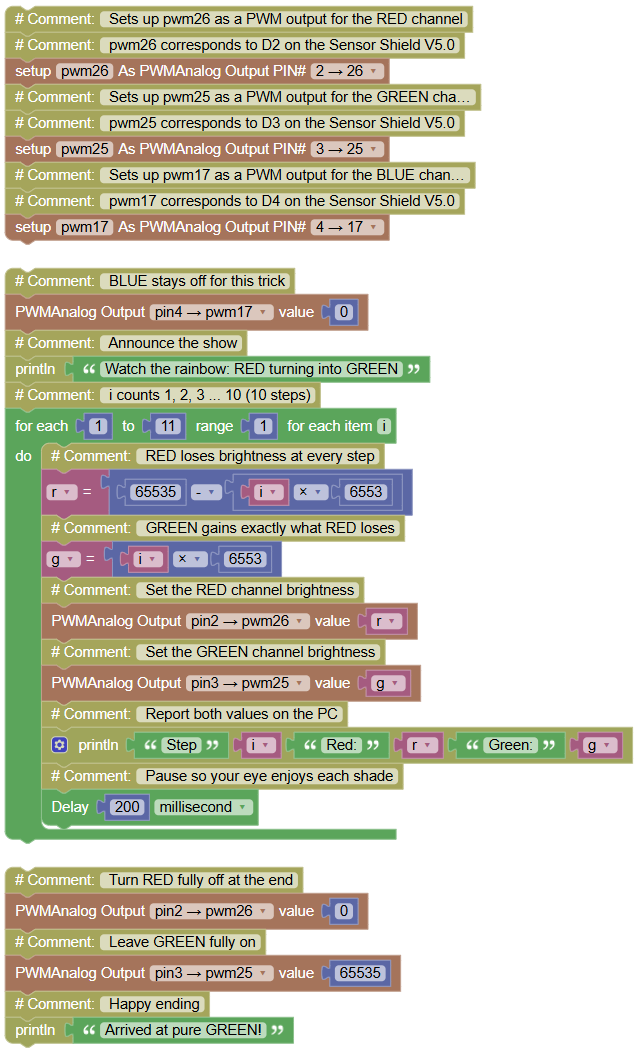
crossfade RED into GREEN with PWM and catch the orange that appears in between.
Concepts:
PWM · Crossfade · Two Changing Variables · Arithmetic in Loops
You need three PWM blocks (one per channel), a for each 1 to 10 loop, and math blocks. RED loses exactly what GREEN gains they trade places step by step.
In previous projects, we control RGB LED on/off state through digital output. Herein, we adopt PWM to light and dim the RGB LED gradually. PWM is a technology that allows us to control the brightness and color change of a RGb LED.
With PWM, instead of simply turning the RGB LED on or off, we adjust the time the RGB LED lights up and the time it turns off within each cycle, so that the LED will “breathe” evenly.
📘 What is PWM? Pulse-width modulation (PWM) is a technique that controls the power delivered to a device by varying the time a signal stays high 1
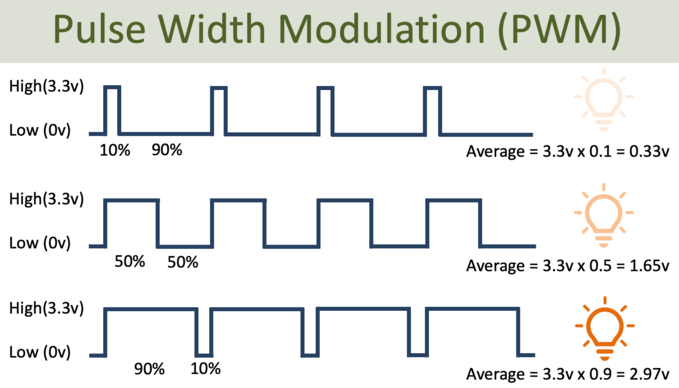
The 0–65535 range (16-bit) is like a "super-detailed brightness control," where 0 is off and 65535 is maximum brightness, with thousands of intermediate levels allowing for smooth light transitions.
import machine  # Library that controls the board's pins
import time  # Library that lets us pause the program

# Sets up pwm26 as a PWM output for the RED channel
# pwm26 corresponds to D2 on the Sensor Shield V5.0
pwm26 = machine.PWM(machine.Pin(26))
# Sets up pwm25 as a PWM output for the GREEN channel
# pwm25 corresponds to D3 on the Sensor Shield V5.0
pwm25 = machine.PWM(machine.Pin(25))
# Sets up pwm17 as a PWM output for the BLUE channel
# pwm17 corresponds to D4 on the Sensor Shield V5.0
pwm17 = machine.PWM(machine.Pin(17))

pwm17.duty_u16(0) # BLUE stays off for this trick
print("Watch the rainbow: RED turning into GREEN") # Announce the show
for i in range(1, 11, 1):  # i counts 1, 2, 3 ... 10 (10 steps)
    r = 65535 - (i * 6553) # RED loses brightness at every step
    g = i * 6553  # GREEN gains exactly what RED loses
    pwm26.duty_u16(r)  # Set the RED channel brightness
    pwm25.duty_u16(g)  # Set the GREEN channel brightness
    print("Step", i, "Red:", r, "Green:", g)   # Report both values on the PC
    time.sleep_ms(200)   # Pause so your eye enjoys each shade
pwm26.duty_u16(0)  # Turn RED fully off at the end
pwm25.duty_u16(65535)  # Leave GREEN fully on
print("Arrived at pure GREEN!")  # Happy ending
Serial Monitor:
Watch the rainbow: RED turning into GREEN
Step 1 Red: 58982 Green: 6553
Step 2 Red: 52429 Green: 13106
...
Step 10 Red: 5 Green: 65530
Arrived at pure GREEN!
💡 Note: two things hide in plain sight here. ① The number 6553 is 65535 ÷ 10 one tenth of the full scale, so 10 steps fill the entire range. ② In the middle of the fade your lamp looks orange but orange exists nowhere in your program! It is born in your eye, from two channels flickering at different speeds. Your code only ever wrote red numbers and green numbers. Also watch Step 10: Red ends at 5, not 0 small leftover of the division. Perfect precision is not needed for beauty.
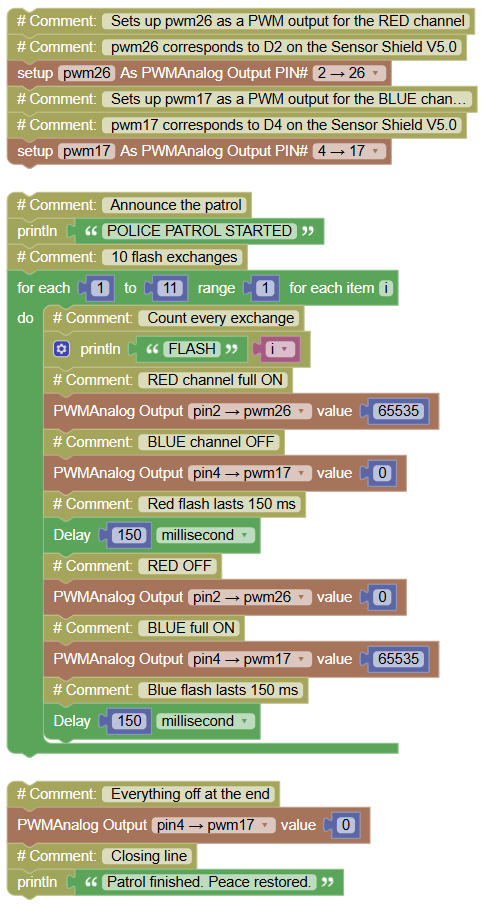
🎮 Police Patrol
Goal:
alternate red and blue at high speed, like a patrol car in an emergency.
Concepts:
Alternation Pattern · PWM On / Off · Fast Timing
import machine  # Library that controls the board's pins
import time     # Library that lets us pause the program

# Sets up pwm26 as a PWM output for the RED channel
# pwm26 corresponds to D2 on the Sensor Shield V5.0
pwm26 = machine.PWM(machine.Pin(26))
# Sets up pwm17 as a PWM output for the BLUE channel
# pwm17 corresponds to D4 on the Sensor Shield V5.0
pwm17 = machine.PWM(machine.Pin(17))

print("POLICE PATROL STARTED")   # Announce the patrol
for i in range(1, 11, 1):  # 10 flash exchanges
    print("FLASH", i)     # Count every exchange
    pwm26.duty_u16(65535)   # RED channel full ON
    pwm17.duty_u16(0)       # BLUE channel OFF
    time.sleep_ms(150)      # Red flash lasts 150 ms
    pwm26.duty_u16(0)       # RED OFF
    pwm17.duty_u16(65535)   # BLUE full ON
    time.sleep_ms(150)      # Blue flash lasts 150 ms
pwm17.duty_u16(0)           # Everything off at the end
print("Patrol finished. Peace restored.")  # Closing line
Serial Monitor:
POLICE PATROL STARTED
FLASH 1
FLASH 2
...
FLASH 10
Patrol finished. Peace restored.
💡 Note: 150 ms per color means the full red→blue cycle repeats about 3 times per second. Experiment challenge: change the 150 to 80 does it feel more urgent? Why do you think real emergency lights flash fast instead of slow? Speed itself carries emotion, and now you control it with a single number.
🎮 Traffic Light of the City
Goal:
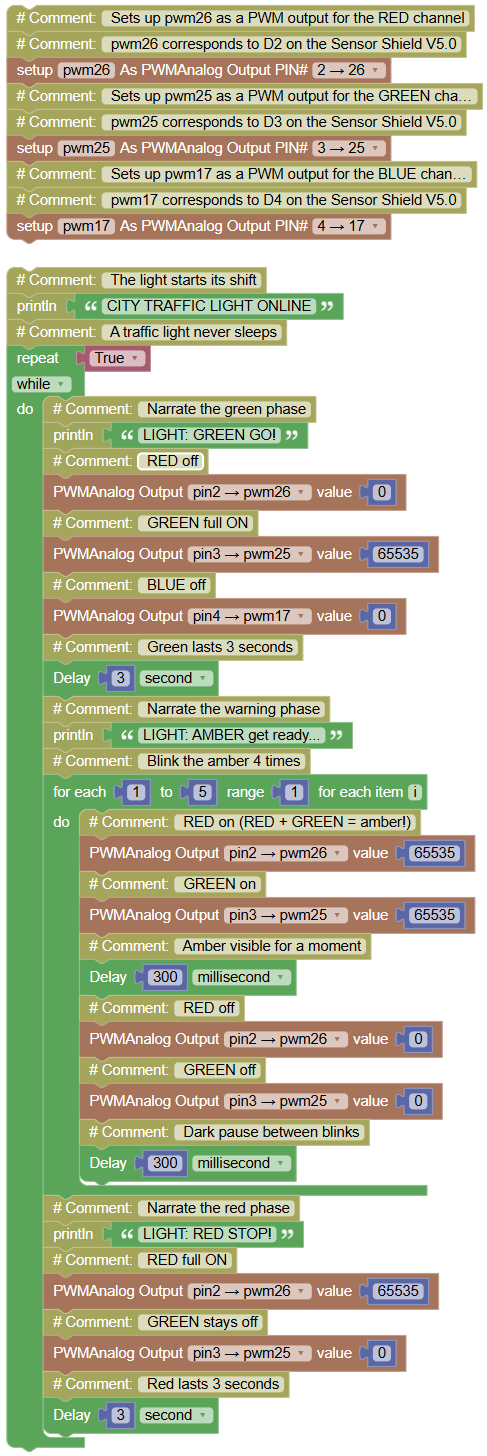
build a complete working traffic light green → blinking amber → red, cycling forever, narrated on the PC.
Concepts:
State Machine (Phases) · Nested Loops · Combined Channels · Infinite Cycle
Amber is your yellow recipe from Exercise 3.2 (RED + GREEN together), made to blink with a small loop inside the big cycle.
import machine  # Library that controls the board's pins
import time  # Library that lets us pause the program

# Sets up pwm26 as a PWM output for the RED channel
# pwm26 corresponds to D2 on the Sensor Shield V5.0
pwm26 = machine.PWM(machine.Pin(26))
# Sets up pwm25 as a PWM output for the GREEN channel
# pwm25 corresponds to D3 on the Sensor Shield V5.0
pwm25 = machine.PWM(machine.Pin(25))
# Sets up pwm17 as a PWM output for the BLUE channel
# pwm17 corresponds to D4 on the Sensor Shield V5.0
pwm17 = machine.PWM(machine.Pin(17))

print("CITY TRAFFIC LIGHT ONLINE")    # The light starts its shift
while True:   # A traffic light never sleeps
    print("LIGHT: GREEN GO!")   # Narrate the green phase
    pwm26.duty_u16(0)   # RED off
    pwm25.duty_u16(65535)   # GREEN full ON
    pwm17.duty_u16(0)   # BLUE off
    time.sleep(3)    # Green lasts 3 seconds

    print("LIGHT: AMBER get ready...")    # Narrate the warning phase
    for i in range(1, 5, 1):    # Blink the amber 4 times
        pwm26.duty_u16(65535)   # RED on (RED + GREEN = amber!)
        pwm25.duty_u16(65535)    # GREEN on
        time.sleep_ms(300)       # Amber visible for a moment
        pwm26.duty_u16(0)        # RED off
        pwm25.duty_u16(0)        # GREEN off
        time.sleep_ms(300)       # Dark pause between blinks

    print("LIGHT: RED STOP!")    # Narrate the red phase
    pwm26.duty_u16(65535)     # RED full ON
    pwm25.duty_u16(0)      # GREEN stays off
    time.sleep(3)   # Red lasts 3 seconds
Serial Monitor (cycles forever):
CITY TRAFFIC LIGHT ONLINE
LIGHT: GREEN GO!
LIGHT: AMBER get ready...
LIGHT: RED STOP!
LIGHT: GREEN GO!
...
💡 Note: your program now has three phases green, amber, red and each phase is a small block with its own behavior. Engineers call this a state machine, and it is one of the most powerful ideas in all of robotics: your future line-following car and your alarm system will be state machines too. Final demo: put your team's lamp where everyone can see it the whole class walks on GREEN, freezes on RED. You just built a machine that commands humans.