
LED Module
🎮 ACTIVATE
Module Goal: send your first command to the physical world, and learn the secret trick that lets a switch make half-light.
Goal:
command electricity itself turn a real lamp ON and OFF, and narrate it on the PC.
Concepts:
Digital Output · Pin Setup · HIGH / LOW · Serial Reporting
🔍 Detective rule of the course: components have personalities. If your lamp behaves inverted (ON when it should be OFF), swap 1 and 0 in your code. Reading the raw values first always reveals the truth.
📦 CONCEPT BOX What is a DIGITAL signal?
A digital signal is a light switch: it only has TWO states, nothing in between.
HIGH → the pin carries 3.3 volts → the number 1
LOW → the pin carries 0 volts → the number 0
And it works in two directions:
DIGITAL OUTPUT the ESP32 speaks: it sets a pin to 1 or 0. (Today: your lamp.)
DIGITAL INPUT the ESP32 listens: it reads what a sensor says. (Coming in Module 5: the famous backwards button.)
💻 What is a digital signal? A digital signal represents information using discrete values, usually binary (0 and 1). Key features: It's more resistant to noise because only whether it's 0 or 1 matters. It allows storage and processing on computers.
Examples: MP3 files, JPEG photos, data on a USB, communication between computers.
✅ Why is digital used more today? Because it allows higher quality, fewer errors, compression, efficient storage, and transmission. Still, analog remains essential in physical phenomena (sound, light), which are later converted to digital.
import machine # Library that controls the board's pins
import time  # Library that lets us pause the program

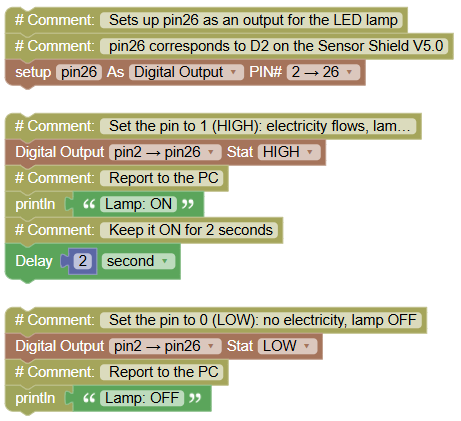
# Sets up pin26 as an output for the LED lamp
# pin26 corresponds to D2 on the Sensor Shield V5.0
pin26 = machine.Pin(26, machine.Pin.OUT)

pin26.value(1)  # Set the pin to 1 (HIGH): electricity flows, lamp ON
print("Lamp: ON")  # Report to the PC
time.sleep(2) # Keep it ON for 2 seconds

pin26.value(0)  # Set the pin to 0 (LOW): no electricity, lamp OFF
print("Lamp: OFF")  # Report to the PC
Serial Monitor:
Lamp: ON (
2 seconds of light)
Lamp: OFF
💡 Note: until today your programs only moved text. This time, a line of code moved real electricity through a real wire into a real lamp. value(1) means 3.3 volts, value(0) means 0 volts. That is the entire vocabulary of a digital output and with it you can command thousands of devices.
🎮 The Disco
Goal:
compose your first light pattern 3 fast blinks plus 3 slow blinks, forever.
Concepts:
Nested Loops · Pattern Timing · Serial Narration
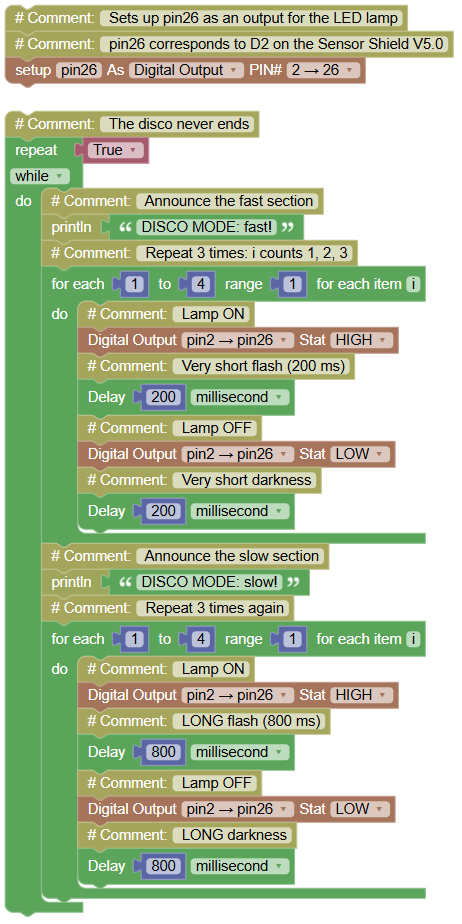
Build the fast section with a repeat 3 times block, then copy it and change the delays for the slow section. Put both inside a repeat while (true).
import machine   # Library that controls the board's pins
import time # Library that lets us pause the program

# Sets up pin26 as an output for the LED lamp
# pin26 corresponds to D2 on the Sensor Shield V5.0
pin26 = machine.Pin(26, machine.Pin.OUT)

while True: # The disco never ends
    print("DISCO MODE: fast!") # Announce the fast section
    for i in range(1, 4, 1):   # Repeat 3 times: i counts 1, 2, 3
        pin26.value(1)   # Lamp ON
        time.sleep_ms(200) # Very short flash (200 ms)
        pin26.value(0)  # Lamp OFF
        time.sleep_ms(200) # Very short darkness
    print("DISCO MODE: slow!") # Announce the slow section
    for i in range(1, 4, 1):  # Repeat 3 times again
        pin26.value(1) # Lamp ON
        time.sleep_ms(800)  # LONG flash (800 ms)
        pin26.value(0)  # Lamp OFF
        time.sleep_ms(800) # LONG darkness
Serial Monitor:
DISCO MODE: fast!
DISCO MODE: slow!
DISCO MODE: fast!
DISCO MODE: slow!
💡 Note: notice what the repeat 3 block saved you: 8 blocks instead of 24. Programmers never copy the same thing many times when a loop can do it. And look at the only difference between "fast" and "slow": two numbers 200 vs 800. You compose light with time, the same way music is composed with beats.
🎮 The Lamp Learns to Breathe
Goal:
make the lamp fade up and down like it is breathing, with the brightness narrated on the PC.
Concepts:
PWM · Duty Cycle · 16-bit Scale (0–65535) · Counting Loops · Nested Loops
📦 CONCEPT BOX What is PWM? (The flicker trick)
The problem: a digital pin only has OFF and ON. So how can a lamp be half bright?
The trick: switch it ON and OFF hundreds of times per second so fast your eyes cannot follow. Your eye averages everything out: if the lamp is ON half of the time, you see medium brightness. It is like flicking a flashlight ON/OFF a thousand times per second you would swear it shines dimmer and steady.
The name: PWM Pulse Width Modulation. The key number is the duty cycle: the fraction of time the signal stays ON.
The course scale (memorize this): 0 to 65535 we always think in 16 bits.
- 0 → never ON → off
- 32768 → ON half the time → half brightness
- 65535 → always ON → full power
In previous projects, we control LED on/off state through digital output. Herein, we adopt PWM to light and dim the LED gradually. PWM is a technology that allows us to control the brightness of an LED or the speed of a motor by changing the duty cycle of a square-wave signal.
With PWM, instead of simply turning the LED on or off, we adjust the time the LED lights up and the time it turns off within each cycle, so that the LED will “breathe” evenly.
📘 What is PWM? Pulse-width modulation (PWM) is a technique that controls the power delivered to a device by varying the time a signal stays high 1
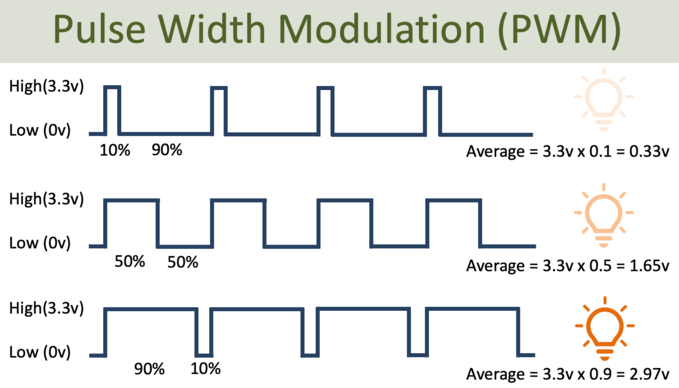
The 0–65535 range (16-bit) is like a "super-detailed brightness control," where 0 is off and 65535 is maximum brightness, with thousands of intermediate levels allowing for smooth light transitions.
import machine # Library that controls the board's pins
import time # Library that lets us pause the program
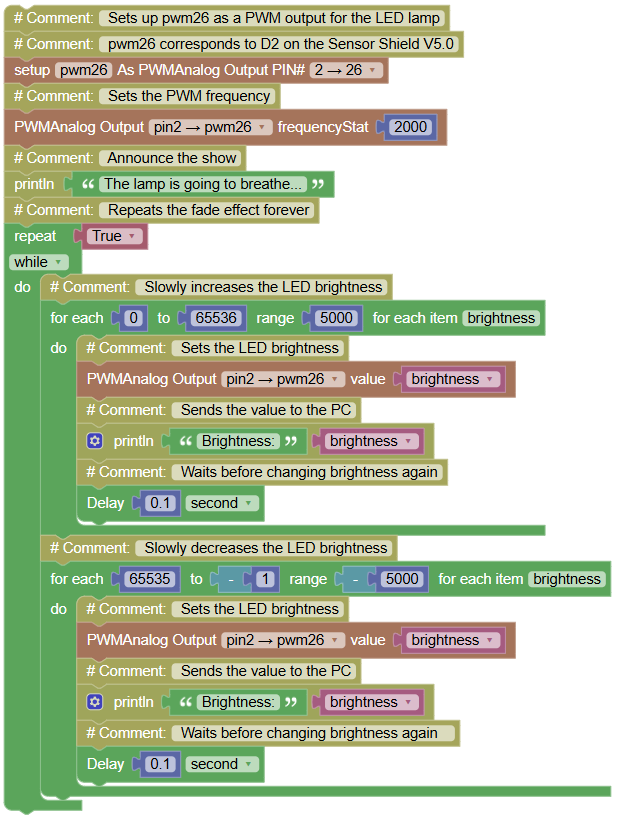
# Sets up pwm26 as a PWM output for the LED lamp
# pwm26 corresponds to D2 on the Sensor Shield V5.0
pwm26 = machine.PWM(machine.Pin(26))
# Sets the PWM frequency
pwm26.freq(2000)
print("The lamp is going to breathe...") # Announce the show

# Repeats the fade effect forever
while True:

    # Slowly increases the LED brightness
    for brightness in range(0, 65536, 5000):

        pwm26.duty_u16(brightness)  # Sets the LED brightness
        print('Brightness:', brightness)  # Sends the value to the PC
        time.sleep(0.1)             # Waits before changing brightness again

    # Slowly decreases the LED brightness
    for brightness in range(65535, -1, -5000):

        pwm26.duty_u16(brightness)  # Sets the LED brightness
        print('Brightness:', brightness)  # Sends the value to the PC
        time.sleep(0.1)             # Waits before changing brightness again
Serial Monitor (a waterfall of numbers while the lamp visibly breathes):
The lamp is going to breathe...
Breath 1 - breathing in
Brightness: 0
Brightness: 5000
Brightness: 10000
…
Brightness: 65535
Brightness: 55535
…
Brightness: 0
💡 Note: freeze your program (mentally) at Brightness: 32768 and ask yourself: what is the lamp really doing right now? Answer: flickering. Half ON, half OFF, hundreds of times per second. Your eye is being tricked and now you know the trick. The multiplication i * 4096 is the bridge between a small counter (0–16) and the big PWM scale (0–65535).
🎮 CREATE A PATTERN · The Heartbeat
Goal:
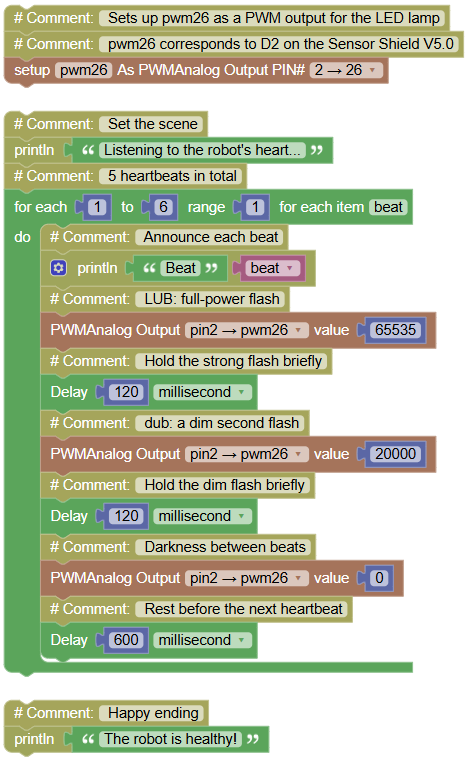
create a lub-dub heartbeat a strong flash followed by a weak flash, like a real pulse.
Concepts:
PWM · Sequence Design · Timing Structure
import machine  # Library that controls the board's pins
import time  # Library that lets us pause the program

# Sets up pwm26 as a PWM output for the LED lamp
# pwm26 corresponds to D2 on the Sensor Shield V5.0
pwm26 = machine.PWM(machine.Pin(26))

print("Listening to the robot's heart...")  # Set the scene
for beat in range(1, 6, 1):  # 5 heartbeats in total
    print("Beat", beat)  # Announce each beat
    pwm26.duty_u16(65535)  # LUB: full-power flash
    time.sleep_ms(120)  # Hold the strong flash briefly
    pwm26.duty_u16(20000)  # dub: a dim second flash
    time.sleep_ms(120)  # Hold the dim flash briefly
    pwm26.duty_u16(0) # Darkness between beats
    time.sleep_ms(600)  # Rest before the next heartbeat
print("The robot is healthy!") # Happy ending
Serial Monitor:
Listening to the robot's heart...
Beat 1
Beat 2
Beat 3
Beat 4
Beat 5
The robot is healthy!
💡 Note: a real heartbeat is strong-weak, strong-weak and you just imitated nature with exactly three duty values (65535, 20000, 0) and three pauses. Notice there is no new concept here: only duty_u16 and sleep, recombined. That is what a pattern is: old knowledge, arranged with intention.
🎮 SOS Rescue Signal
Goal:
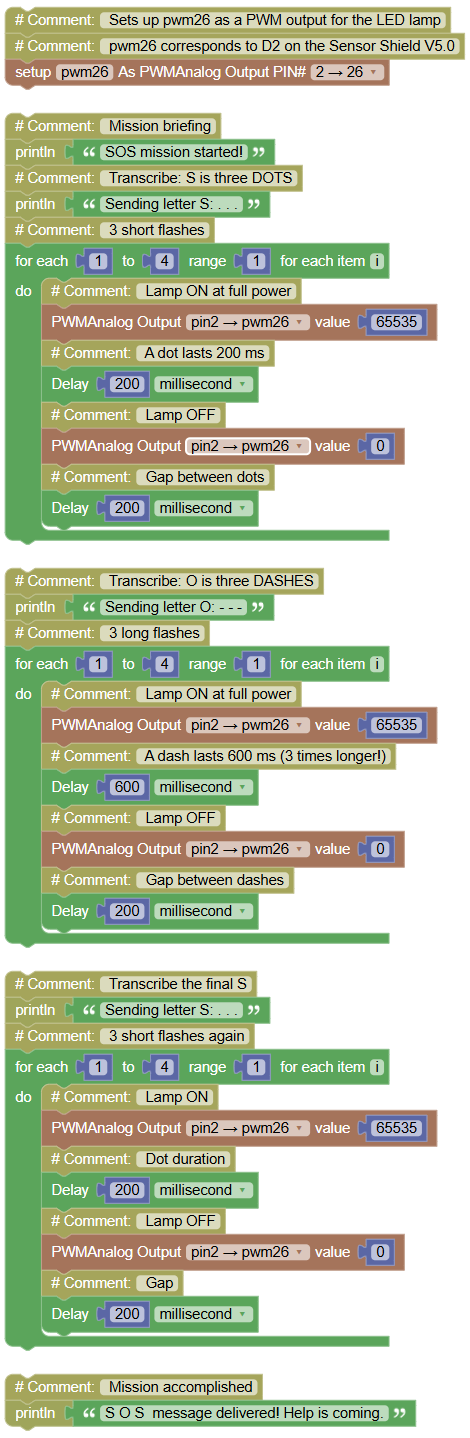
transmit a real emergency signal in Morse code S = 3 short flashes, O = 3 long flashes while your PC transcribes every letter.
Concepts:
Morse Code · Dot / Dash Timing · Repeated Blocks · Serial Transcription
The whole alphabet of Morse has only two ingredients: dot = 200 ms, dash = 600 ms (three times longer). This program is your longest yet and here is the professional secret: build the first 3-flash block, get it working, then copy-paste it twice and only change the comment text. Copy-paste with intention is a programmer's tool.
import machine # Library that controls the board's pins
import time  # Library that lets us pause the program

# Sets up pwm26 as a PWM output for the LED lamp
# pwm26 corresponds to D2 on the Sensor Shield V5.0
pwm26 = machine.PWM(machine.Pin(26))

print("SOS mission started!")  # Mission briefing
print("Sending letter S: . . .")  # Transcribe: S is three DOTS
for i in range(1, 4, 1):  # 3 short flashes
    pwm26.duty_u16(65535)   # Lamp ON at full power
    time.sleep_ms(200)  # A dot lasts 200 ms
    pwm26.duty_u16(0)  # Lamp OFF
    time.sleep_ms(200)  # Gap between dots
print("Sending letter O: - - -")  # Transcribe: O is three DASHES
for i in range(1, 4, 1):  # 3 long flashes
    pwm26.duty_u16(65535)   # Lamp ON at full power
    time.sleep_ms(600)  # A dash lasts 600 ms (3 times longer!)
    pwm26.duty_u16(0)   # Lamp OFF
    time.sleep_ms(200)   # Gap between dashes
print("Sending letter S: . . .") # Transcribe the final S
for i in range(1, 4, 1):   # 3 short flashes again
    pwm26.duty_u16(65535)  # Lamp ON
    time.sleep_ms(200)   # Dot duration
    pwm26.duty_u16(0)   # Lamp OFF
    time.sleep_ms(200)  # Gap
print("S O S  message delivered! Help is coming.")   # Mission accomplished
Serial Monitor:
SOS mission started!
Sending letter S: . . .
Sending letter O: - - -
Sending letter S: . . .
S O S message delivered! Help is coming.
💡 Note: turn off the classroom lights, transmit, and have a classmate decode your lamp by eye dot = short, dash = long, that is all the decoder needs to know. You have built a real communication channel with nothing but a lamp and time. Bonus: with dot = 200 ms and dash = 600 ms you could now encode ANY letter... a challenge for a rainy day.