
ESP-NOW
🎮 IDENTIFY · Who Am I?
The finale of communication: no remote, no phone, no router, no internet two of YOUR boards talking directly to each other, through the air, through walls, with nothing in between. This is the technology your course finale will be built on.
🔍 The one-PC workflow: ① connect Board A to the PC, upload its program, ② move its USB cable to a power bank (or any phone charger), ③ plug Board B into the PC the show begins. For Exercise 34.4 you will use the cable-swap technique: run 15 seconds with the cable on Board A, then swap and watch Board B's side of the same conversation.
📦 CONCEPT BOX ESP-NOW: the walkie-talkie network
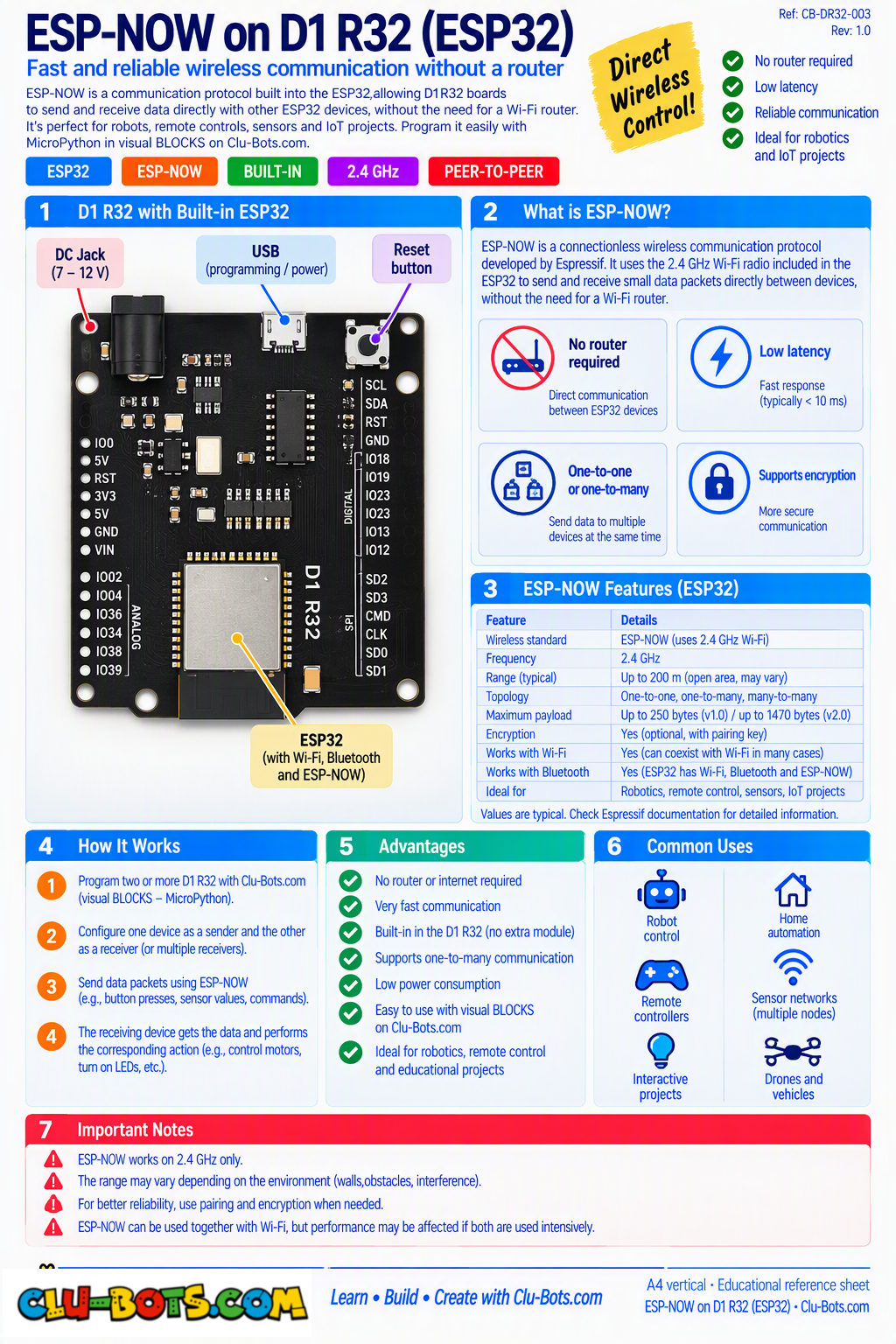
Everything wireless you've used so far needed a partner device: the remote, the phone, the router. ESP-NOW needs nobody two ESP32 boards connect directly, chip to chip, no middleman. Espressif built it exactly for this: sensors and controllers whispering to each other without any network.
The best mental model is the walkie-talkie, not the telephone:
| Telephone (Wi-Fi) | Walkie-talkie (ESP-NOW) |
|---|---|
| Needs a central tower (router) | No tower direct link |
| Connects to the whole planet | Reach: about 100–200 meters, open air |
| You dial a number | You tune a channel |
Two rules of the walkie-talkie world:
- Same channel or silence. Both boards must tune the same channel number two walkie-talkies on different channels hear nothing. Yours: set_channel(channel=1).
- Broadcast = shout to everyone. Every board has a MAC address a unique serial number engraved at the factory, like a house address. Send to a specific MAC and only that house hears you. Send to the broadcast address (ffffffffffff twelve F's) and every ESP-NOW board on the channel hears you. Today you broadcast; private addresses come in Level 2.
And one brand-new programming idea arrives with it: the callback a recipe your board executes automatically the instant a message lands, even while the main program is sleeping. You'll meet it in 34.2.
Goal:
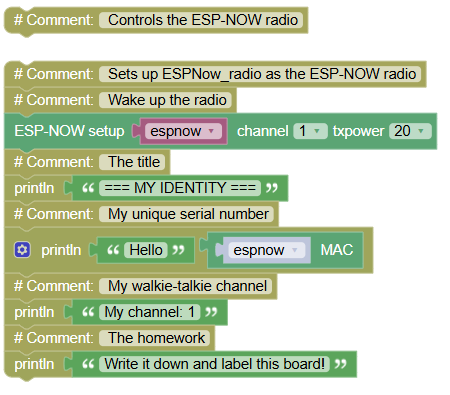
discover each board's MAC address and tune both radios to the same channel.
Concepts:
MAC Address · Radio Channels · The One-PC Workflow
Run this program on Board A first (cable on A), write its MAC on paper, label the board. Then swap the cable to Board B and repeat. Two identities, two labels.
import radio  # Controls the ESP-NOW radio

# Sets up ESPNow_radio as the ESP-NOW radio
espnow = radio.ESPNow(channel=1, txpower=20)	# Wake up the radio
print("=== MY IDENTITY ===")	# The title
print('Hello', espnow.mac) 	# My unique serial number
print('My channel: 1')	# My walkie-talkie channel
print("Write it down and label this board!")	# The homework
Serial Monitor (once per board):
=== MY IDENTITY ===
My MAC address: b'x\xac\xb7\xa4\xf0\x1c' (or a format like 24:0A:C4:F0:1C:...)
My channel: 1
Write it down and label this board!
💡 Note: the MAC may arrive wearing the b'...' bytes costume raw data before dressing up as text (you met this family in Bluetooth and Wi-Fi). It doesn't matter how it prints: what matters is that no other board on Earth shares it. Two boards, two labels on paper from here on, "Board A" and "Board B" are real identities, not just names. And notice active(True) the radio has an on/off switch, and polite programs turn it on explicitly.
🎮 SEND · The Beacon and the Listener
Goal:
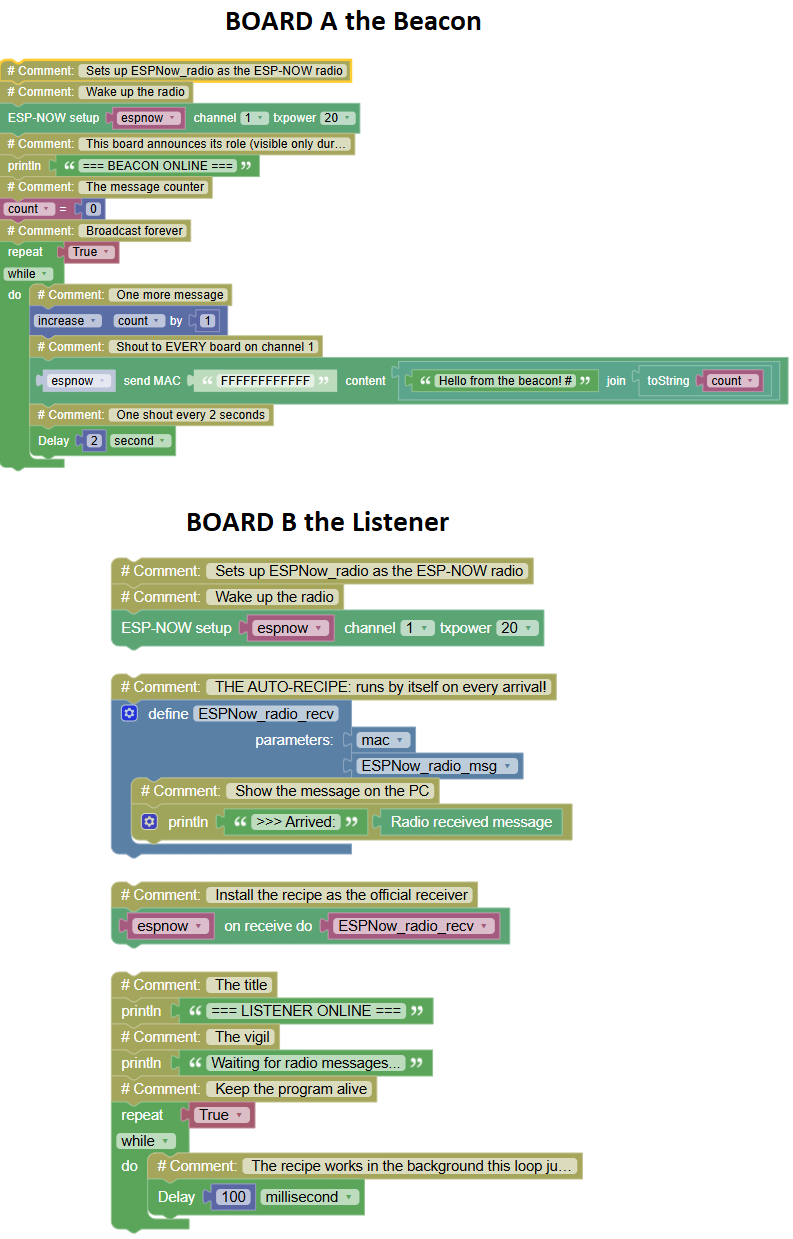
the first message ever to travel between YOUR boards a standalone beacon shouting "Hello" every 2 seconds, caught by the listener on your PC.
Concepts:
Broadcast · Callback the Auto-Recipe · Standalone
BOARD A the Beacon (upload, then move to power bank no PC!):
import radio	# Controls the ESP-NOW radio
import time	# Controls pauses and timing

# Sets up ESPNow_radio as the ESP-NOW radio
espnow = radio.ESPNow(channel=1, txpower=20)	# Wake up the radio

print("=== BEACON ONLINE ===")	# This board announces its role (visible only during upload)
count = 0	# The message counter
while True:	# Broadcast forever
    count += 1	# One more message
    espnow.send('ffffffffffff',('Hello from the beacon! #' + str(count)))	# Shout to EVERY board on channel 1
    time.sleep(2)	# One shout every 2 seconds
BOARD B the Listener (stays on the PC):
import radio	# Controls the ESP-NOW radio
import time	# Controls pauses and timing

# Sets up ESPNow_radio as the ESP-NOW radio
espnow = radio.ESPNow(channel=1, txpower=20)	# Wake up the radio

def ESPNow_radio_recv(mac, ESPNow_radio_msg):	# THE AUTO-RECIPE: runs by itself on every arrival!
    print(">>> Arrived:", ESPNow_radio_msg)	# Show the message on the PC

espnow.recv_cb(ESPNow_radio_recv)	# Install the recipe as the official receiver

print("=== LISTENER ONLINE ===")	# The title
print("Waiting for radio messages...")	# The vigil
while True:	# Keep the program alive
    time.sleep_ms(100)	# The recipe works in the background this loop just breathes
Serial Monitor Board B:
=== LISTENER ONLINE ===
Waiting for radio messages...
>>> Arrived: Hello from the beacon! #1
>>> Arrived: Hello from the beacon! #2
>>> Arrived: Hello from the beacon! #3
💡 Note the callback, the newest idea of the course: until today, YOUR program checked for things (if ir_rx.any():, if ble_p.recv(): you asked, every loop). The callback inverts it: you hand the radio a named recipe (ESPNow_radio_recv), and the radio calls you the instant a message lands even mid-sleep. It's the difference between standing at the door watching for the pizza, and the doorbell ringing while you do your homework. Walk the beacon behind a wall: the messages keep arriving. Light needed line of sight radio doesn't even notice the wall.
🎮 RECEIVE · The Data Stream and the Gap Detective

Goal:
upgrade from words to data the beacon broadcasts a running number, and the listener counts every packet AND detects the ones lost in flight.
Concepts:
Sending Data (not just text) · global the Permission Slip · Gap Detection
BOARD A the Number Beacon:
import radio	# Controls the ESP-NOW radio
import time	# Controls pauses and timing

# Sets up ESPNow_radio as the ESP-NOW radio
espnow = radio.ESPNow(channel=1, txpower=20)	# Wake up the radio

n = 0	# The packet counter
while True:	# Broadcast forever
    n += 1	# The next number
    espnow.send('ffffffffffff', str(n))	# Send the NUMBER as text
    time.sleep_ms(500)	# Two packets per second
BOARD B the Gap Detective (on the PC):
import radio	# Controls the ESP-NOW radio
import time	# Controls pauses and timing

# Sets up ESPNow_radio as the ESP-NOW radio
espnow = radio.ESPNow(channel=1, txpower=20)	# Wake up the radio

last = 0	# The last number seen
lost = 0	# How many packets died in flight

def ESPNow_radio_recv(mac, ESPNow_radio_msg):	# The auto-recipe
    global last, lost	# PERMISSION SLIP: this recipe may modify the boxes outside
    n = int(ESPNow_radio_msg)	# Convert the arriving text back into a number
    if n > last + 1:	# A number jumped packets are missing!
        gap = n - last - 1	# How many died?
        lost += gap	# Add them to the tombstone counter
        print(">>> GAP! Missed", gap, "packet(s)")	# The alarm
    print("Packet", n, "arrived | lost so far:", lost)	# The live report
    last = n	# Remember this number

espnow.recv_cb(ESPNow_radio_recv)	# Install the recipe

print("=== PACKET WATCHER ===")	# The title
while True:	# Keep alive
    time.sleep_ms(100)	# Breathing loop
Serial Monitor Board B (walk the beacon far away, behind walls, then back):
=== PACKET WATCHER ===
Packet 1 arrived | lost so far: 0
Packet 2 arrived | lost so far: 0
Packet 3 arrived | lost so far: 0
>>> GAP! Missed 4 packet(s)
Packet 8 arrived | lost so far: 4
Packet 9 arrived | lost so far: 4
💡 Note: two upgrades hide here. ① The beacon now sends data a number wearing a text costume (str(n)), undressed on arrival (int(...)). Same round trip as the telegraph's ord/chr, same idea: everything over the air travels as text; meaning is rebuilt on arrival. ② The word global a permission slip. A callback recipe lives in its own little room, and by default cannot touch the boxes outside; global last, lost opens the door so the recipe can update the detective's counters. Without it, the recipe would silently create its own private copies and your "lost" would stay 0 forever a famous bug, now one you can recognize. Then the experiment: find your link's range and wall count, like the IR delivery report but this time the wall loses.
🎮 EXCHANGE · Ping-Pong (Both Boards Speak)

Goal:
the same program on BOTH boards each one shouts PING every 3 seconds AND answers every PING it hears with a PONG. Both boards become sender and receiver at once. Viewed with the cable-swap technique.
Concepts:
Dual-Role Devices · Answer Guards · Cable-Swap Debugging
The SAME program runs on Board A and Board B:
import radio	# Controls the ESP-NOW radio
import time	# Controls pauses and timing

# Sets up ESPNow_radio as the ESP-NOW radio
espnow = radio.ESPNow(channel=1, txpower=20)	# Wake up the radio
def ESPNow_radio_recv(mac, ESPNow_radio_msg):	# The auto-recipe
    if ESPNow_radio_msg == "PING":	# ONLY answer pings never pongs!
        print("<<< PING arrived sending PONG")	# Log the incoming side
        espnow.send('ffffffffffff', "PONG")	 # The reply, back into the air
    elif ESPNow_radio_msg == "PONG":	# OUR ping was answered!
        print(">>> PONG arrived the other board is alive!")	# The confirmation
espnow.recv_cb(ESPNow_radio_recv)  # Install the recipe
print("=== PING-PONG STATION ===")	# The title
while True:	# The heartbeat
    print("Sending PING...")	# Log the outgoing side
    espnow.send('ffffffffffff', "PING")   # Shout
    time.sleep(3)	# Every 3 seconds
Serial Monitor cable on Board A (you see A's outgoing PINGs, A's answers to B's PINGs, and B's PONGs arriving):
=== PING-PONG STATION ===
Sending PING...
>>> PONG arrived the other board is alive!
<<< PING arrived sending PONG
Sending PING... >
>> PONG arrived the other board is alive!
Serial Monitor cable swapped to Board B (the same conversation, from the other chair):
=== PING-PONG STATION ===
Sending PING...
>>> PONG arrived the other board is alive!
<<< PING arrived sending PONG
Sending PING...
💡 Note: find your board's lines and the visitor's lines on the same screen the conversation is real and both sides log it. Now the guard that saved the day: the recipe answers only PING, never PONG. Remove that if and answer everything A pings, B pongs, A pongs the pong, B pongs the pong's pong... an infinite echo storm that chokes the air in seconds! Every real protocol has these message-type guards; you just watched one prevent a meltdown. And the cable-swap technique is now part of your toolkit: with one PC, the truth is distributed across two boards, and you visit each side in turn.
🎮 The Wireless Joystick Remote
Goal:
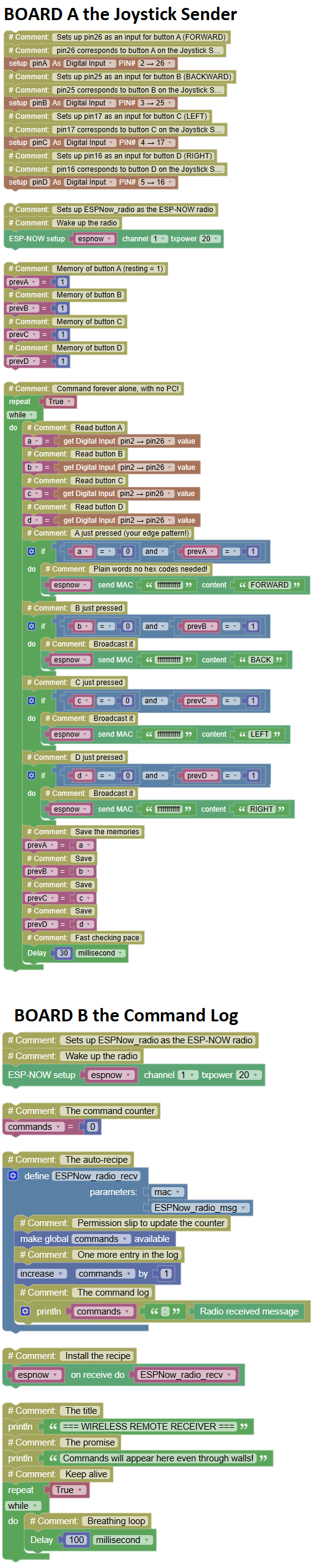
the family rematch. In Module 31 you built a remote on light line of sight, aligned modules, no walls. Today the same mission runs on radio: the joystick board (standalone, on battery) broadcasts plain-word commands, and the receiver board logs them from another room.
Concepts:
Plain-Text Commands (no hex codes!) · Edge Pattern on Battery · The IR vs Radio Showdown
BOARD A the Joystick Sender (shield mounted, no PC, on power bank):
import machine	# Controls the board's pins
import radio	# Controls the ESP-NOW radio
import time	# Controls pauses and timing

# Sets up pin26 as an input for button A (FORWARD)
# pin26 corresponds to button A on the Joystick Shield
pinA = machine.Pin(26, machine.Pin.IN, machine.Pin.PULL_UP)
# Sets up pin25 as an input for button B (BACKWARD)
# pin25 corresponds to button B on the Joystick Shield
pinB = machine.Pin(25, machine.Pin.IN, machine.Pin.PULL_UP)
# Sets up pin17 as an input for button C (LEFT)
# pin17 corresponds to button C on the Joystick Shield
pinC = machine.Pin(17, machine.Pin.IN, machine.Pin.PULL_UP)
# Sets up pin16 as an input for button D (RIGHT)
# pin16 corresponds to button D on the Joystick Shield
pinD = machine.Pin(16, machine.Pin.IN, machine.Pin.PULL_UP)

# Sets up ESPNow_radio as the ESP-NOW radio
espnow = radio.ESPNow(channel=1, txpower=20)	# Wake up the radio

prevA = 1	# Memory of button A (resting = 1)
prevB = 1	# Memory of button B
prevC = 1	# Memory of button C
prevD = 1	# Memory of button D

while True:	# Command forever alone, with no PC!
    a = pinA.value()	# Read button A
    b = pinB.value()	# Read button B
    c = pinC.value()	# Read button C
    d = pinD.value()	# Read button D
    if a == 0 and prevA == 1:	# A just pressed (your edge pattern!)
        espnow.send('ffffffffffff', "FORWARD")	# Plain words no hex codes needed!
    if b == 0 and prevB == 1:	# B just pressed
        espnow.send('ffffffffffff', "BACK")	# Broadcast it
    if c == 0 and prevC == 1:	# C just pressed
        espnow.send('ffffffffffff', "LEFT")	# Broadcast it
    if d == 0 and prevD == 1:	# D just pressed
        espnow.send('ffffffffffff', "RIGHT")	# Broadcast it
    prevA = a	# Save the memories
    prevB = b	# Save
    prevC = c	# Save
    prevD = d	# Save
    time.sleep_ms(30)	# Fast checking pace
BOARD B the Command Log (on the PC):
import radio	# Controls the ESP-NOW radio
import time	# Controls pauses and timing

# Sets up ESPNow_radio as the ESP-NOW radio
espnow = radio.ESPNow(channel=1, txpower=20)	# Wake up the radio

commands = 0	# The command counter

def ESPNow_radio_recv(mac, ESPNow_radio_msg):	# The auto-recipe
    global commands	# Permission slip to update the counter
    commands += 1	# One more entry in the log
    print(commands, ":", ESPNow_radio_msg)	# The command log

espnow.recv_cb(ESPNow_radio_recv)	# Install the recipe

print("=== WIRELESS REMOTE RECEIVER ===")	# The title
print("Commands will appear here even through walls!")	# The promise
while True:	# Keep alive
    time.sleep_ms(100)	# Breathing loop
Serial Monitor Board B (the sender is in the HALLWAY. Behind a wall. On a battery.):
=== WIRELESS REMOTE RECEIVER ===
Commands will appear here even through walls!
1 : FORWARD
2 : FORWARD
3 : RIGHT
4 : RIGHT
5 : BACK
💡 Note the showdown that closes the wireless family: run both remotes back to back and fill the final table of the course:
| IR Remote (Module 31) | ESP-NOW Remote (today) | |
|---|---|---|
| Travels as | Invisible light | Radio |
| Line of sight | Required beam blocked = dead | Not needed walls are transparent to it |
| Command format | Secret hex codes (0x41...) | Plain words ("FORWARD") |
| Who can hear it | Any NEC listener | Any board on the same channel |
| Partner device | None board to board | None board to board |
Count what you deployed one last time: the edge pattern (tenth deployment it even runs on battery), the broadcast concept, the callback serving your commands automatically, and the channel discipline. And notice the honest limitation to carry into Level 2: broadcast means everyone on the channel hears everything the day your two robots need a private conversation, you'll address messages to a specific MAC instead of twelve F's. You already know where MACs live: on the label from Exercise 34.1, in your notebook.
The communication family is complete: light, phone, internet, and now robots-to-robots. One module remains in Level 1 and it's the one where all of it joins: the Wireless Weather Station (Module 35): DHT11 on one board, ESP-NOW across the room, OLED face on the other, both PCs narrating. Everything you've built since Module 1, on one table.