
Photoresistor
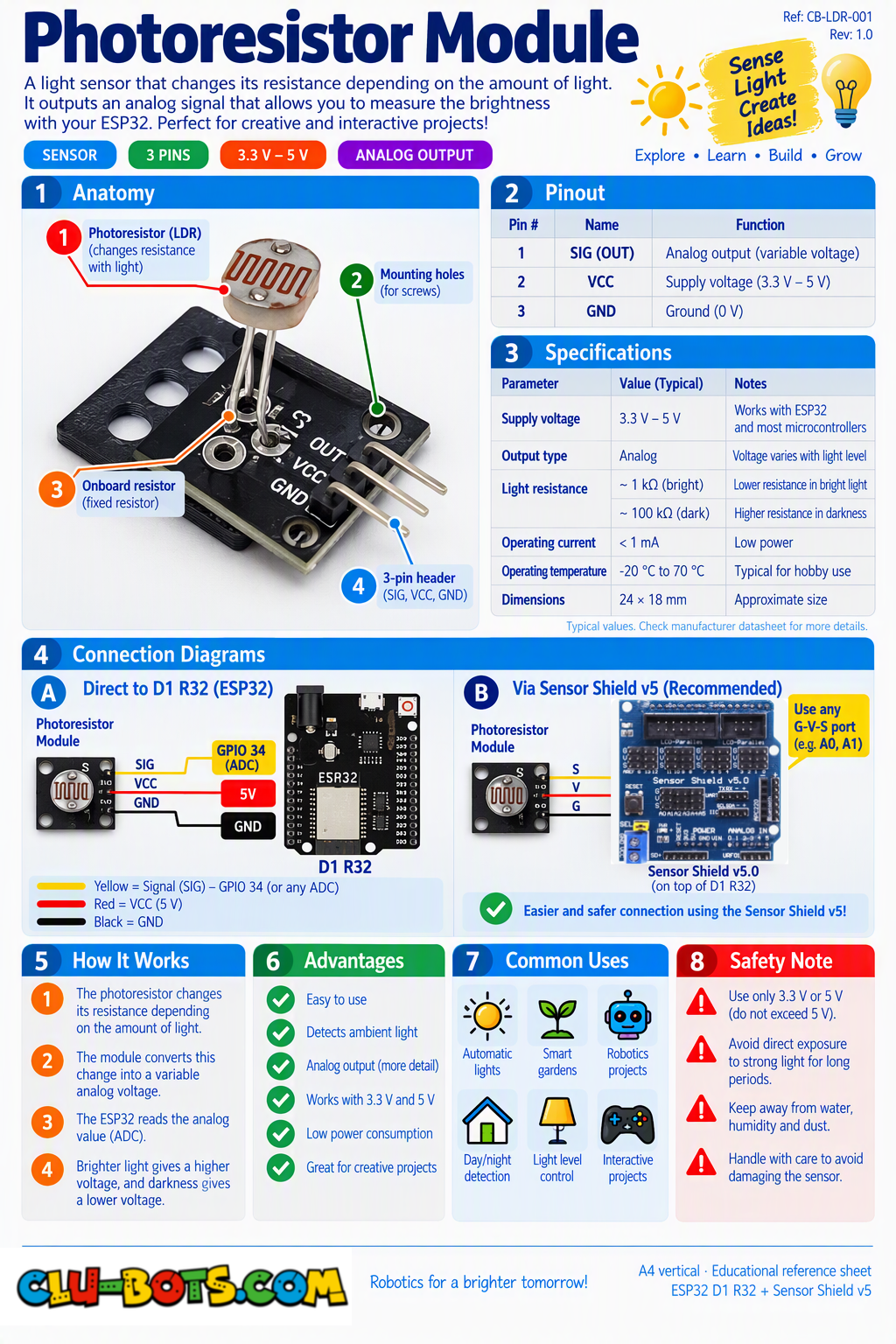
🎮 The Eye of Light

Module Goal: turn light into numbers. This tiny eye is the ancestor of every automatic streetlight, every phone that dims at night, and every robot that follows a flashlight. By the end, it will count your shadows.
Goal:
watch light levels flow as numbers and discover your sensor's direction.
Concepts:
Analog Input · ADC Recap · Prediction · Component Personality
Before running double prediction: ① Cover the sensor completely with your hand: will the number go UP or DOWN? ② Shine a flashlight (or phone light) at it: UP or DOWN? Write both guesses, then run and test.
import machine	# Library that controls the board's pins
import time	# Library for pauses
# Sets up adc4 as an analog input for the light sensor
# adc4 corresponds to A1 on the Sensor Shield V5.0
adc4 = machine.ADC(machine.Pin(4))
adc4.atten(machine.ADC.ATTN_11DB) # Sets the analog input range
while True:	# Repeat forever
	# 16-bit is the default; just use adc4.read_u16()
    value = adc4.read_u16()	# Ask the ADC how much light is arriving (0 to 65535)
    print("Light value:", value)	# Send the raw value to the PC
    time.sleep_ms(300)	# Pause so the screen stays readable
Serial Monitor (cover the sensor, then shine light on it):
Light value: 8450 ← covered by your hand
Light value: 9120
Light value: 22400 ← normal room light
Light value: 59800 ← flashlight pointed at it!
Light value: 62100
💡 Note: most Photoresistor modules read HIGHER with more light but some read the opposite! Did yours match the table above, or is it the rebel of the family? This matters for every exercise below: if your numbers run inverted, the fix is always the same swap the comparisons. Light is a continuous quantity, so the readings also jitter slightly, even with everything still. Remember that jitter
📦 CONCEPT BOX What is CALIBRATION?
Your sensor returns numbers from 0 to 65535. But your room will never use that whole range: in a classroom, the reading might only travel between 8000 (dark) and 58000 (flashlight). Those two numbers YOUR dark and YOUR bright are called calibration points.
Calibration = measuring your sensor's real minimum and maximum in YOUR conditions, then placing your thresholds between them.
- A threshold picked at random → zones that never trigger, or always trigger.
- A threshold picked from your own measurements → zones that mean something.
Every serious measuring device on Earth is calibrated: kitchen scales, hospital thermometers, weather stations. Today you calibrate like a pro: measure first, then decide the limits.
🎮 Dark, Medium or Bright?
Goal:
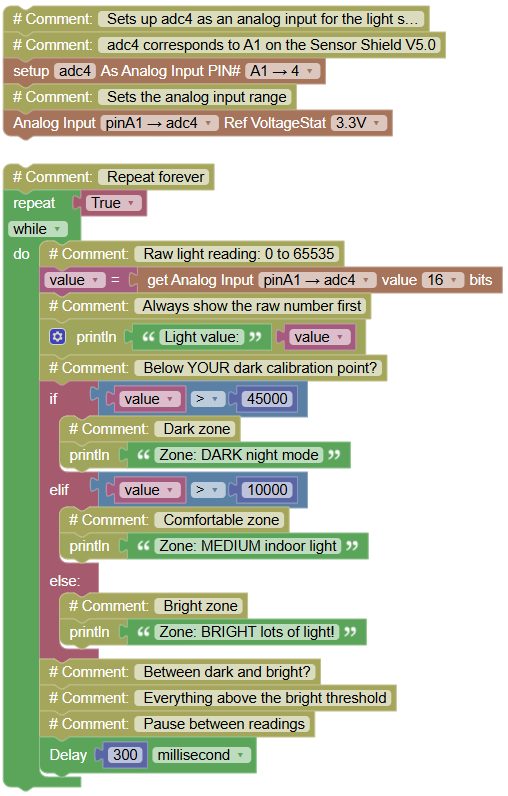
classify the light into three zones with thresholds based on YOUR room.
Concepts:
Threshold Classification · if / elif / else · Calibration
First, calibrate: from Exercise 13.1, note your covered value and your flashlight value. The code below uses typical classroom values replace the two thresholds (10000 and 45000) with numbers that fit YOUR measurements.
import machine	# Library that controls the board's pins
import time	# Library for pauses

# Sets up adc4 as an analog input for the light sensor
# adc4 corresponds to A1 on the Sensor Shield V5.0
adc4 = machine.ADC(machine.Pin(4))
adc4.atten(machine.ADC.ATTN_11DB) # Sets the analog input range

while True:	# Repeat forever
	# 16-bit is the default; just use adc4.read_u16()
    value = adc4.read_u16()	# Raw light reading: 0 to 65535
    print("Light value:", value)	# Always show the raw number first
    if value > 45000:	# Below YOUR dark calibration point?
        print("Zone: DARK night mode")	# Dark zone
    elif value > 10000:	# Between dark and bright?
        print("Zone: MEDIUM indoor light")	# Comfortable zone
    else:	# Everything above the bright threshold
        print("Zone: BRIGHT lots of light!")	# Bright zone
    time.sleep_ms(300)	# Pause between readings
Serial Monitor:
Light value: 7320
Zone: DARK night mode
Light value: 28900
Zone: MEDIUM indoor light
Light value: 58400
Zone: BRIGHT lots of light!
💡 Note: look at the funnel structure: if catches the darkest, elif catches the middle, else takes everything left over. You built this exact funnel with the touch sensor (7.4) now it classifies a continuous signal instead of a duration. Same skeleton, new universe. And notice what the calibration box changed: your thresholds are not "correct" or "incorrect" they are yours. Another team's thresholds would be wrong for your room.
🎮 The Light Went Out!
Goal:
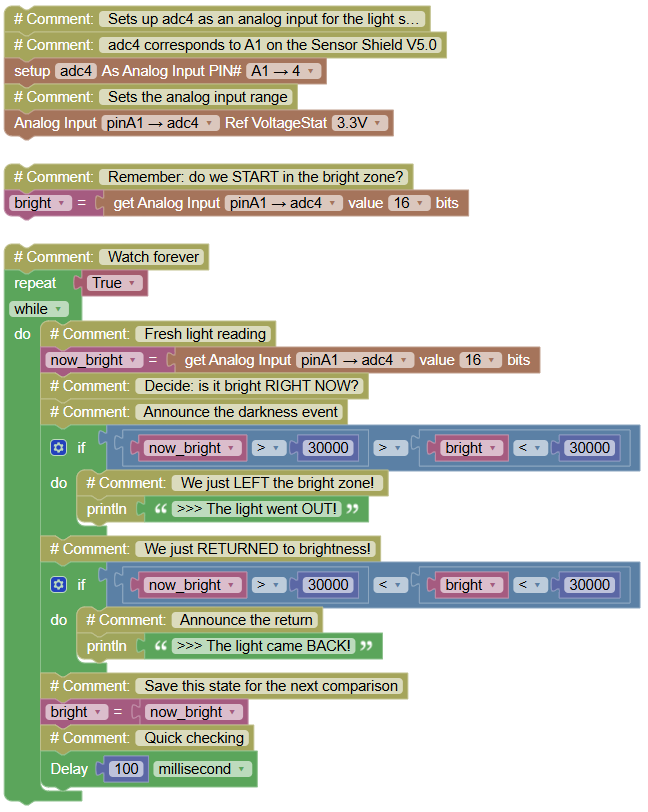
detect the MOMENT light changes zone announce when darkness arrives and when light returns.
Concepts:
Zone Edges · State Memory · Event Detection on Analog
import machine	# Library that controls the board's pins
import time	# Library for pauses

# Sets up adc4 as an analog input for the light sensor
# adc4 corresponds to A1 on the Sensor Shield V5.0
adc4 = machine.ADC(machine.Pin(4))
adc4.atten(machine.ADC.ATTN_11DB) # Sets the analog input range

bright = adc4.read_u16()  # Remember: do we START in the bright zone?

while True:	# Watch forever
	# 16-bit is the default; just use adc4.read_u16()
    now_bright = adc4.read_u16()	# Fresh light reading
    # Decide: is it bright RIGHT NOW?
    if  (now_bright > 30000) > (bright < 30000):	# Announce the darkness event
        print(">>> The light went OUT!")	# We just LEFT the bright zone!
    if (now_bright > 30000) < (bright < 30000):	# We just RETURNED to brightness!
        print(">>> The light came BACK!")	# Announce the return
    bright = now_bright	# Save this state for the next comparison
    time.sleep_ms(100)	# Quick checking
Serial Monitor (pass your hand slowly over the sensor, then remove it):
>>> The light went OUT! (silence while your hand stays)
>>> The light came BACK!
💡 Note: this is the meeting of two patterns you already own: zones (Module 12) + both-edge detection (tilt 8.3, guardian 11.3). Digital sensors gave you events for free; analog signals change gradually so you built the boundary yourself, and the variable bright is the memory. You have just written the core of an automatic streetlight: dark arrives → light goes OUT event → (in Level 2) a lamp turns ON. One if away from a real product.
🎮 The Calm Average
Goal:
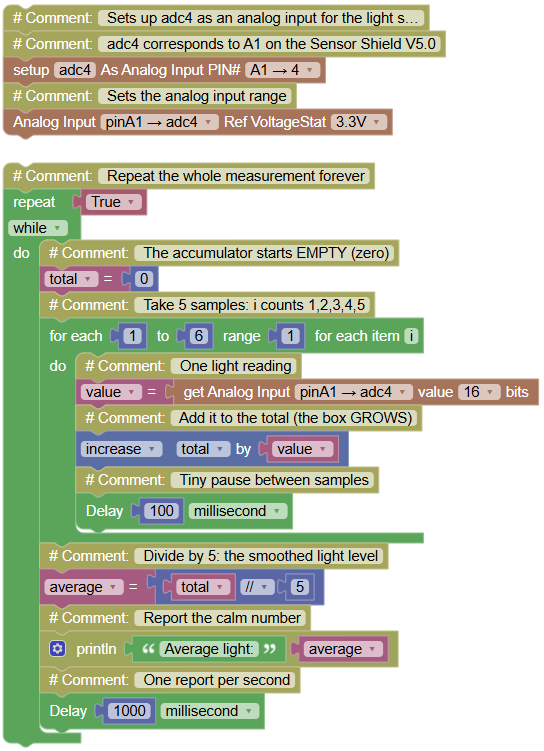
tame the jitter average 5 readings into one calm, trustworthy number.
Concepts:
Accumulator Pattern · Averaging · Noise Smoothing
import machine	# Library that controls the board's pins
import time	# Library for pauses

# Sets up adc4 as an analog input for the light sensor
# adc4 corresponds to A1 on the Sensor Shield V5.0
adc4 = machine.ADC(machine.Pin(4))
adc4.atten(machine.ADC.ATTN_11DB) # Sets the analog input range

while True:	# Repeat the whole measurement forever
    total = 0	# The accumulator starts EMPTY (zero)
    for i in range(1, 6, 1):	# Take 5 samples: i counts 1,2,3,4,5
    	# 16-bit is the default; just use adc4.read_u16()
        value = adc4.read_u16()	# One light reading
        total += value	# Add it to the total (the box GROWS)
        time.sleep_ms(100)	# Tiny pause between samples
    average = total // 5	# Divide by 5: the smoothed light level
    print("Average light:", average)	# Report the calm number
    time.sleep_ms(1000)	# One report per second
Serial Monitor:
Average light: 28512
Average light: 28497
Average light: 28530
💡 Note a brand-new pattern for your collection: the accumulator. A box that starts at zero and GROWS by adding one piece per loop turn. Compare the calm averages above with the jumpy single readings from 13.1 five samples blended into one is far more stable. This is called smoothing, and it is everywhere: your phone's auto-brightness averages several frames, cameras average light to set exposure, and weather stations average wind over minutes because single gusts lie. Collect the pattern: accumulate → divide → trust the result.
🎮 Shadow Detective

Goal:
count every shadow that passes over the sensor AND measure how long each one lasted. Slow mysterious shadows versus quick waves: your program can tell them apart.
Concepts:
Analog Events · Duration Measurement · Combining Patterns
import machine	# Library that controls the board's pins
import time	# Library for pauses and time
# Sets up adc4 as an analog input for the light sensor
# adc4 corresponds to A1 on the Sensor Shield V5.0
adc4 = machine.ADC(machine.Pin(4))
adc4.atten(machine.ADC.ATTN_11DB) # Sets the analog input range
# 16-bit is the default; just use adc4.read_u16()
print("=== SHADOW DETECTIVE ===")	# Mission title
print("Pass your hand over the sensor!")	# Instructions
shadows = 0	# Counts shadow events
dark = False	# We start assuming the sensor sees light begin in the light!
while True:	# Watch forever
	# 16-bit is the default; just use adc4.read_u16()
    value = adc4.read_u16()	# Fresh light reading
    if value < 12000 and dark == False:	# Just entered a shadow!
        shadows += 1	# One more shadow
        start = time.ticks_ms()	# Freeze the ms the shadow began
        print("Shadow", shadows, "detected!")	# Announce it
        dark = True	# Remember: we are inside a shadow now
        while adc4.read_u16() < 12000:	# Wait WHILE the shadow lasts...
            time.sleep_ms(50)	# ...checking patiently
        duration = time.ticks_diff(time.ticks_ms(), start)	# Shadow ended: measure its length
        print("It lasted", duration, "ms")	# Report the duration
        dark = False	# Remember: we are back in the light
    time.sleep_ms(50)	# Calm checking between shadows
Serial Monitor (a quick wave, then a slow hover):
=== SHADOW DETECTIVE ===
Pass your hand over the sensor!
Shadow 1 detected!
It lasted 240 ms
Shadow 2 detected!
It lasted 1830 ms
💡 Note: this mission is a chimera of five patterns: calibration threshold (13.2), edge memory (13.3), accumulator speed (13.4 taught you patience), waiting loop (5.4), and duration measurement (everywhere). Nothing new was taught and look what it can do: classify shadows by personality. Quick 240 ms = a wave. Long 1830 ms = someone looming. A security camera does the same math with a video feed; you did it with light and time. Challenge: how slowly can you move your hand and still register as ONE shadow instead of two?