
Joystick Shield V1.A
🎮 The Command Cockpit
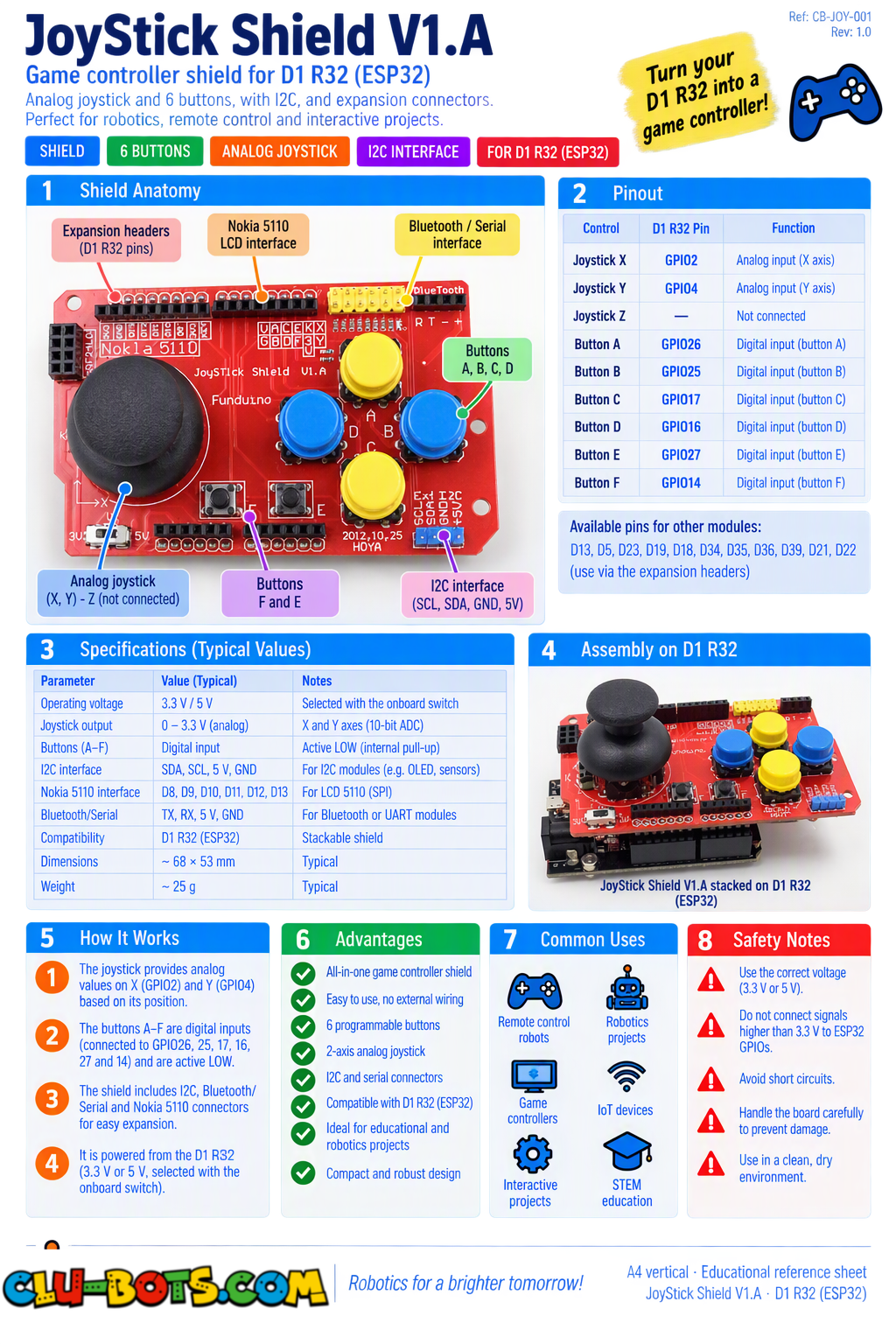
Module Goal: six buttons and a two-axis stick your robot gets a human control panel. This is the bridge between reading inputs and designing interfaces: by the end, you will fly a cursor on a grid and build your own command layout.
| Control | Shield label | Code name |
|---|---|---|
| Button A | 2 | pin26 |
| Button B | 3 | pin25 |
| Button C | 4 | pin17 |
| Button D | 5 | pin16 |
| Button E | 6 | pin27 |
| Button F | 7 | pin14 |
| Stick X | A0 | adc2 |
| Stick Y | A1 | adc4 |
🔍 Detective note: the stick at rest reads the middle (~32768 on both axes) an analog sensor that self-centers. And the buttons: test in 25.1 whether yours rest at 1 or 0. The detective ritual never gets skipped, even for a familiar component type.
Goal:
watch all eight controls report at once six buttons and two analog axes.
Concepts:
Multi-Input Reading · Self-Centering Analog · Detective Ritual
import machine  # Controls the board's pins
import time     # Controls pauses and timing

# Sets up pin26 as an input for button A
# pin26 corresponds to D2 on the Sensor Shield V5.0
pin26 = machine.Pin(26, machine.Pin.IN)  # Button A
# Sets up pin25 as an input for button B
# pin25 corresponds to D3 on the Sensor Shield V5.0
pin25 = machine.Pin(25, machine.Pin.IN)  # Button B
# Sets up pin17 as an input for button C
# pin17 corresponds to D4 on the Sensor Shield V5.0
pin17 = machine.Pin(17, machine.Pin.IN)  # Button C
# Sets up pin16 as an input for button D
# pin16 corresponds to D5 on the Sensor Shield V5.0
pin16 = machine.Pin(16, machine.Pin.IN)  # Button D
# Sets up pin27 as an input for button E
# pin27 corresponds to D6 on the Sensor Shield V5.0
pin27 = machine.Pin(27, machine.Pin.IN)  # Button E
# Sets up pin14 as an input for button F
# pin14 corresponds to D7 on the Sensor Shield V5.0
pin14 = machine.Pin(14, machine.Pin.IN)  # Button F
# Sets up adc2 as an analog input for the stick X axis
# adc2 corresponds to A0 on the Sensor Shield V5.0
adc2 = machine.ADC(machine.Pin(2))  # Stick X axis
# Sets up adc4 as an analog input for the stick Y axis
# adc4 corresponds to A1 on the Sensor Shield V5.0
adc4 = machine.ADC(machine.Pin(4))  # Stick Y axis

while True:  # Report forever
    x = adc2.read_u16()  # Stick X position: 0 to 65535
    y = adc4.read_u16()  # Stick Y position: 0 to 65535
    a = pin26.value()  # Button A: 1 or 0
    b = pin25.value()  # Button B
    c = pin17.value()  # Button C
    d = pin blocksD.value()  # Button D
    e = pin27.value()  # Button E
    f = pin14.value()  # Button F
    print("X:", x, "| Y:", y, "| A:", a, "B:", b, "C:", c, "D:", d, "E:", e, "F:", f)  # All eight controls on one line
    time.sleep_ms(300)  # Calm reporting pace
Serial Monitor (move the stick around, press buttons):
X: 32890 | Y: 32500 | A: 1 B: 1 C: 1 D: 1 E: 1 F: 1
X: 52100 | Y: 32700 | A: 1 B: 1 C: 1 D: 1 E: 1 F: 1 ← stick pushed right
X: 32900 | Y: 12000 | A: 1 B: 1 C: 1 D: 1 E: 1 F: 1 ← stick pushed up
X: 32800 | Y: 32600 | A: 0 B: 1 C: 1 D: 1 E: 1 F: 1 ← button A pressed
💡 Note: eight sensors, one line of report this is a dashboard in miniature. Notice the stick's superpower: released, it reads ~32768 on both axes (the middle!). Springs inside push it back to center an analog sensor that self-centers. That center value is your reference for everything this module: bigger X = right, smaller X = left.
🎮 The Direction Translator
Goal:
convert the two analog axes into five words: UP, DOWN, LEFT, RIGHT, CENTER.
Concepts:
Zone Funnels ×2 · Threshold Bands · Direction Logic
import machine  # Controls the board's pins
import time     # Controls pauses and timing

# Sets up adc2 as an analog input for the stick X axis
# adc2 corresponds to A0 on the Sensor Shield V5.0
adc2 = machine.ADC(machine.Pin(2))  # Stick X
# Sets up adc4 as an analog input for the stick Y axis
# adc4 corresponds to A1 on the Sensor Shield V5.0
adc4 = machine.ADC(machine.Pin(4))  # Stick Y

while True:  # Translate forever
    x = adc2.read_u16()  # X position
    y = adc4.read_u16()  # Y position
    if x > 45000:  # X clearly big?
        print("Direction: RIGHT")  # East
    elif x < 20000:  # X clearly small?
        print("Direction: LEFT")  # West
    elif y > 45000:  # X neutral, Y clearly big?
        print("Direction: DOWN")  # South (screen convention!)
    elif y < 20000:  # X neutral, Y clearly small?
        print("Direction: UP")  # North
    else:  # Both axes near center
        print("Direction: CENTER")  # At rest
    time.sleep_ms(200)  # Fast translating
Serial Monitor (tip the stick toward each direction): Direction: CENTER
Direction: RIGHT
Direction: CENTER
Direction: UP
Direction: CENTER
💡 Note: two secrets hide here. ① The dead-zone bands (20000–45000) around the center swallow the spring's jitter the stick at rest wobbles slightly, and without the bands "CENTER" would flicker with "LEFT" and "RIGHT" randomly. Same dead-zone lesson as the knob, now doubled. ② Y-inverted: pushing physically UP gives a smaller Y number (screen coordinates grow downward remember Module 24). Your program quietly absorbed that reversal with < translation layers are where hardware quirks get fixed, once, forever.
🎮 Only When It Changes
Goal:
announce direction ONLY when it changes the quiet reporter returns, on a joystick.
Concepts:
State Memory · Change Detection · Multi-Value Memory
import machine  # Controls the board's pins
import time     # Controls pauses and timing

# Sets up adc2 as an analog input for the stick X axis
# adc2 corresponds to A0 on the Sensor Shield V5.0
adc2 = machine.ADC(machine.Pin(2))  # Stick X
# Sets up adc4 as an analog input for the stick Y axis
# adc4 corresponds to A1 on the Sensor Shield V5.0
adc4 = machine.ADC(machine.Pin(4))  # Stick Y

prev = "CENTER"  # Memory of the last announced direction

while True:  # Watch forever
    x = adc2.read_u16()  # X position
    y = adc4.read_u16()  # Y position
    if x > 45000:  # X clearly big?
        now = "RIGHT"  # The current direction
    elif x < 20000:  # X clearly small?
        now = "LEFT"  # West
    elif y > 45000: # X neutral, Y clearly big?
        now = "DOWN"  # South
    elif y < 20000:  # X neutral, Y clearly small?
        now = "UP"  # North
    else:  # Both near center
        now = "CENTER"  # At rest
    if now != prev:  # The direction CHANGED!
        print(">>>", now)  # Announce the change only
        prev = now  # Save for the next comparison
    time.sleep_ms(100)  # Fast watching
Serial Monitor (wiggle the stick slowly, then swing it around):
>>> RIGHT
>>> CENTER
>>> UP
>>> CENTER
>>> LEFT
💡 Note: the quiet reporter (tilt, guardian, radar) now narrates a joystick and notice prev here stores a word, not a number! Memory variables can hold anything: signals (0/1), zones ("bright"), and now directions. The pattern is identical: compare now against memory, speak only on change, save. Six deployments it is officially yours.
🎮 The Direction Counters
Goal:
keep a score table how many times was each direction chosen?
Concepts:
Parallel Counters · Score Tables · Statistics from Play
import machine  # Controls the board's pins
import time     # Controls pauses and timing

# Sets up adc2 as an analog input for the stick X axis
# adc2 corresponds to A0 on the Sensor Shield V5.0
adc2 = machine.ADC(machine.Pin(2))  # Stick X
# Sets up adc4 as an analog input for the stick Y axis
# adc4 corresponds to A1 on the Sensor Shield V5.0
adc4 = machine.ADC(machine.Pin(4))  # Stick Y

up = 0    # Counter for UP
down = 0  # Counter for DOWN
left = 0  # Counter for LEFT
right = 0 # Counter for RIGHT

print("=== DIRECTION COUNTERS ===")  # Title
print("Flick the stick! Reset the board to see totals.")  # Instructions
while True:  # Count forever
    x = adc2.read_u16()  # X position
    y = adc4.read_u16()  # Y position
    if x > 45000:  # RIGHT chosen?
        right += 1  # Its counter grows
        print("RIGHT! (", right, "total)")  # Live count
        time.sleep_ms(400)  # Ignore window so one hold = one count
    elif x < 20000:  # LEFT chosen?
        left += 1  # Its counter grows
        print("LEFT! (", left, "total)")
        time.sleep_ms(400)  # Ignore window
    elif y > 45000:  # DOWN chosen?
        down += 1  # Its counter grows
        print("DOWN! (", down, "total)")
        time.sleep_ms(400)  # Ignore window
    elif y < 20000:  # UP chosen?
        up += 1  # Its counter grows
        print("UP! (", up, "total)")
        time.sleep_ms(400)  # Ignore window
    time.sleep_ms(50)  # Base checking pace
Serial Monitor (flick the stick around):
=== DIRECTION COUNTERS ===
Flick the stick! Reset the board to see totals.
RIGHT! ( 1 total)
UP! ( 1 total)
RIGHT! ( 2 total)
DOWN! ( 3 total)
💡 Note: four counters running in parallel a score table in variables. Each has its own ignore window (400 ms) so holding the stick counts ONCE, not twenty times: the debounce lesson (clap sensor) applied to a spring-loaded analog input. Notice what these counters already are: a tiny usage profile. Which direction does your team favor? Game designers ask exactly this when they place important actions on the most-used button.
🎮 The Grid Voyager
Goal:
a coordinate grid drawn on paper; your stick navigates a cursor (x, y) from start to a hidden treasure. The Serial announces every step your first program where YOU drive a character through a world.
Concepts:
Cursor State (x, y) · Direction Moves · Grid Boundaries · Game Loop
Setup: draw a 5×5 grid on paper (coordinates 1–5, columns and rows). Start at (1,1). The teacher secretly picks the treasure coordinates (for example (4,3)).
import machine  # Controls the board's pins
import time     # Controls pauses and timing

# Sets up adc2 as an analog input for the stick X axis
# adc2 corresponds to A0 on the Sensor Shield V5.0
adc2 = machine.ADC(machine.Pin(2))  # Stick X
# Sets up adc4 as an analog input for the stick Y axis
# adc4 corresponds to A1 on the Sensor Shield V5.0
adc4 = machine.ADC(machine.Pin(4))  # Stick Y

posx = 1  # Cursor starts at column 1
posy = 1  # Cursor starts at row 1
treasure_x = 4  # The hidden treasure column (change it each game!)
treasure_y = 3  # The hidden treasure row

print("=== GRID VOYAGER ===")  # Title
print("Move to the treasure on the 5x5 grid!")  # The goal
print("Start: (1,1) stick moves, then release")  # How to play

while True:  # The game loop
    x = adc2.read_u16()  # X position
    y = adc4.read_u16()  # Y position
    moved = False  # Did a move happen this turn?
    if x > 45000:  # Stick tipped RIGHT?
        if posx < 5:  # But do NOT walk off the grid!
            posx += 1  # One step east
            moved = True  # A move happened
    elif x < 20000:  # Stick tipped LEFT?
        if posx > 1:  # Grid fence on the west
            posx -= 1  # One step west
            moved = True
    elif y < 20000:  # Stick tipped UP?
        if posy > 1:  # Grid fence on the north
            posy -= 1  # One step north
            moved = True
    elif y > 45000:  # Stick tipped DOWN?
        if posy < 5:  # Grid fence on the south
            posy += 1  # One step south
            moved = True
    if moved:  # Only announce real moves
        print("Position:", "(", posx, ",", posy, ")")  # Report the new spot
        time.sleep_ms(500)  # Ignore window: one tip = one step
    if posx == treasure_x and posy == treasure_y:  # Standing on the treasure?
        print(">>> TREASURE FOUND at (", posx, ",", posy, ")!")  # THE VICTORY
        break  # End the game lesson from the Security System
print("Voyage complete. Well done, navigator!")  # The closing
Serial Monitor:
=== GRID VOYAGER ===
Move to the treasure on the 5x5 grid!
Start: (1,1) stick moves, then release
Position: ( 2 , 1 )
Position: ( 3 , 1 )
Position: ( 3 , 2 )
Position: ( 4 , 2 )
Position: ( 4 , 3 )
>>> TREASURE FOUND at ( 4 , 3 )!
Voyage complete. Well done, navigator!
💡 Note the deepest lesson of the module: the cursor is two variables with a job: posx and posy ARE the character on the map. The stick doesn't move anything it suggests, and the fences (if posx < 5) decide. Look at the fence logic: you can WANT to walk east off the grid, but the program refuses boundaries are not physical, they are rules you wrote. Change treasure_x/treasure_y each round, hide the paper grid from the player, and this becomes a full hide-and-seek game. Two variables, four fences, one victory condition that is the skeleton of every 2D game ever made, from Pong to Zelda. Your robot now listens to humans next stop: the first real machine that MOVES.