
General concepts
Programming
We usually drag blocks of code that can complete a certain function into this area to connect.
Being in this area we have a contextual menu (by clicking on the right mouse button) that allows us the functions indicated in the figure.
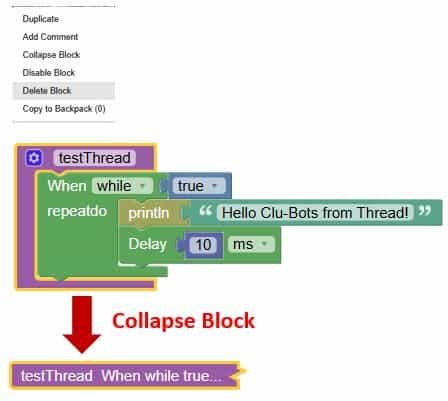
Collapsing blocks consists of compressing them into a single block.
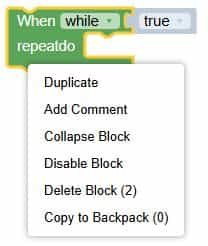
The functions that can be executed on a block placed in the editing area are those shown in the figure.
Removal of the program
- Drag the unwanted code to the trash can at the bottom right.
- Drag the unused code to the leftmost graphical selection of the program.
- Select the code you don’t use, click the Delete or Backspace keys on your keyboard.
Organization of the program
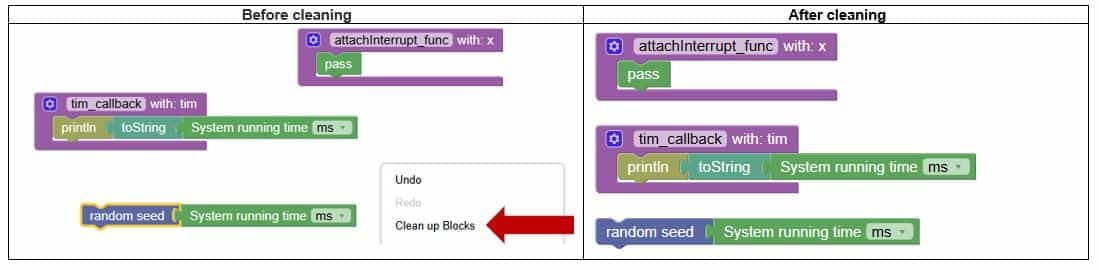
When there are many programs written, it is necessary to organize the programs.
Right-click on the blank area and select Clear Block.
Copy of the program
Right-clicking on a graph block and selecting Copy will produce an identical block, but only one block can be copied.
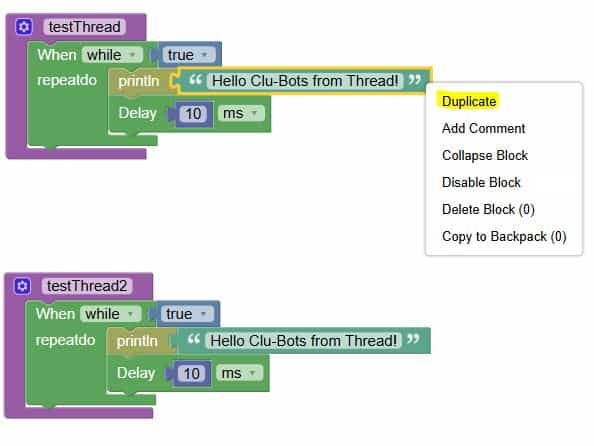
To copy, select a block with the mouse and press Ctrl+C. To copy multiple blocks, press Shift and select the blocks with the mouse, then press Ctrl+C.
To paste, press Ctrl+V.

