
IoT
Seniverse Weather
🧩 Fun Guide to Seniverse Weather Blocks (Clu-blocks Pro)
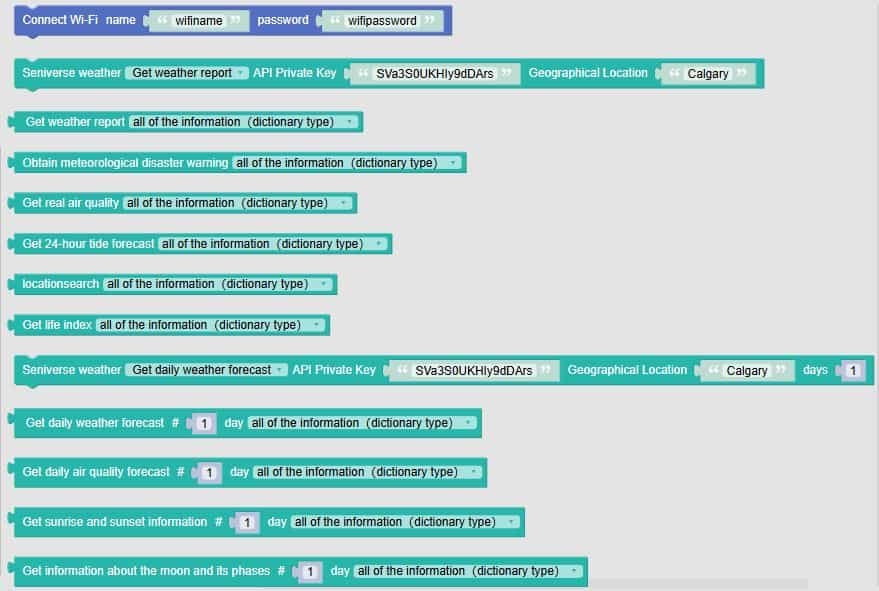
🌦️ Important! Seniverse blocks let your robot check the weather, track air quality, and even follow the moon. It’s like giving your robot a weather app — but way cooler!
| # | Block | What it does | Dropdown options | What the options mean |
|---|---|---|---|---|
| 1 | Connect Wi-Fi name "wifiname" password "wifipassword" |
Connects your robot to Wi-Fi | — | Needed before using any online weather features |
| 2 | Seniverse weather Get weather report |
Gets current weather data | — | You enter your API key and location (e.g. Calgary) |
| 3 | Get weather report all of the information (dictionary type) |
Chooses what weather data to get | Many options: temperature, humidity, wind speed, visibility, etc. | You can get everything or just specific info like temperature or wind direction |
| 4 | Obtain meteorological disaster warning |
Gets weather alerts | — | Useful for detecting storms, floods, or extreme conditions |
| 5 | Get 7-day forecast |
Gets weather for the next 7 days | — | Great for planning ahead or building smart schedules |
| 6 | locationsearch |
Gets info about a city or location | — | Returns city name, country code, timezone, etc. |
| 7 | Get life index |
Gets lifestyle tips based on weather | — | Tells you if it’s a good day for outdoor sports, sunscreen, or carrying an umbrella |
| 8 | Seniverse weather Get daily weather forecast |
Gets forecast for a specific number of days | — | You enter location, API key, and number of days |
| 9 | Get daily weather forecast all of the information (dictionary type) |
Chooses what forecast info to get | Options: high/low temp, precipitation, wind, day/night conditions | You can get full forecast or just specific parts |
| 10 | Get daily air quality forecast |
Gets air pollution data | — | Useful for checking PM2.5, ozone, CO, NO₂, and more |
| 11 | Get sunrise and sunset |
Gets sun timing info | — | Tells you when the sun rises and sets — great for light-based projects |
| 12 | Get information about the moon and its phases |
Gets moon data | — | Includes moonrise/set, illumination, phase name — perfect for astronomy fans! |
🧠 Quick Tips for Students
- Always connect to Wi-Fi first — no internet, no weather!
- Use your API key to unlock the weather data — it’s like your robot’s weather passport.
- Use dictionary type to get all the info at once — or pick just what you need.
- Use life index and alerts to make smart decisions — like when to go outside or stay in.
- Use sun/moon data for time-based lighting, astronomy, or seasonal projects.

