
Communicate
ESPNow Communicate
📻 ESPNow – Communicate – Your “Secret Messaging”
What it does: Connects two or more D1 R32 boards directly without Wi-Fi.
Fast: Instant communication between D1 R32 boards
Direct: No routers, board-to-board communication
📡 Example: Send to a friend board – Receive from a neighbor board
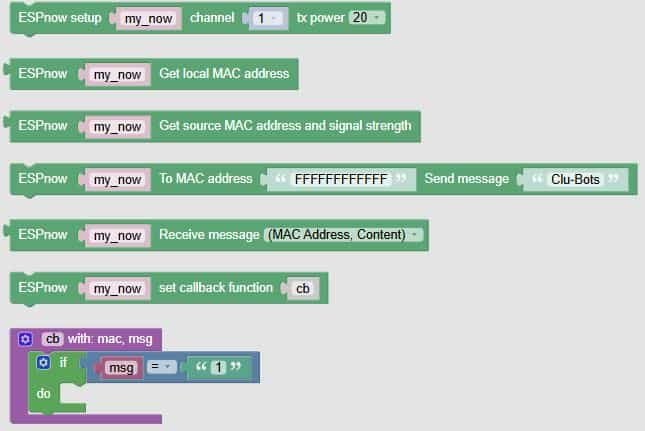
🧩 Fun Guide to ESP-NOW Communication Blocks (Clu-blocks Pro)
📶 Important! ESP-NOW blocks let your robot send and receive messages directly to other ESP32 boards — fast, secure, and without needing a router. It’s like walkie-talkies for robots!
🔧 Setup & Configuration
| # | Block | What it does | Dropdown options | What the options mean |
|---|---|---|---|---|
| 1 | ESPnow setup my_now channel 1 tx power 20 |
Initializes ESP-NOW | channel: 1–11tx power: 8–20 |
– Channel: Wi-Fi channel used – TX Power: signal strength (higher = longer range) |
| 2 | ESPnow my_now Get local MAC address |
Gets your robot’s unique ID | — | Useful for pairing or debugging |
| 3 | ESPnow my_now Get source MAC address and signal strength |
Reads who sent the message and how strong it was | — | Great for identifying senders and checking signal quality |
📤 Sending Messages
| # | Block | What it does | Dropdown options | What the options mean |
|---|---|---|---|---|
| 4 | ESPnow my_now To MAC address FFFFFFFFFFFF Send message "Clu-Bots" |
Sends a message to a specific device | — | Replace FFFFFFFFFFFF with the target MAC address |
| 5 | ESPnow my_now Send message "n" |
Sends a reply or broadcast message | — | Can be used inside a callback or condition |
📥 Receiving Messages
| # | Block | What it does | Dropdown options | What the options mean |
|---|---|---|---|---|
| 6 | ESPnow my_now Receive message (MAC Address, Content) |
Listens for incoming messages | (MAC Address, Content), MAC Address, Content |
Choose what data to extract from the message |
| 7 | ESPnow my_now set callback function cb |
Sets up a function to run when a message arrives | — | You define what happens when a message is received |
| 8 | cb with: mac, msg |
Defines the callback function | — | You can use mac and msg to trigger actions |
| 9 | if msg = "e" |
Checks the message content | — | Use conditions to respond to specific commands |
🧠 Quick Tips for Students
- Use setup + MAC address to create a secure, direct link between robots.
- Use callback functions to make your robot react instantly — like replying or changing behavior.
- Use signal strength to check how far apart your robots can be.
- Use message content to send commands like
"forward","stop", or"dance".

